

How VAT Codes Work in Saldio
Eleven standard codes, one code per entry, automatic split into net and VAT: how VAT codes in Saldio determine where an amount lands on Form 100.

Contents
A VAT code is a small decision with a big effect. Book a laptop invoice with the code for materials instead of investments, and the input tax ends up in box 400 instead of 405. Record an export invoice without a deduction reason, and you declare taxable turnover without tax — the return contradicts itself.
Many accounting programs offer dozens of codes for this, with abbreviations nobody remembers. The result is entries where “some” code was set, and a quarterly review that has to hunt for exactly those mistakes.
Saldio keeps the list short and splits the work: the VAT code determines rate and direction, a separate flag determines the form box, and on documents Saldio suggests both. This article shows how the pieces fit together.
The standard codes
When the chart of accounts is set up, Saldio creates eleven codes for each tenant. The VAT codes page under Accounting → VAT lists them with code, name, rate, rate type, direction and status:
| Code | Name | Rate | Direction | Account |
|---|---|---|---|---|
| N81 | Output tax standard rate | 8.1 % | Sales | 2200 |
| N26 | Output tax reduced rate | 2.6 % | Sales | 2200 |
| N38 | Output tax accommodation | 3.8 % | Sales | 2200 |
| NBE | Turnover exempt from tax | 0 % | Sales | — |
| V81 | Input tax materials/services | 8.1 % | Input | 1170 |
| V26 | Input tax reduced rate | 2.6 % | Input | 1170 |
| V38 | Input tax accommodation | 3.8 % | Input | 1170 |
| VBE | Input tax exempt | 0 % | Input | — |
| VI81 | Input tax investments | 8.1 % | Input | 1171 |
| VI26 | Input tax investments | 2.6 % | Input | 1171 |
| VI38 | Input tax investments | 3.8 % | Input | 1171 |
The logic is simple: N stands for output tax, V for input tax on materials and services, VI for input tax on investments and other operating expenses. The number is the rate. That also settles where input tax goes on Form 100: V codes via account 1170 to box 400, VI codes via account 1171 to box 405.
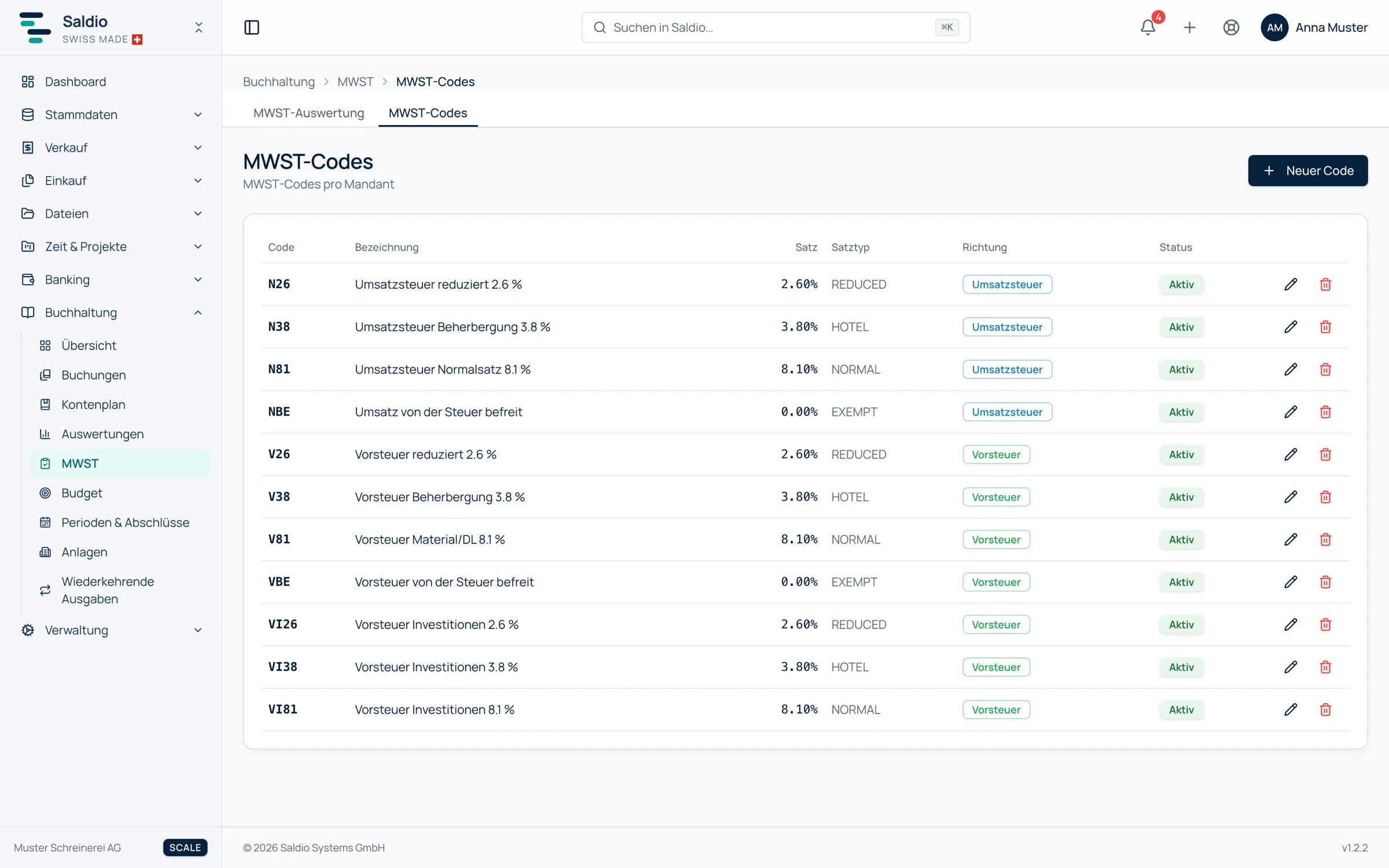
The codes belong to the tenant. New code adds more — with code, name, rate, rate type (NORMAL, REDUCED, HOTEL or EXEMPT) and direction (sales or input). Existing codes can be edited, set inactive or deleted; the code itself is fixed once created.
One code, one line
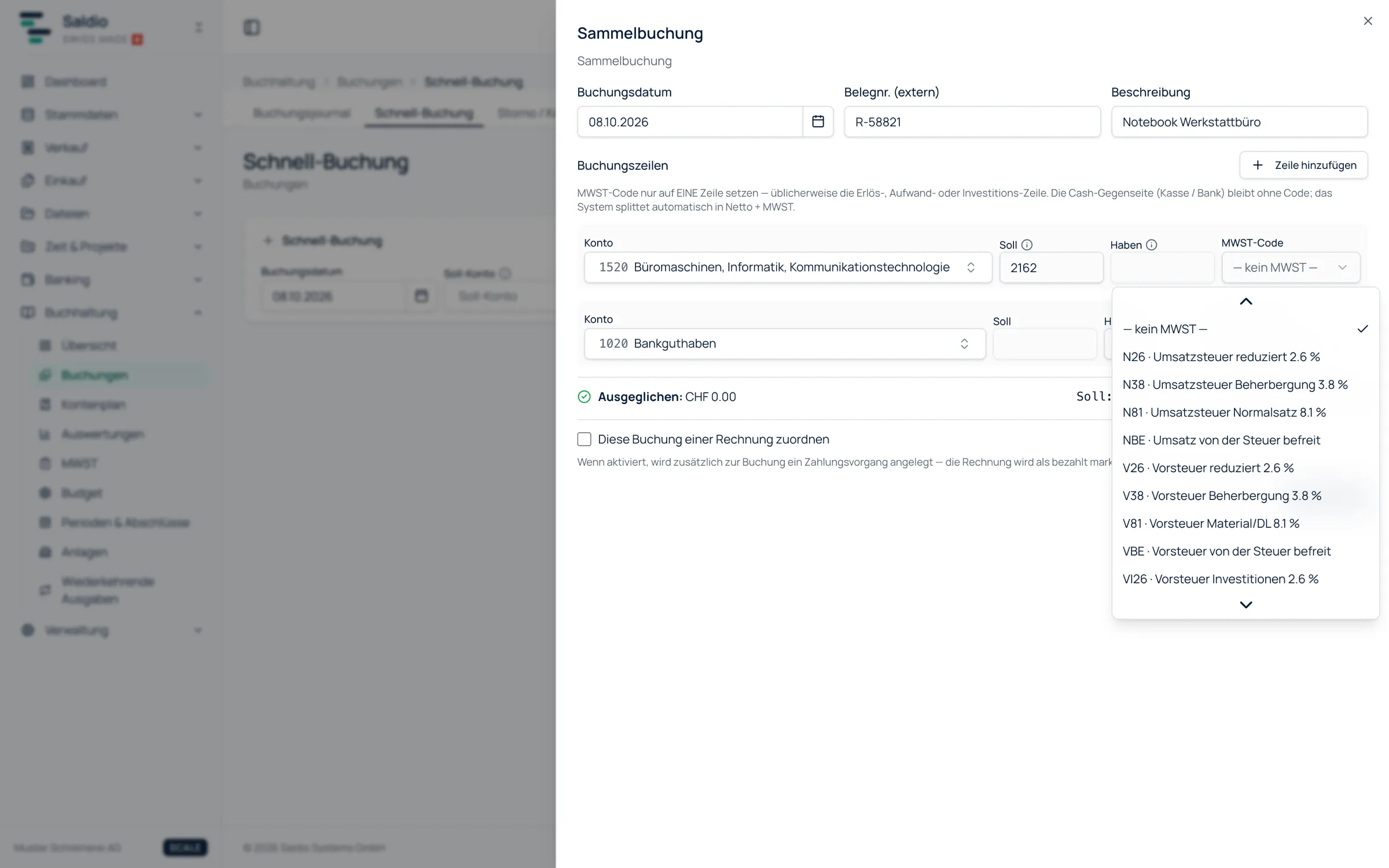
In a manual entry, the VAT code goes on exactly one line — usually the revenue, expense or investment line. The counter-side, i.e. bank or cash, stays without a code. Saldio then splits the amount into net and VAT automatically and books the tax to the code’s account.
An example: office supplies for CHF 108.10 including VAT, paid by bank, booked with V81 on the expense line:
| Account | Debit | Credit |
|---|---|---|
| 6500 Office supplies | 100.00 | |
| 1170 Input VAT | 8.10 | |
| 1020 Bank | 108.10 |
The same for a laptop at CHF 2,162.00, this time with VI81:
| Account | Debit | Credit |
|---|---|---|
| 1520 Office equipment, IT | 2,000.00 | |
| 1171 Input VAT on investments | 162.00 | |
| 1020 Bank | 2,162.00 |
On Form 100 the CHF 8.10 lands in box 400 and the CHF 162.00 in box 405 — without anyone having to know box numbers. If you keep the laptop as a fixed asset, the article Taking over fixed assets cleanly explains how acquisition and depreciation fit together.
The VAT form box for special cases
Rate and direction are enough for the normal case. For anything that does not appear on Form 100 as regular taxable turnover or regular input tax, the booking line has the field VAT form box. The default is Standard (automatic). The alternatives:
| Flag | Box | Allowed on |
|---|---|---|
| Export (Art. 23) | 220 | revenue accounts |
| Supply abroad | 221 | revenue accounts |
| Notification procedure (Art. 38) | 225 | revenue accounts |
| Exempt (Art. 21) | 230 | revenue accounts |
| Miscellaneous (land value, margin taxation) | 280 | revenue accounts |
| Subsidy (not consideration) | 900 | revenue accounts |
| Donation, dividend, damages (not consideration) | 910 | revenue accounts |
| Subsequent input tax deduction | 410 | 1170, 1171 |
| Input tax correction (private share, mixed use) | 415 | 1170, 1171 |
| Input tax reduction (subsidies, donations) | 420 | 1170, 1171 |
| Acquisition tax (service from abroad) | 383 | 2200 |
Saldio checks the combination: a flag that does not fit the account is rejected. For some accounts Saldio sets the box itself — interest income on 695x goes to box 230 automatically, dividends on 696x to box 910. And if you credit an input tax account, Saldio suggests that this is usually an input tax correction.
Invoices: the deduction reason
On invoices you do not work with codes but with the VAT rate per line item. For the items at 0 %, the invoice carries a VAT deduction reason: Taxable turnover, Export (Art. 23), Supply abroad, Excluded (Art. 21), Notification procedure (Art. 38) or Miscellaneous. It determines which deduction box of Form 100 the invoice appears in.
For a customer abroad, Saldio suggests setting the line items to 0 % and derives a deduction reason from the customer’s country and the item type — as a suggestion to be checked.
For VAT-registered tenants the deduction reason is not optional. Saldio rejects a 0 % line item without a deduction reason when saving (error code E-2015). The reason: turnover without tax and without a deduction box would remain taxable turnover in box 299 with no matching tax — and the upload to the ESTV portal would fail exactly this plausibility check.
Supplier invoices: acquisition tax
If a business buys a service from a foreign provider without Swiss VAT — a software licence, consulting — it owes the tax itself: the acquisition tax (Bezugsteuer).
Supplier invoices have the switch Acquisition tax (box 383) for this. When it is on, Saldio books the tax at the standard rate and, under the effective method, the input tax deduction at the same time. If Saldio recognises a foreign supplier without Swiss VAT, it suggests the switch. For goods imported through customs it stays off — there, the Federal Office for Customs and Border Security (BAZG) collects import tax.
How supplier invoices get into Saldio in the first place is covered in Reading supplier invoices automatically — without AI.
What Saldio deliberately does not do
- No code on both sides. An entry carries exactly one VAT code. That prevents double-counted tax.
- No free choice of boxes. The form-box flag is tied to the account type. Acquisition tax on a revenue account cannot be recorded.
- No silent zero rates. For VAT-registered tenants, every 0 % line needs a deduction reason.
- No import tax via acquisition tax. The switch is for services from abroad. Goods coming through customs do not go through box 383.
Conclusion
VAT codes in Saldio are not a secret language but three groups of letters and a rate. Whatever departs from the normal case — exports, acquisition tax, input tax corrections — gets its own flag, which Saldio checks against the account.
The result shows at the end of the quarter: Form 100 is built from entries that knew where they belonged when they were recorded.
From order to balance.