

How Quotation Management Works in Saldio
Build a quote, send it, revise it, get it accepted: how Saldio keeps every revision as a version and lets customers accept bindingly via an online link.

Contents
A quote goes out as a PDF. Two weeks later the customer calls: “We’ll take the option with the discount.” The mail folder holds three PDFs with similar names, and nobody is quite sure which one the customer saw last.
That is not a filing problem but a proof problem. A quote is the basis for everything that follows — order, delivery, invoice. If a dispute arises later, what counts is not the current version in the system but the one both sides agreed on.
Saldio solves this with two things: every version that is sent is frozen as a version, and the customer responds via an online link directly on the document. This article shows both, from the empty quote to the acceptance.
Building a quote
Quotes live under Sales → Offers. A new one is created there with New Quote, or via the Create New dialog, which is reachable from every page.
The Quote Header holds customer, date and Valid until — the date up to which the offer stands. Add document language, payment terms and optionally a project. The document language is prefilled from the contact or the company but can be overridden per quote.
The line items are the same toolkit as on the invoice:
- Item from the product catalogue or entered freely, with quantity, unit, unit price and VAT rate
- Multiple items to take over a selection from the product catalogue in one go
- Text Item for explanations between the lines
- Subtotal to divide a quote into sections
For quotes that resemble each other there are two shortcuts. Save as template stores the current line items under a name — say “Paint house wall” — and Insert from template appends them to the next quote. To reuse an entire quote, use Copy: the copy is standalone, with no link to the original.
A discount as a percentage or a fixed amount, notes for the customer and internal notes for the team complete the document.
Sending freezes version 1
As long as the quote is a draft, it can be edited freely. Sending changes that: on the first send — by email or via Mark as Sent — Saldio freezes the current state as version 1.
If you edit the quote afterwards, the notice “This change will create a new version” appears. On save, the previous state is archived unchangeably and a new version is created. A change note records what changed — optional, but exactly the information you will be looking for six months later.
On the document, the Version History lists every version with its date and change note; the first is marked “Initial”. An example:
| Version | Date | Change note |
|---|---|---|
| v1 | 02.10.2026 | Initial |
| v2 | 07.10.2026 | Scaffolding added |
| v3 | 09.10.2026 | 5 % discount granted |
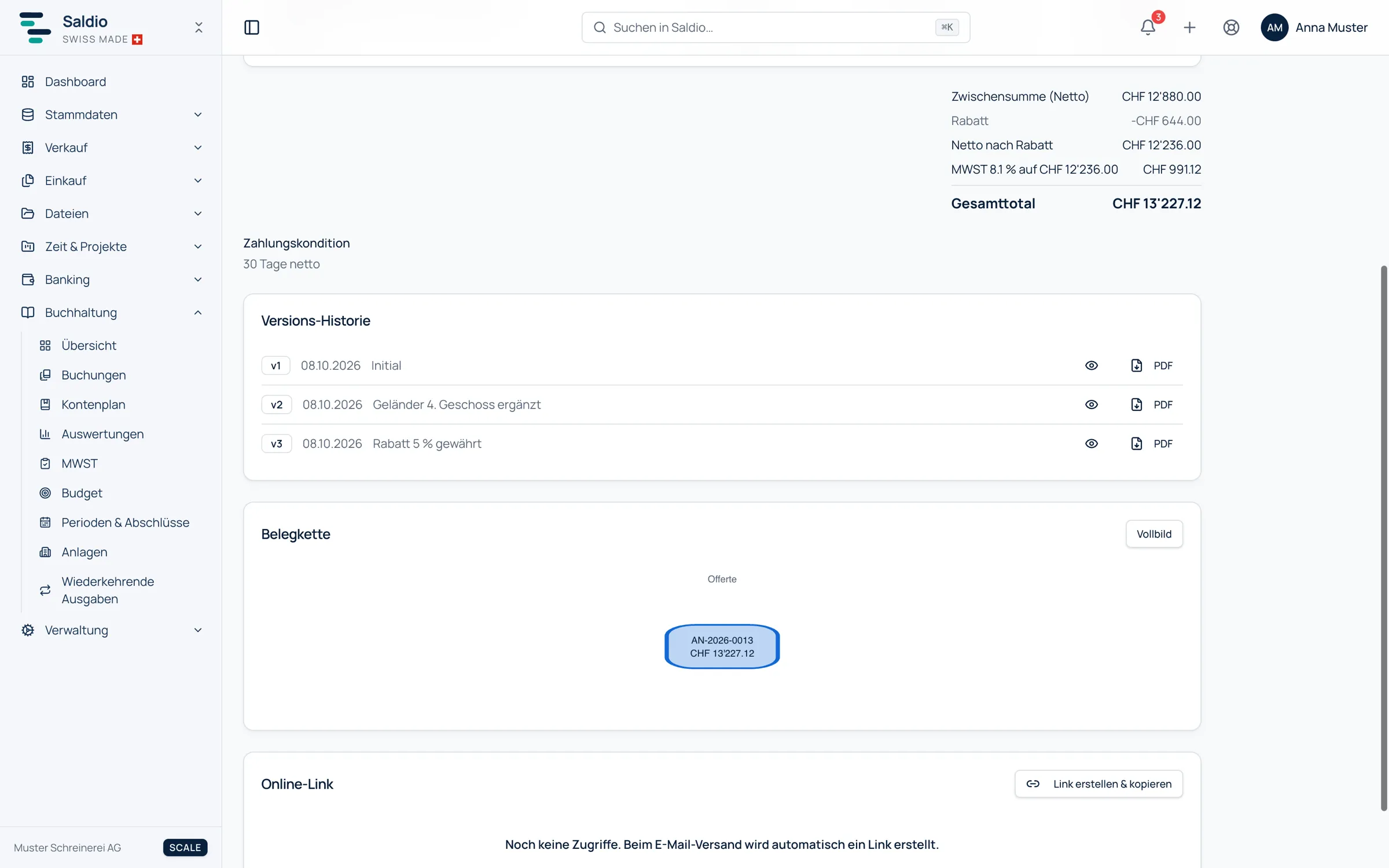
Every version can be opened in a preview and downloaded as a PDF. When the customer says “the option with the discount”, it is clear which one they mean and what was on paper at the time.
The online link
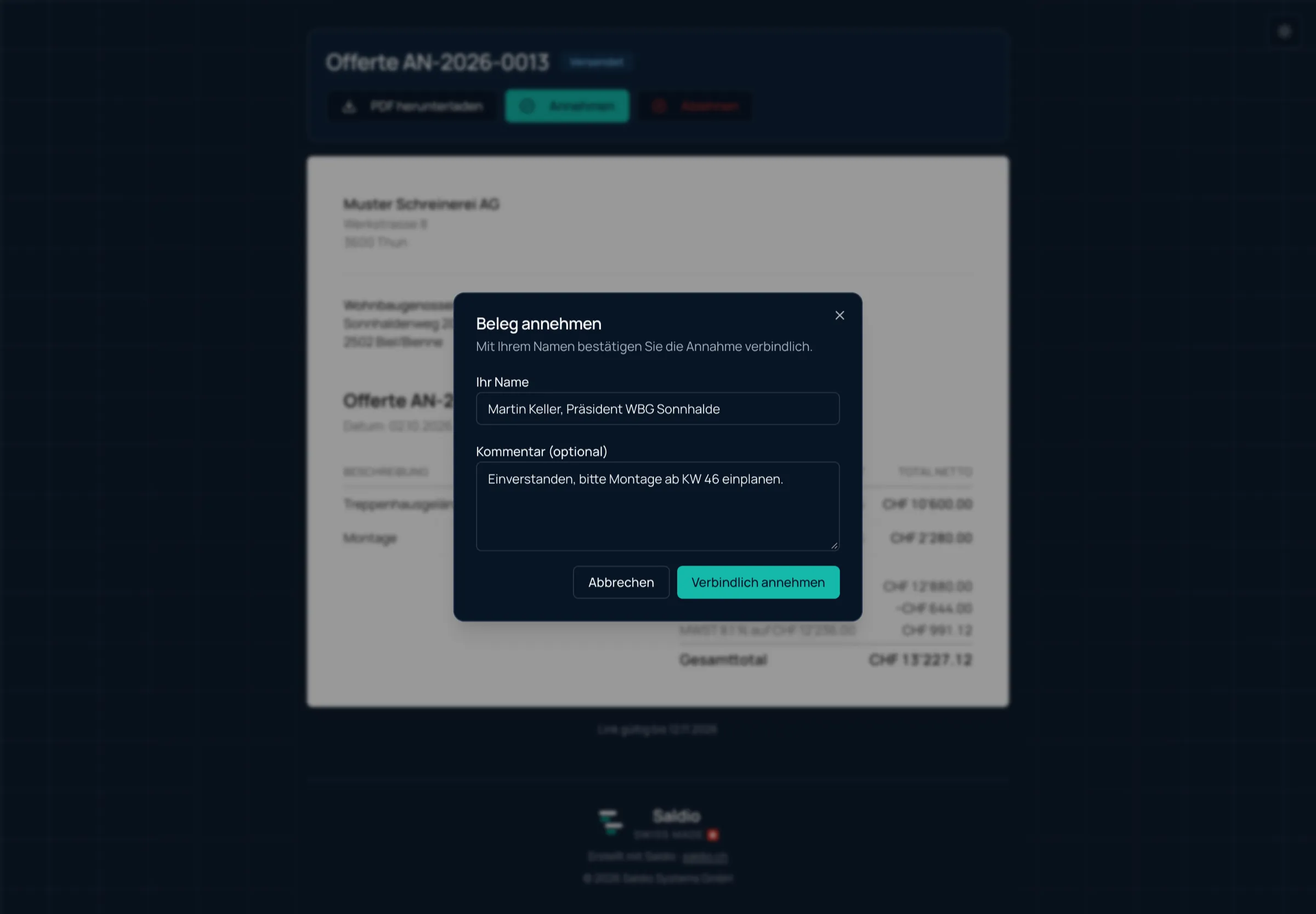
Every email sent with a quote automatically contains a time-limited online link in addition to the PDF. With it the customer opens the quote in the browser, without an account and without logging in. They see sender, recipient, date and line items, can download the PDF — and respond:
- Accept asks for their name and allows an optional comment. They confirm their binding acceptance.
- Decline asks for their name and a short reason.
The response lands directly on the document. The quote switches to Accepted or Declined, and the document shows who responded and when — for example “Accepted by Anna Muster on 14.10.2026”. If the quote changed while the customer had it open, the page reloads instead of saving a response to an outdated state.
So that nobody has to keep checking, the notification bell at the top right reports when a customer opens the shared quote for the first time and when they accept or decline it.
The access log
The Online link section on the document shows what happened with the link. The Access log lists every event: Viewed, PDF downloaded, Accepted, Declined. Below it, the Created links are listed with their origin — Email delivery or Created manually —, their validity and the number of downloads.
That answers a question that otherwise only a phone call settles: has the customer even seen the quote?
Links can also be created without an email. Create & copy link creates a new one that you can paste into a chat or your own mail client. And links can be withdrawn — individually or with Revoke all links. A revoked or expired link takes the customer to a notice page asking them to contact the sender.
After acceptance
A sent or accepted quote can be converted into an order or directly into an invoice. The quote stays on record, switches to Converted and is frozen from then on. In a direct conversion, the invoice keeps the running number, and the quote’s PDF is attached to the invoice as an immutable attachment.
How quote, order, delivery note and invoice fit together — and why you have to choose between order and invoice — is described in the article on quotes and orders.
The Sales overview shows all running offers with the figure Open offers — number and amount of the quotes that are still drafts or have been sent.
The email text
The text of the email comes from an email template for the document type quote. Saldio ships a default template that inserts the quote number, the date and the validity — in German, English, French and Italian. How to adapt it is covered in the article on email templates.
What Saldio deliberately does not do
- No silent overwriting. A sent quote is never changed, only extended by a new version.
- No anonymous acceptance. Accepting requires a name, declining requires a name and a reason.
- No customer portal. The customer needs no account; the link applies to exactly one document and expires.
- No editing after conversion. A converted quote is frozen for good.
- No quote into both order and invoice. Conversion goes in exactly one direction.
Conclusion
A quote in Saldio is more than a PDF. It carries its own history: which version was sent when, what changed, whether the customer opened it and under which name they accepted.
That makes the quote what it should be — a reliable basis for order and invoice. And it saves the phone call trying to figure out which of the three PDFs was meant.
From order to balance.