

How Financial KPIs Are Analyzed in Saldio
Liquidity ratios, equity and debt ratios, net margin, EBITDA and EBIT – each with its formula, straight from the general ledger. Plus eight reports.
Contents
Most SMEs see their key figures once a year: when the accountant delivers the annual accounts, sometime in spring, for a year that is long over. Anyone who wants to know mid-year how liquidity looks exports a trial balance to Excel and does the maths.
That has two catches. The figures are out of date the day after the export. And the formula sits in a cell nobody checks any more — whether it divides current assets or only cash by short-term liabilities, nobody remembers after six months.
Saldio calculates the key figures from the general ledger every time you open them and writes the formula next to each one. This article shows which figures exist, how they are calculated and which reports sit behind them.
The general ledger as the only source
All the figures in this article come from one source: booked transactions. Invoices, supplier invoices, payments and bank lines post to the journal automatically; whatever is there appears in the reports. Whatever is not booked appears nowhere.
That sounds obvious, but it has a practical consequence: there is no export, no cut-off date and no refresh. A supplier invoice booked today changes the figures immediately.
The accounting overview
The page Accounting → Overview shows two blocks.
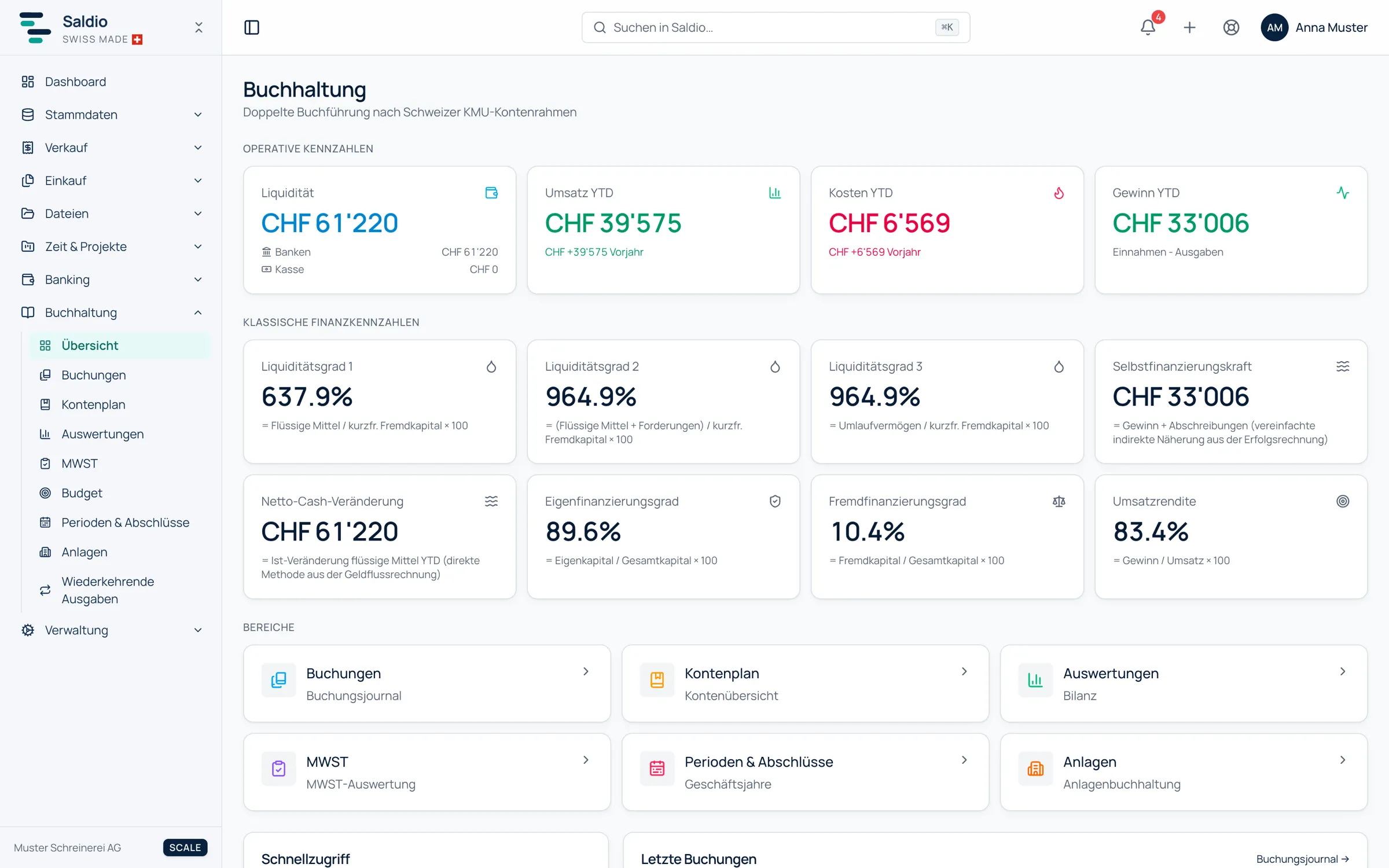
Operating metrics — revenue YTD, expenses YTD and profit YTD, each with the change against the previous year, plus liquidity split into banks and cash.
Financial ratios — eight figures, each with its formula directly below the value:
| Figure | Formula |
|---|---|
| Cash ratio | Liquid assets / short-term debt × 100 |
| Quick ratio | (Liquid assets + receivables) / short-term debt × 100 |
| Current ratio | Current assets / short-term debt × 100 |
| Equity ratio | Equity / total capital × 100 |
| Debt ratio | Debt / total capital × 100 |
| Self-financing power | Profit + depreciation |
| Net margin | Profit / revenue × 100 |
| Net cash change | Actual change in liquid assets since the start of the year |
An example to check by hand
A trade business has the following balance sheet and income figures at the end of September:
| Item | CHF |
|---|---|
| Liquid assets | 80,000 |
| Receivables | 60,000 |
| Inventory | 30,000 |
| Current assets | 170,000 |
| Short-term debt | 100,000 |
| Total capital | 400,000 |
| Equity | 160,000 |
| Revenue | 900,000 |
| Profit | 45,000 |
| Depreciation | 25,000 |
That gives:
| Figure | Value |
|---|---|
| Cash ratio | 80 % |
| Quick ratio | 140 % |
| Current ratio | 170 % |
| Equity ratio | 40 % |
| Debt ratio | 60 % |
| Self-financing power | CHF 70,000 |
| Net margin | 5.0 % |
Read it like this: liquid assets alone cover 80 % of short-term debt. Add receivables and it is 140 % — the business can meet its short-term obligations, provided its customers pay. That is exactly why the quick ratio is closely tied to dunning: a receivable that is ninety days overdue counts in full here, even though the money may never arrive.
The eight reports
Behind the figures, Accounting → Reports offers eight reports:
- Balance sheet — assets, liabilities and equity at a given date
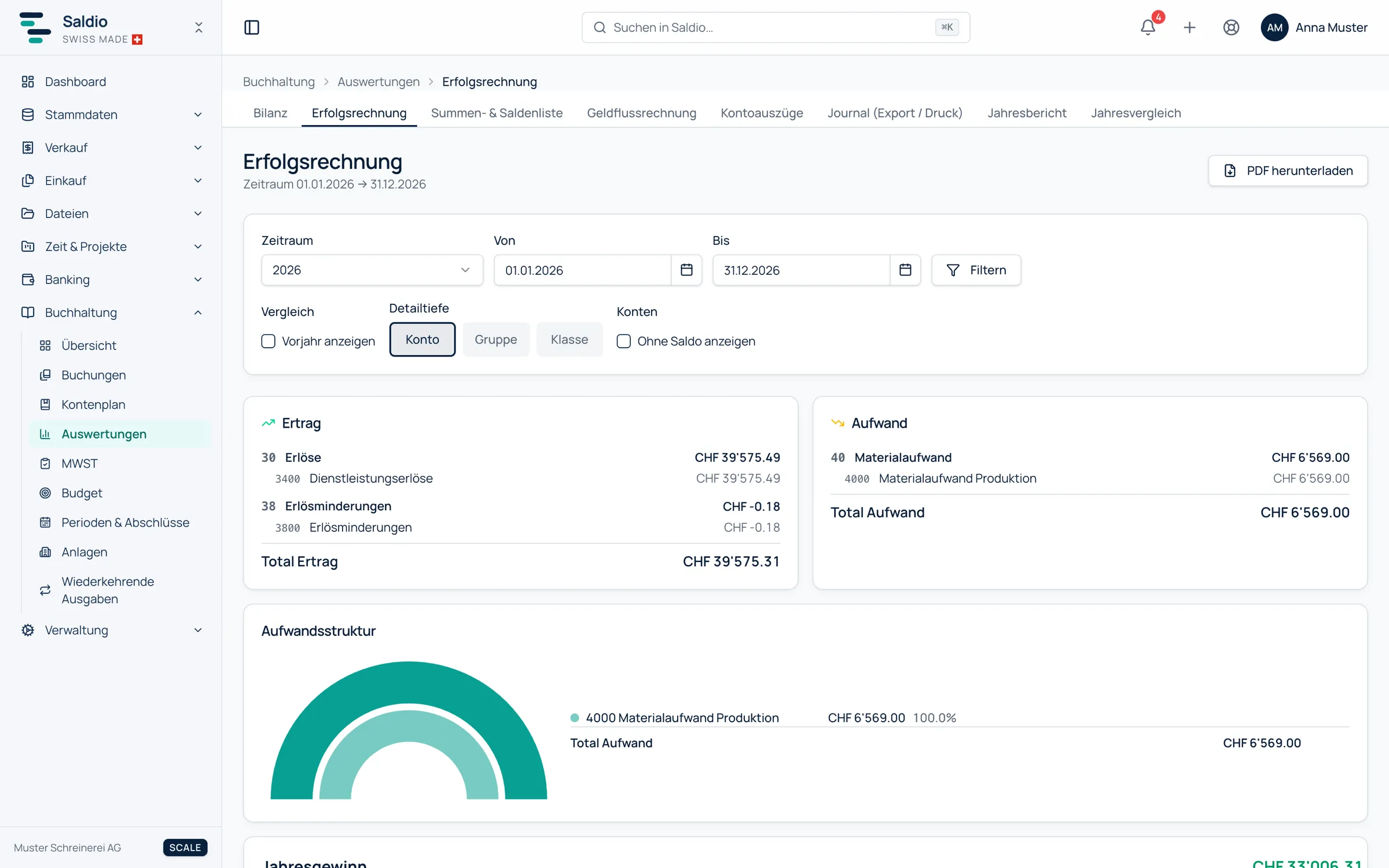
- Income statement — revenue and expense over a period, with expense structure and result stages
- Trial balance — debit, credit and balance per account
- Cash flow statement — inflows and outflows by operating, investing and financing activity, with opening and closing cash
- Account statements — all movements on one account with a running balance
- Year comparison — two fiscal years side by side at account level
- Journal (export / print) — the complete journal for passing on
- Annual report — the simplified annual overview
Balance sheet and income statement can be shown at three detail levels — account, group or class — optionally with Show previous year and with or without zero-balance accounts. All reports can be exported as CSV or PDF. If a previous year has not been closed yet, the balance sheet shows its result separately as Prior years’ result (not closed).
Result stages: EBITDA and EBIT
Below revenue and expense, the income statement shows result stages. Depreciation (account group 68), financial result (69) and income taxes (89) are deducted in turn. For the example above:
| Stage | CHF |
|---|---|
| Operating revenue | 900,000 |
| Expenses before depreciation, financial result and taxes | − 812,000 |
| EBITDA | 88,000 |
| Depreciation (68) | − 25,000 |
| EBIT | 63,000 |
| Financial result (69) | − 3,000 |
| Income taxes (89) | − 15,000 |
| Result for the year | 45,000 |
Every line can be recalculated. The stages only appear, though, if the tenant actually books on these account groups. A sole proprietorship without depreciation or financial expense would otherwise see the same number three times.
The cash flow statement has its own plausibility check: if its totals do not match the change in liquid assets, the report says so. The cause is usually a missing or wrong cash flow assignment on an account in the chart of accounts.
What Saldio deliberately does not do
- No rating of the figures. Saldio shows value and formula, but no traffic light and no industry benchmark. Whether a 140 % quick ratio is good depends on the business.
- No forecast. All figures describe the booked state. For looking ahead there is budget planning.
- No shadow accounting. There is no second data set for reports where figures are added by hand. Corrections happen in the journal.
- No year-end revaluation of foreign currency. Open foreign currency items stay on the balance sheet at the original rate until they are paid.
- No stages without a basis. EBITDA and EBIT only appear if the corresponding account groups are used.
Conclusion
Key figures are only as good as the bookkeeping behind them and only as credible as their formula. Saldio handles both the same way: the figures come straight from the general ledger, and the formula sits right next to them.
That turns the annual KPI session with the accountant into a look you can take at any time. For a quick overview of income, expenses and open invoices there is also the dashboard.
From order to balance.