

How Employee Management Works in Saldio
Billing rate and hourly wage kept apart, no mandatory login, an honest margin: how Saldio connects the employee register to projects and time tracking.

Contents
Many SMEs keep three lists with the same names: the software logins, the billing rates in a spreadsheet and the wage costs in the managing director’s head. If they do not match, the project accounts do not match either.
Then there is a sensitive question: who may see what a person costs? The rate at which an hour is billed appears on every invoice. The wage behind it does not belong in front of the whole team.
Saldio keeps a dedicated employee register for this under Master Data → Employees. This article shows what is recorded there, how the two hourly rates interact and what the per-person report shows.
Employees are not users
The most important point first: in Saldio, an employee and a user are two different things.
A user is a login with a role and permissions, managed in user management. An employee is a person whose work is booked to projects and billed. The two can be linked, but they do not have to be.
That solves an everyday problem: the freelancer who works on a project for two weeks does not need Saldio access for their hours to be recorded and billed. And the fiduciary with a login is not an employee whose hours run against client projects.
Recording an employee
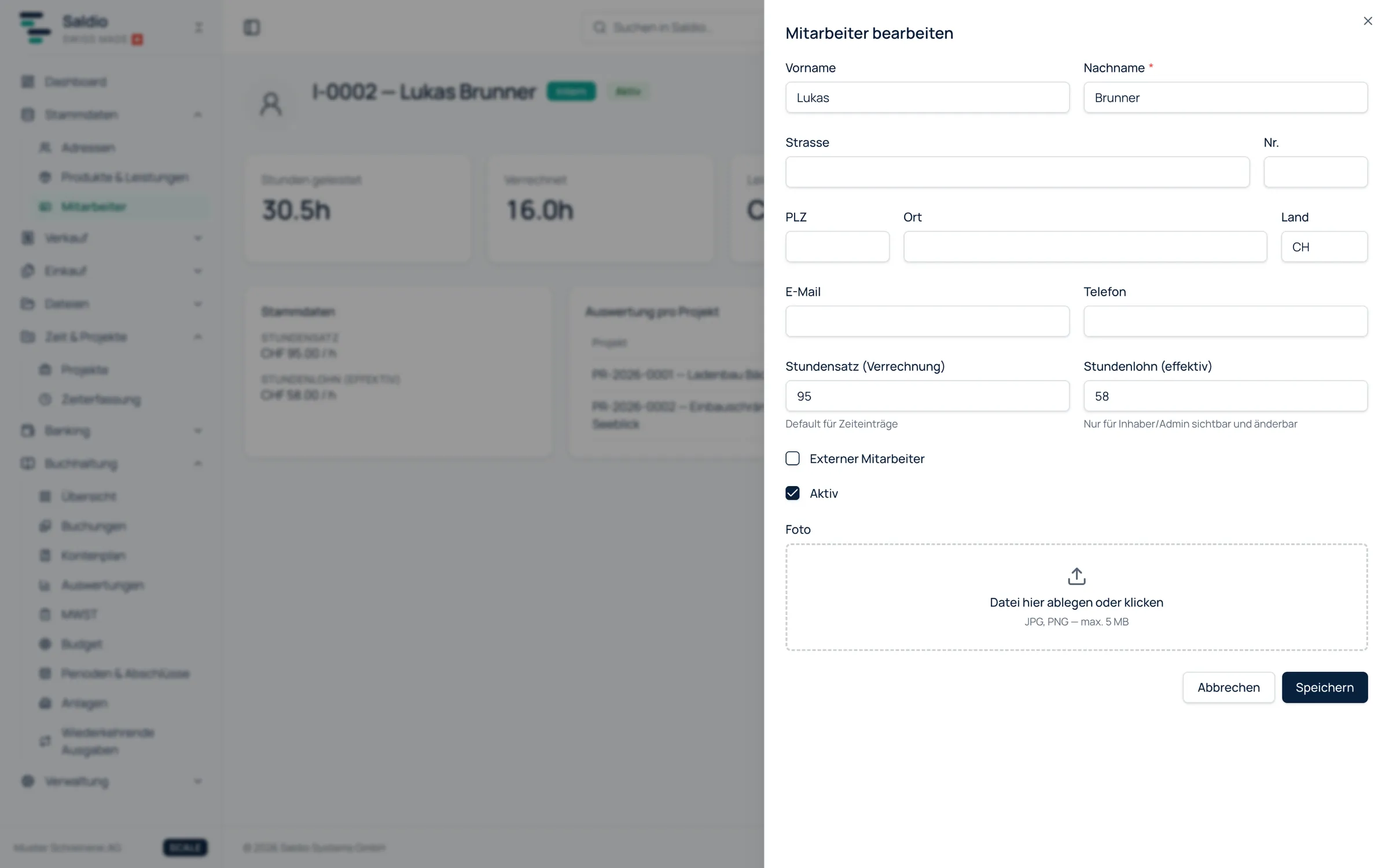
Via New employee you record:
- First name and Last name, address, email and phone
- the type: internal, External worker or Freelancer — for external workers with the Staffing company
- Hourly rate (billing) — the default for time entries
- Hourly wage (effective) — the internal cost per hour
- Linked login, if the person works in Saldio themselves
- a Photo as JPG or PNG, up to 5 MB
Saldio assigns the employee number itself: I-0001 for internal staff, E-0001 for external workers and freelancers. The number is set at creation and stays stable even if someone later moves from external to internal.
Two rates: billing and cost
Every person has two hourly rates, and they deliberately have different visibility.
The Hourly rate (billing) is what the customer pays per hour. It flows into the invoice via the time entries and is visible to everyone with access to the employee page.
The Hourly wage (effective) is what the hour costs internally. Only Owners and administrators can change it; standard users do not see it. If someone without that right tries to set the wage, Saldio rejects the change instead of silently ignoring it.
| Hourly rate (billing) | Hourly wage (effective) | |
|---|---|---|
| Purpose | default for time entries and invoices | cost side in the employee report and project costing |
| Change | anyone with write access to Employees | Owners and administrators only |
| Standard user | visible | not visible |
How the rate gets into time tracking
When a time entry is recorded, Saldio suggests the hourly rate in a fixed order:
- a person-specific rate for this project (Hourly rate (override) in the project members)
- otherwise the Hourly rate (billing) from the employee register
- otherwise the project’s Default hourly rate
Anyone may enter a different rate in the time entry. Saldio then flags the entry with Rate above employee rate or Rate below employee rate. Discounts and special terms remain possible, but they stand out. What that looks like day to day is covered in the article on time tracking.
The per-employee report
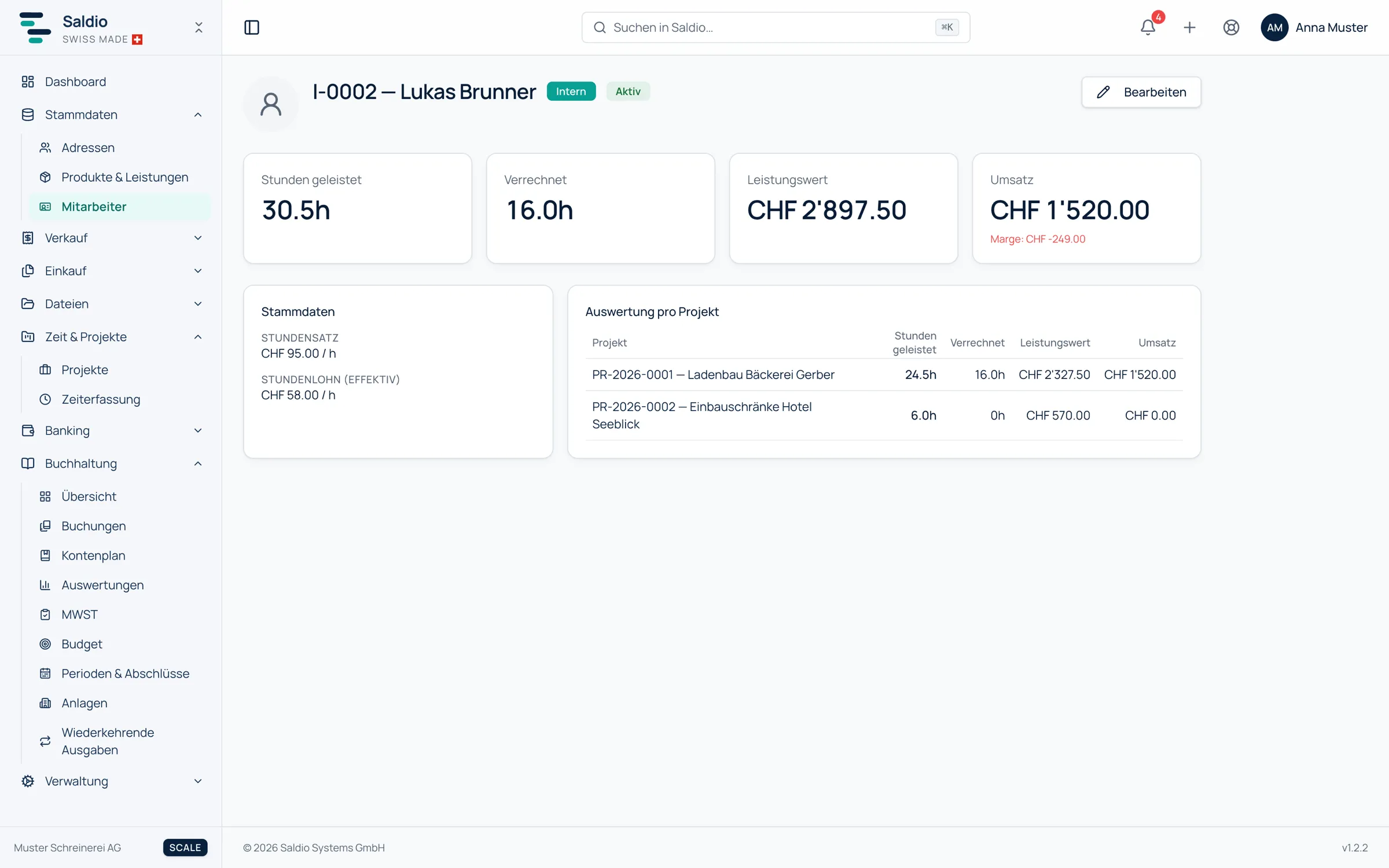
On a person’s detail page, Saldio shows what their work has brought in:
- Hours worked — all recorded hours
- Invoiced — the hours that are already on an invoice
- Service value — hours times rate, excluding non-billable entries
- Revenue — the value of the hours already invoiced
- Margin — revenue minus the cost of all hours worked at the hourly wage
Below that comes the Breakdown by project with hours, service value and revenue per project.
An example: Lea Muster has a billing rate of CHF 140 and an hourly wage of CHF 62. In the quarter she worked 120 hours on two projects, 100 of which have been invoiced.
| Project | Hours worked | Invoiced | Service value | Revenue |
|---|---|---|---|---|
| Website relaunch | 80 h | 80 h | 11,200.00 | 11,200.00 |
| Online shop | 40 h | 20 h | 5,600.00 | 2,800.00 |
| Total | 120 h | 100 h | 16,800.00 | 14,000.00 |
The cost is 120 h × CHF 62 = CHF 7,440. The margin is therefore CHF 14,000 − 7,440 = CHF 6,560.
When someone leaves
Employees with time entries or project memberships cannot be deleted. Saldio then reports: Employee has time entries or project memberships — deactivate instead.
The way to go is the Active switch. An inactive person no longer appears when new time entries are recorded, but their past hours remain correct in every project report and cost analysis. Someone who never recorded hours, for instance after a mistaken entry, can still be deleted.
What Saldio deliberately does not do
- No payroll. The hourly wage is a costing value for margin and project costing. Saldio does not produce payslips, social insurance returns or salary certificates.
- No mandatory login. Employees do not need access to Saldio for their hours to be recorded.
- No deleting with history. Anyone with hours or project memberships is deactivated, not deleted — otherwise past reports would become wrong after the fact.
- No open wages. The hourly wage is not visible to standard users, and only Owners and administrators may change it.
Conclusion
The employee register in Saldio is small, but it answers three questions in one place: who works for us, at what rate is that work billed, and what does it cost internally? Because time tracking and projects draw on it directly, there is no second list to keep up to date.
Where a person’s hours end up in a project and how the project costing is built from them is covered in the article on project management.
From order to balance.