

How Email Templates Work in Saldio
One text per document type and language, placeholders for number, amount and due date: how Saldio builds the email for invoices, quotes and reminders.
Contents
Every invoice needs an email. And almost every one of those emails is written the same way: open the last one, copy the text, replace number and amount — and overlook the due date that is still from last month.
With ten invoices a month that is tedious. With fifty in a bulk run it is a risk: a wrong amount in an email is quickly sent and hard to take back.
That is why Saldio builds the email from templates. Subject and text are written once; Saldio inserts number, amount and due date itself when sending. This article shows how templates are structured, which placeholders exist and which template applies when.
Where the templates live
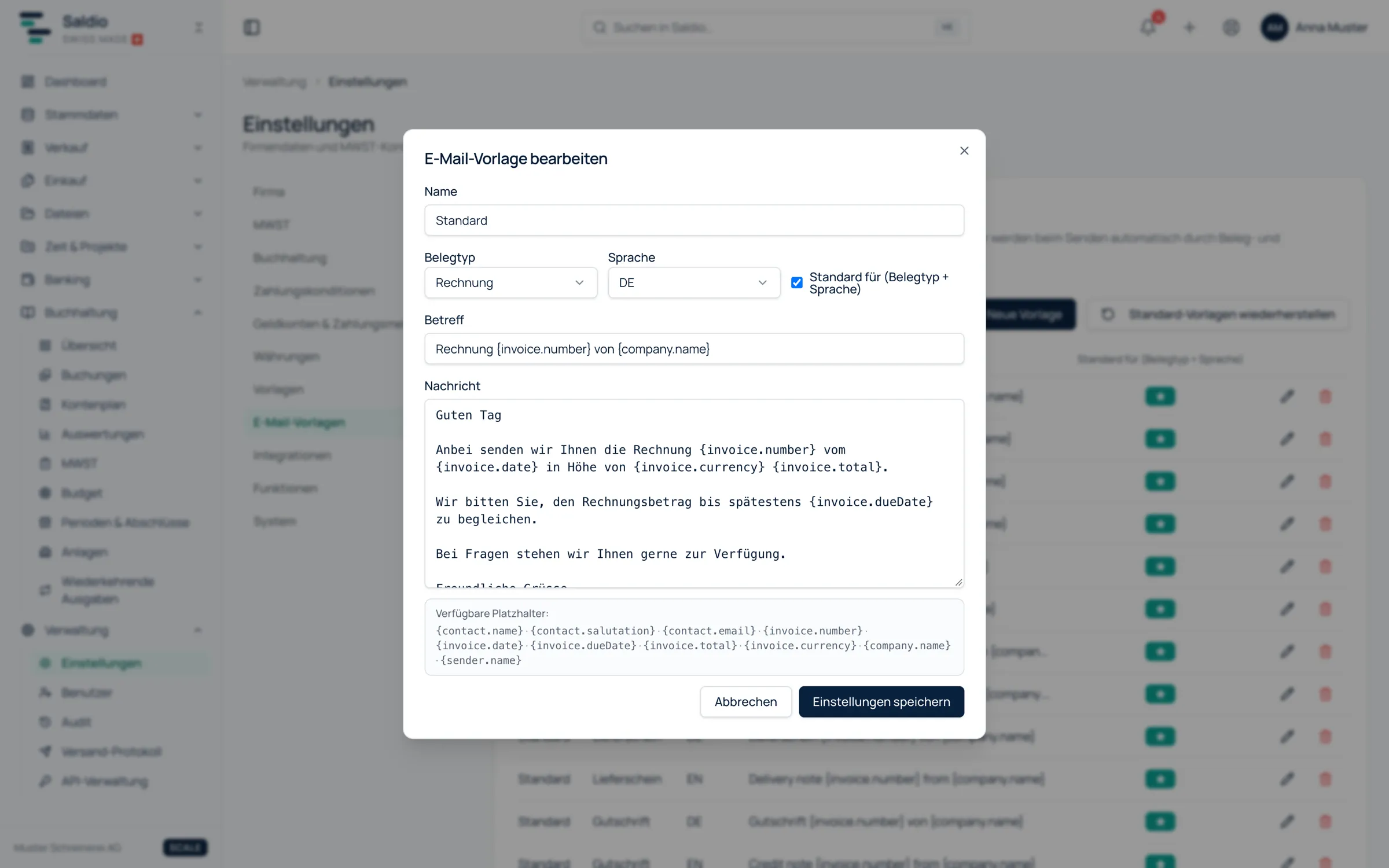
Templates are found under Administration → Settings → Email templates. Each template has six fields:
- Name — for selection when sending, for example “Invoice standard” or “Payment reminder”
- Document type — invoice, quote, order, delivery note, credit note or reminder
- Language — German, English, French or Italian
- Subject
- Message
- Default for this (document type + language) — marks the template that is preselected when sending
There is exactly one default template per combination of document type and language. If another one is made the default, the previous one loses that mark. Further templates for the same combination remain available for selection.
What comes out of the box
A new company does not start with empty fields. Saldio creates a default template in German and English for each of the six document types, and additionally in French and Italian for quotes. The English invoice template reads:
Subject: Invoice
{invoice.number}from{company.name}Dear Sir or Madam
Please find attached invoice
{invoice.number}dated{invoice.date}for{invoice.currency}{invoice.total}.Kindly settle the invoice by
{invoice.dueDate}.
Note the greeting: a neutral one, without a name. That is deliberate. With company contacts the German version would otherwise read “Guten Tag Muster Handels AG” — correctly resolved, but not a sentence a human would write.
If a default template has been deleted, Restore default templates brings it back. Only missing ones are added; your own changes to existing templates remain untouched.
The placeholders
Placeholders are written in curly braces and replaced with data from the document, contact and company when sending. The editor lists them under Available placeholders:
| Placeholder | Replaced with | Example |
|---|---|---|
{invoice.number} | document number | RE-2026-0042 |
{invoice.date} | document date | 01.10.2026 |
{invoice.dueDate} | due date, validity for quotes | 31.10.2026 |
{invoice.total} | total amount | 1’454.17 |
{invoice.currency} | the company’s currency | CHF |
{contact.name} | contact name | Muster Handels AG |
{contact.email} | contact’s email address | accounts@muster.ch |
{company.name} | your company name | Muster Malerei GmbH |
{sender.name} | username of the person sending | anna.muster |
Reminders add three more: {reminder.level} for the dunning stage, {reminder.dueDate} for the new due date and {reminder.fee} for the reminder fee.
Dates appear as DD.MM.YYYY, amounts with the Swiss thousands separator.
Which template applies when sending
In the Send document by email dialog, Saldio preselects the template itself:
- It looks for templates for the document type in the document language — for documents without their own language, in the contact’s language.
- If there are none in that language, Saldio takes the document type’s templates in all languages.
- The default template is preselected, otherwise the first one found.
Subject and message then appear resolved in the dialog and can still be adjusted before sending. A different template is one click away, and if you do not want one at all, you write the email freely.
Two things Saldio adds regardless of the template: the PDF as an attachment, and an online link to view the document in the browser. Cc and Bcc accept several addresses, separated by commas.
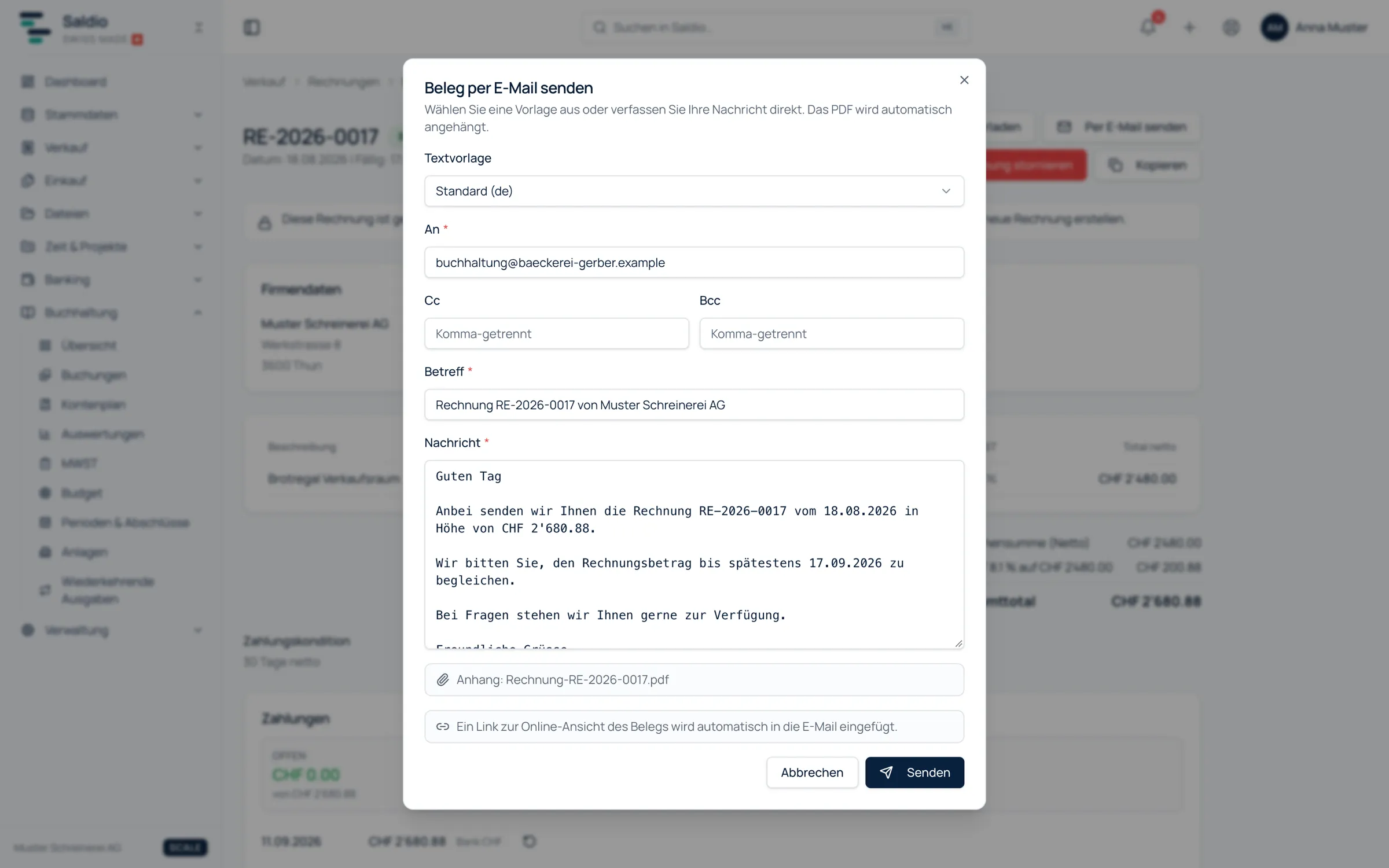
If the contact has no email address on file, the dialog cannot be sent — the notice is shown right there.
Replies reach the right inbox
Saldio sends the emails. Customer replies, however, should not end up with Saldio but with you. That is what the Reply-To address in the company settings is for: whoever replies to an invoice or reminder writes to that address. If the field is left empty, the Saldio default applies.
Templates in bulk sending
In the Dispatch center under Sales → Dispatch, the template is chosen once for the whole run and resolved for each document individually — so every email carries its own number, its own amount and its own due date. Alternatively, No template applies, and subject and text are set directly in the Dispatch center.
That is also the way to send reminders in different tones. The default reminder template is not chosen by stage; if you want to send the first stage as a friendly reminder, create a second reminder template and select it for that run. What that looks like in practice is described in the article on payment reminders.
What remains traceable afterwards
On the document, the Email history records what was sent to whom — with recipient, Cc, Bcc and status: Sent, Failed or Rate limited. Sending is limited in volume; if the limit is reached, Saldio says so instead of silently leaving emails behind. Administrators also see the Email log across all documents.
How invoices are issued and sent is covered in the article on invoicing.
What Saldio deliberately does not do
- No template language. There are no conditions, loops or formulas — just a fixed set of placeholders replaced with text.
- No template selection by dunning stage. One default applies per document type and language; the choice for a particular stage is made when sending.
- No sending without a recipient address. If the contact has no email, nothing is sent.
- No overwriting your own texts. Restoring the default templates only adds what is missing.
Conclusion
Email templates in Saldio are a small tool with a large effect: the text is written cleanly once, and every email afterwards carries the right number, the right amount and the right date — individually and in bulk.
The rest follows from data that is there anyway: document language, contact, company. Once you maintain one template per document type and language, you only write sending emails when you have something personal to say.
From order to balance.