

How Year-End Closing Preparation Works in Saldio
Lock monthly periods, pass four pre-checks, close with preview and audit record: how Saldio prepares the year-end close – and why it stays closed.

Contents
In mid-February the accountant receives last year’s figures. At the end of February someone books a forgotten supplier invoice to 28 December. By March, the balance sheet on the accountant’s desk no longer matches the one in the books — and nobody knows exactly since when.
A year-end close is less a calculation than a matter of discipline: when is a month finished? Who may still change anything after that? And how do you see whether everything is in before the year is closed?
Saldio answers these questions under Accounting → Periods & closings. This article shows how periods, pre-checks and the close itself fit together.
Fiscal years and monthly periods
A fiscal year has a name, a start and an end and is either Open or Closed. It is created in the setup wizard; without a fiscal year nothing can be booked. A non-calendar fiscal year, for example from 1 July to 30 June, is possible.
Within the fiscal year, Saldio automatically creates booking periods — one per month. Each period is Open or Locked. Lock stops a period from accepting entries dated in that month; Unlock reverses it. The list shows when a period was locked.
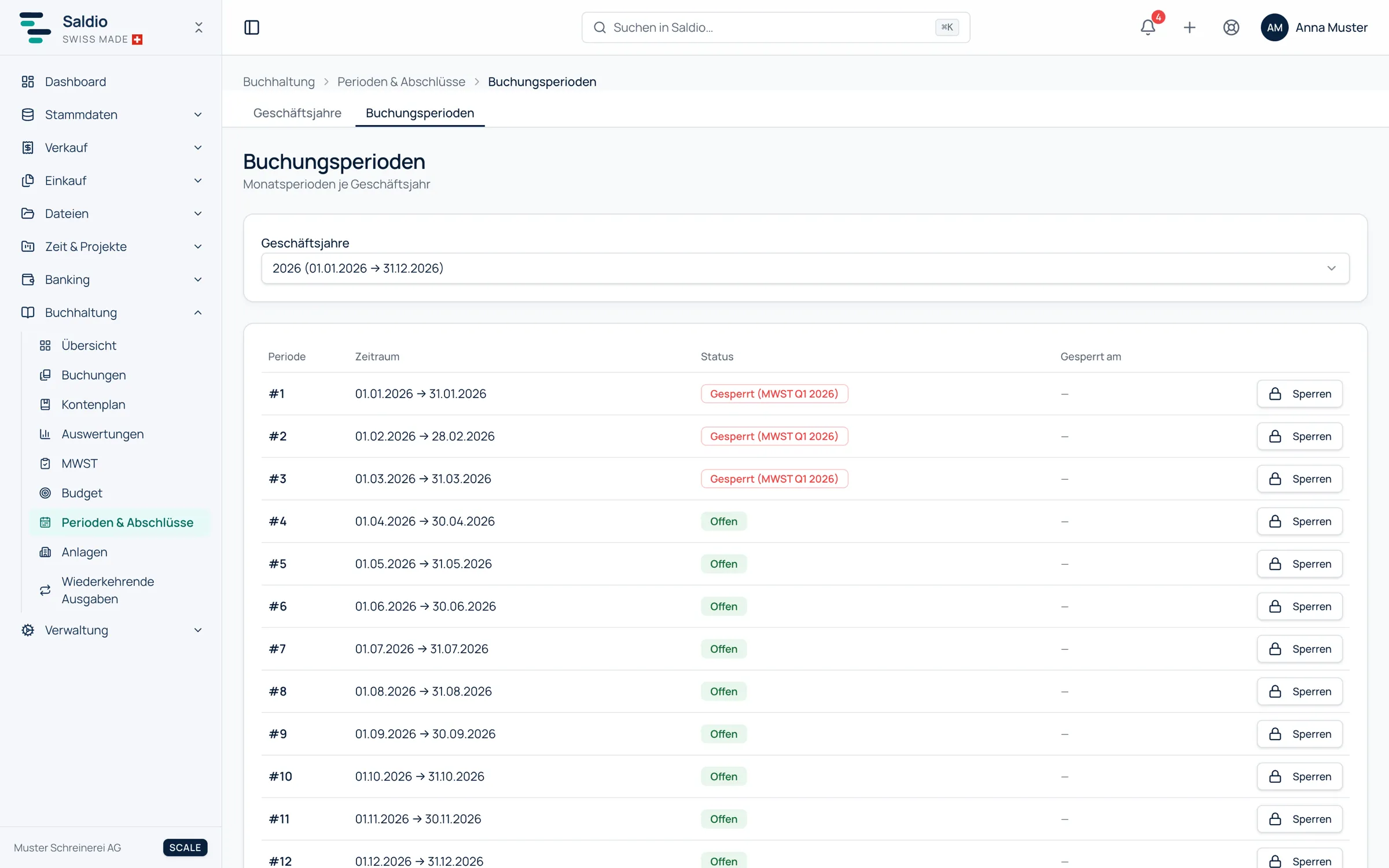
Locking does not only happen by hand. When you settle a VAT quarter, Saldio locks the corresponding months automatically; they show as Locked (VAT Q3 2026). What has been declared to the tax authority cannot be changed silently — the process is described in the article on VAT processing.
The lock applies everywhere, not just in the journal. A supplier invoice dated in a locked period is flagged during import and kept out of bulk booking. Recurring expenses whose date falls into a locked period are skipped; the execution history shows this, but they are not caught up automatically.
What should be done before closing
Software can check whether the books are formally in order. Whether they are complete is known only to whoever knows the documents. The usual order in Saldio:
- Record all documents — invoices, supplier invoices, expenses.
- Reconcile the bank until nothing is left under Pending assignments.
- Clear open items — what is really still open, what is a mistake? The article on open items shows the list for this.
- Run depreciation for the fiscal year if you keep fixed assets — details in Taking over fixed assets cleanly.
- Settle VAT for the last quarter. If you forget, the VAT page shows Not settled for that period after the year-end close.
- Book accruals and provisions by hand where needed.
- Lock the monthly periods as soon as they are finished.
The closing preview
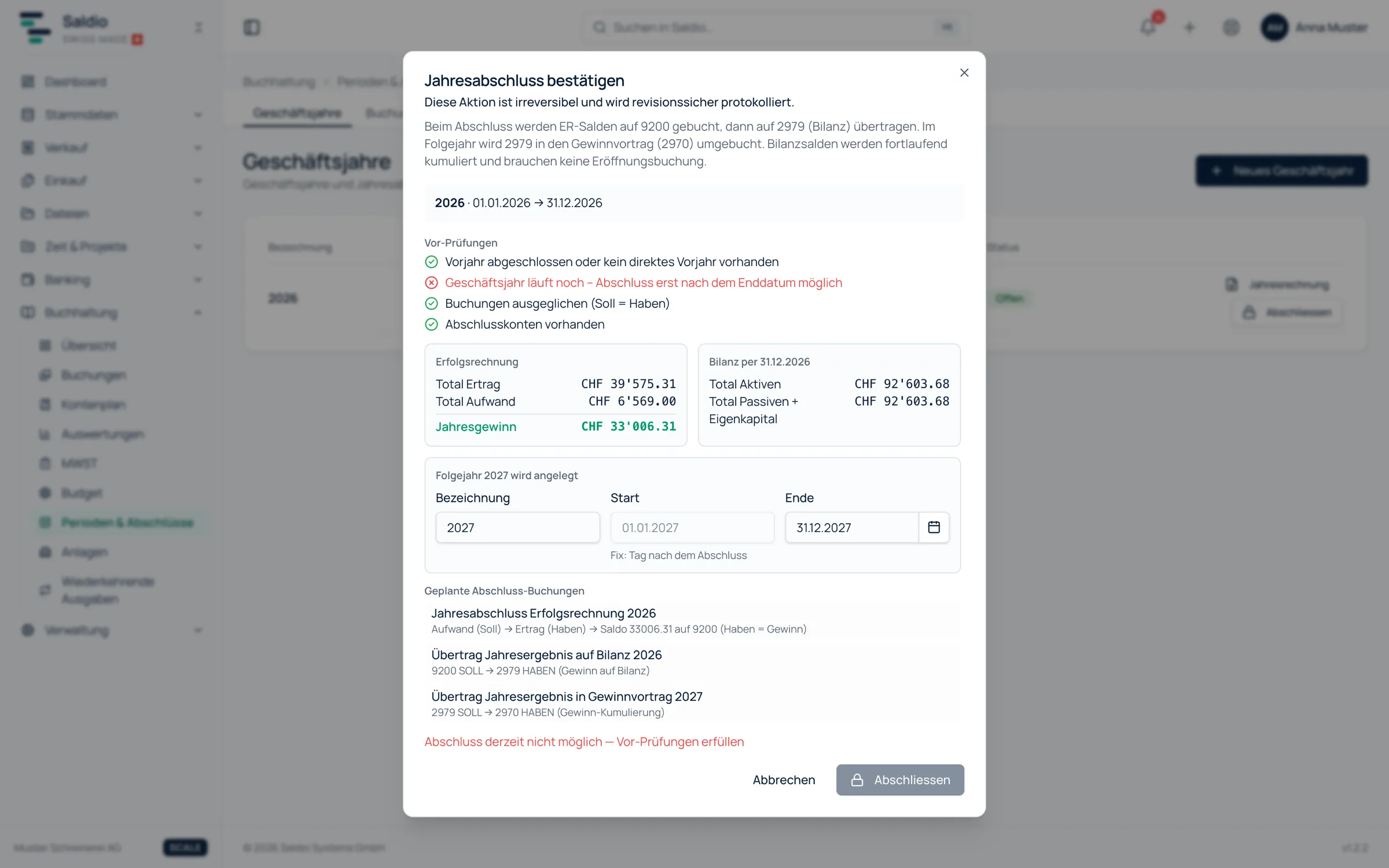
Close on the fiscal year does not open a confirmation first, but a preview. It shows five things:
- the pre-checks, each Passed or Failed
- the income statement with total revenue, total expense and net profit or loss
- the balance sheet as of the closing date, with total assets and total liabilities + equity
- the planned closing entries
- the successor year that will be created — or a note that it already exists and stays unchanged
The four pre-checks are:
| Check | Fails if … |
|---|---|
| Previous year closed | the directly preceding year is still open |
| Fiscal year has ended | the end date has not been reached |
| Entries balanced | debit and credit do not match |
| Closing accounts present | the closing accounts are missing from the chart of accounts |
Only when all four pass can the year be closed. You confirm by typing the name of the year — a stray click does not close anything.
What the close books
Saldio transfers the income statement balances to closing account 9200, from there to account 2979 on the balance sheet and, in the following year, into retained earnings 2970. Balance sheet accounts carry on continuously and need no separate opening entry.
An example: total revenue CHF 420,000.00, total expense CHF 372,000.00, net profit CHF 48,000.00.
| Step | Debit | Credit | Amount |
|---|---|---|---|
| P&L closing: revenue | revenue accounts | 9200 | 420,000.00 |
| P&L closing: expense | 9200 | expense accounts | 372,000.00 |
| Transfer to balance sheet | 9200 | 2979 | 48,000.00 |
| Next year: transfer to retained earnings | 2979 | 2970 | 48,000.00 |
With a loss, the last two lines run the other way. The journal numbers of these entries follow the calendar year of their booking date, like all others.
Opening and closing entries are exempt from the period lock. Otherwise a neatly locked December would block its own close.
The closing audit
Every close produces a closing audit: who closed, when, with which net result, with which totals in the income statement and balance sheet, and which entries were created. Each entry can be opened directly in the journal from there. The record is meant to be printed and filed.
A closed year locks all its booking periods. They cannot be reopened individually while the year is closed. After closing, the Year comparison in the reports is worth a look: two fiscal years side by side at account level, with a note when an account had activity in only one of the two years.
Reopening — with a trace
Sometimes a year does have to be opened again. The accountant finds a missing accrual, or the audit requires a correction.
Saldio allows this with Reopen — again by typing the name of the year. The closing entries and the closing audit are deleted, and the reopening is recorded in the audit log. You then correct and close again, which creates a new record.
What Saldio deliberately does not do
- No closing before year end. A running fiscal year cannot be closed, not even “provisionally”.
- No skipping a year. As long as the directly preceding year is open, the close stays blocked.
- No automatic accruals. Deferrals and provisions are judgement calls; you book them yourself.
- No year-end revaluation of foreign currency items. Open items in foreign currency are not revalued at year end; exchange differences arise only on payment.
- No changes to closed entries. Entries in a closed year are neither edited nor reversed while the year is closed.
Conclusion
The year-end close in Saldio is not an event in January but the end of a series of small steps: reconcile the month, lock the month, settle the quarter. Working this way, you reach year end with a preview showing four passed checks and a close that takes minutes.
More important than the click is what applies afterwards: a closed year stays closed, and if it is opened again, the record shows it.
From order to balance.