

How VAT Processing Works in Saldio
Form 100 from the general ledger, the settlement entry in one click, eVAT XML for SuisseTax: how Saldio settles Swiss VAT – effective or net tax rate.

Contents
At the end of each quarter, many SMEs go through the same ritual: export accounts 2200 and 1170 to Excel, sort by tax rate, add up the totals, type the figures into the ESTV portal. Then the return is booked — by hand, with amounts you have just calculated yourself.
The problem is not only the effort. It is the two versions of the truth: the spreadsheet says one thing, the ledger something slightly different, because a credit note was booked into February after the fact. At the latest when the year is finalised, someone has to explain where the difference comes from.
Saldio calculates the VAT return directly from the general ledger. This article walks through the process under Accounting → VAT: from the basic settings via Form 100 to the payment to the Federal Tax Administration (ESTV).
The basic setting: method and reporting basis
Under Administration → Settings, tab VAT, two things are set once — the setup wizard also asks for them when you start:
- Settlement method — Effective method (quarterly) or the net tax rate method, shown in the app as Flat-rate tax method (semi-annual). With the net tax rate method you also pick the approved rate from the list of rates valid since 2024.
- Reporting method — Agreed considerations (by invoice date) or Collected considerations (by payment receipt). Agreed is the default; choose collected only if the ESTV has approved it.
The method determines the period length, the form and whether input tax is deducted. Which method fits which business is covered in the guide VAT methods compared.
The reporting basis should only be switched at the start of a reporting period; invoices already issued keep their existing treatment. The tax rates themselves are maintained centrally by Saldio as a history with effective dates. When you record something, Saldio suggests the rate valid on the booking date — an invoice from December 2023 still gets 7.7 %, one from January 2024 already 8.1 %.
The periods at a glance
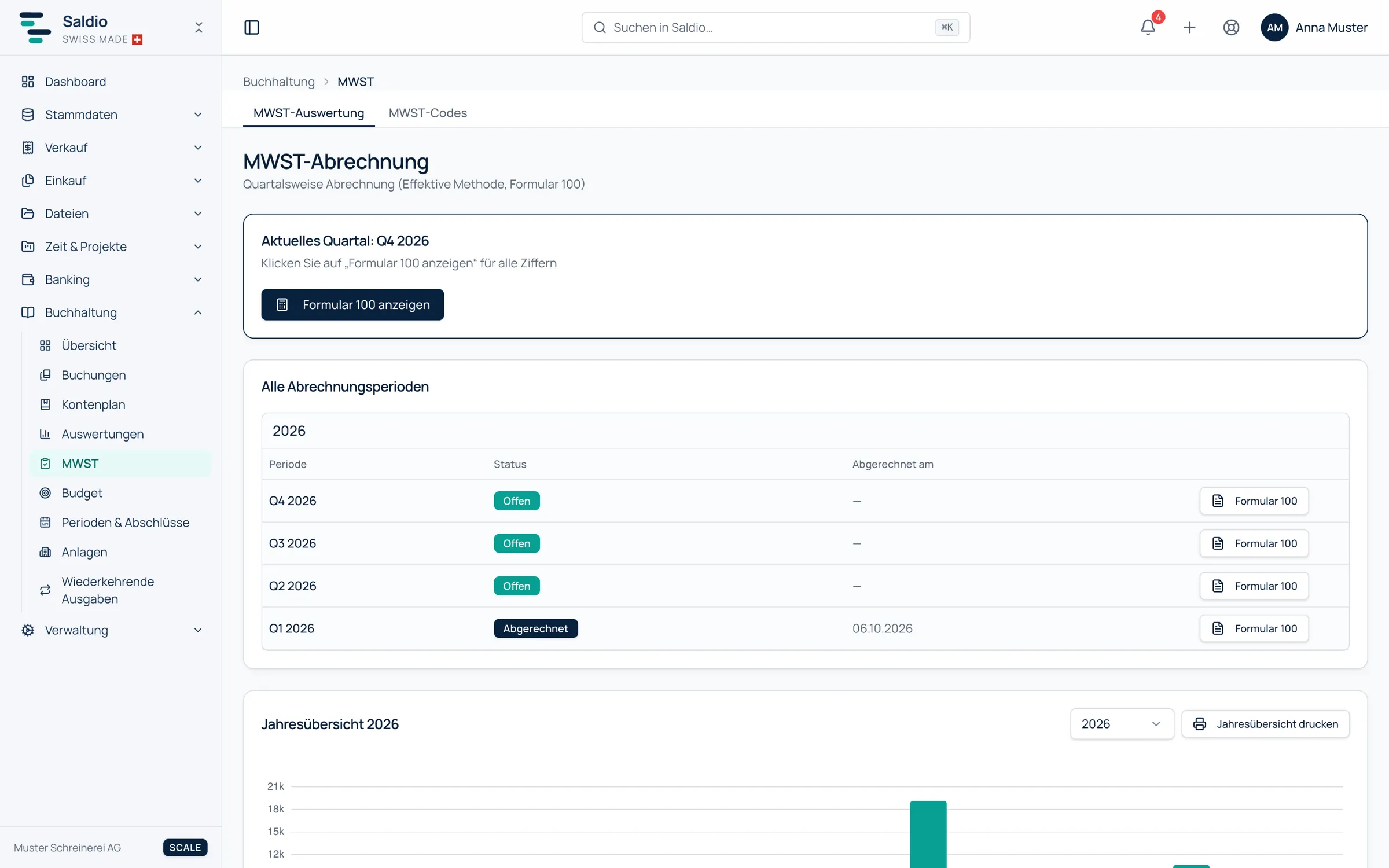
The VAT Statement page shows the current quarter at the top — the current half-year under the net tax rate method — and below it All Settlement Periods with their status:
| Status | Meaning |
|---|---|
| Open | not yet settled |
| Submitted | settled and booked, with date |
| Corrected | corrected afterwards |
| No transactions | period without VAT-relevant entries |
| Not settled | fiscal year closed, but this period with entries was never settled |
The last status is a warning, not a normal state. It catches exactly the case where a year-end close was done and one return was forgotten along the way.
Below sits the Annual Overview with turnover and tax per period and a total for the year. It can be printed and is the first basis for the turnover reconciliation at year end.
Form 100 from the general ledger
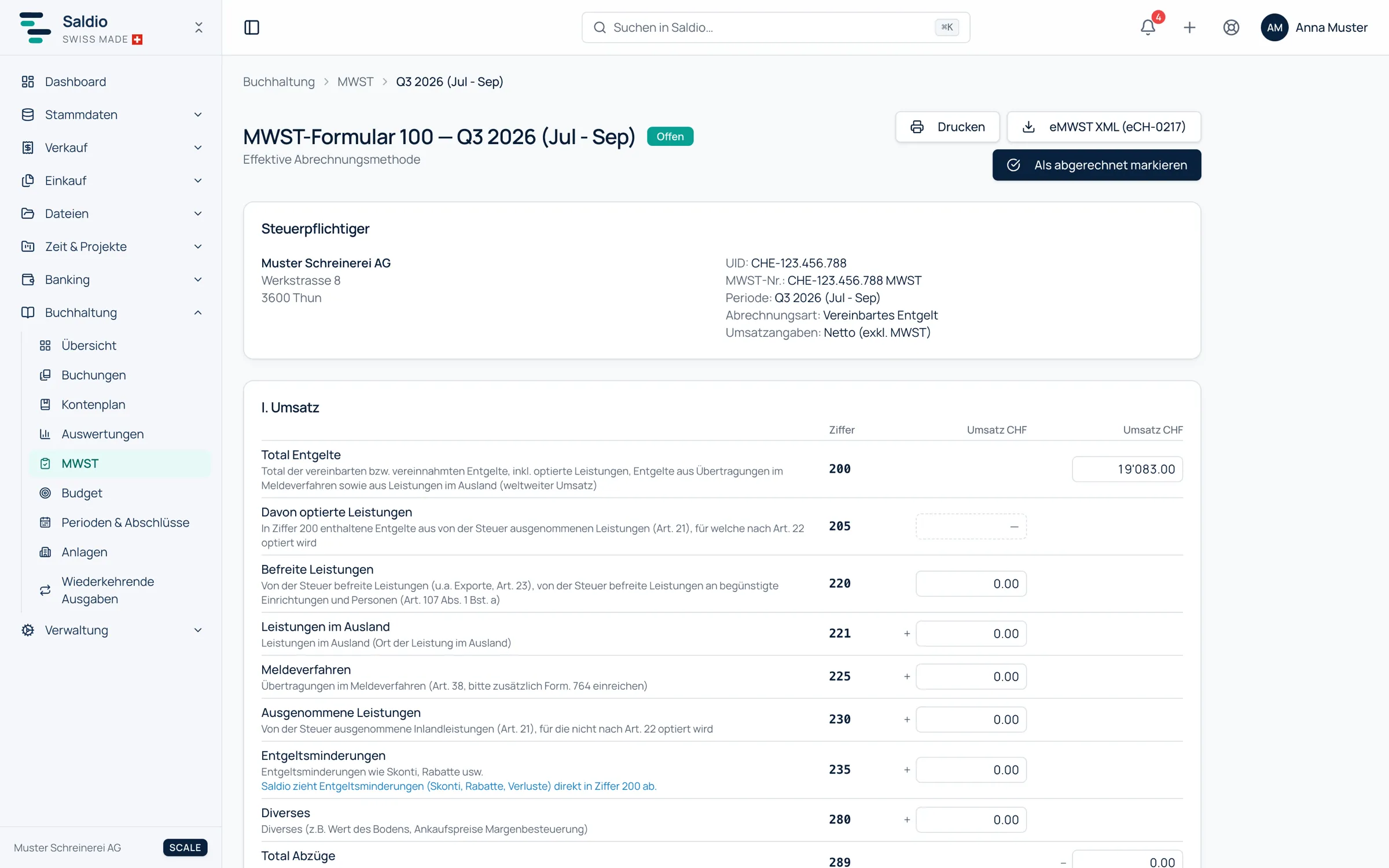
Clicking Show Form 100 opens the return for the period. It is laid out like the ESTV portal — same sections, boxes and columns: I. Turnover, II. Tax calculation, Input tax and result and III. Other cash flows. Every amount can be copied with one click, in case you do transfer it to the portal by hand.
The figures come exclusively from booked transactions. Whatever is not in the ledger is missing from the form. A few rules Saldio applies:
- Box 200 is net, i.e. without VAT, as net reporting requires.
- Reductions of consideration such as cash discounts, rebates and bad debts are deducted directly in box 200. Box 235 therefore stays empty.
- Deductions in boxes 220, 221, 225, 230 and 280 come from the VAT deduction reason on the invoice or the flag on the booking line — more on that in the article on VAT codes.
- Interest income (accounts 695x) appears as excluded turnover in boxes 200 and 230. Exchange gains and securities income do not count as turnover; dividends (696x) go to box 910.
- Input tax is split into box 400 (materials and services, account 1170) and box 405 (investments and other operating expenses, account 1171).
An example for the third quarter of 2026, effective method, agreed consideration:
| Box | Description | Supplies CHF | Tax CHF |
|---|---|---|---|
| 200 | Total consideration | 130,150.00 | |
| 230 | Excluded supplies (interest income) | 150.00 | |
| 299 | Total taxable turnover | 130,000.00 | |
| 303 | Standard rate 8.1 % | 120,000.00 | 9,720.00 |
| 313 | Reduced rate 2.6 % | 10,000.00 | 260.00 |
| 399 | Total tax due | 9,980.00 | |
| 400 | Input tax on materials and services | 3,400.00 | |
| 405 | Input tax on investments | 800.00 | |
| 479 | Total input tax | 4,200.00 | |
| 500 | Amount payable | 5,780.00 |
Boxes that Saldio does not calculate — box 205 for opted supplies, for example — are marked with a dashed outline, and a note below the form lists them. If they apply to you, enter them in the ESTV form yourself.
Under the net tax rate method the form looks different: turnover is reported gross, i.e. including VAT, and multiplied by the approved rate; there is no input tax deduction. The page says so explicitly: input tax is included in the flat rate.
Settle and book
Once the period is over, it is settled. Not before: until the period ends, Saldio only shows the date from which settlement is possible.
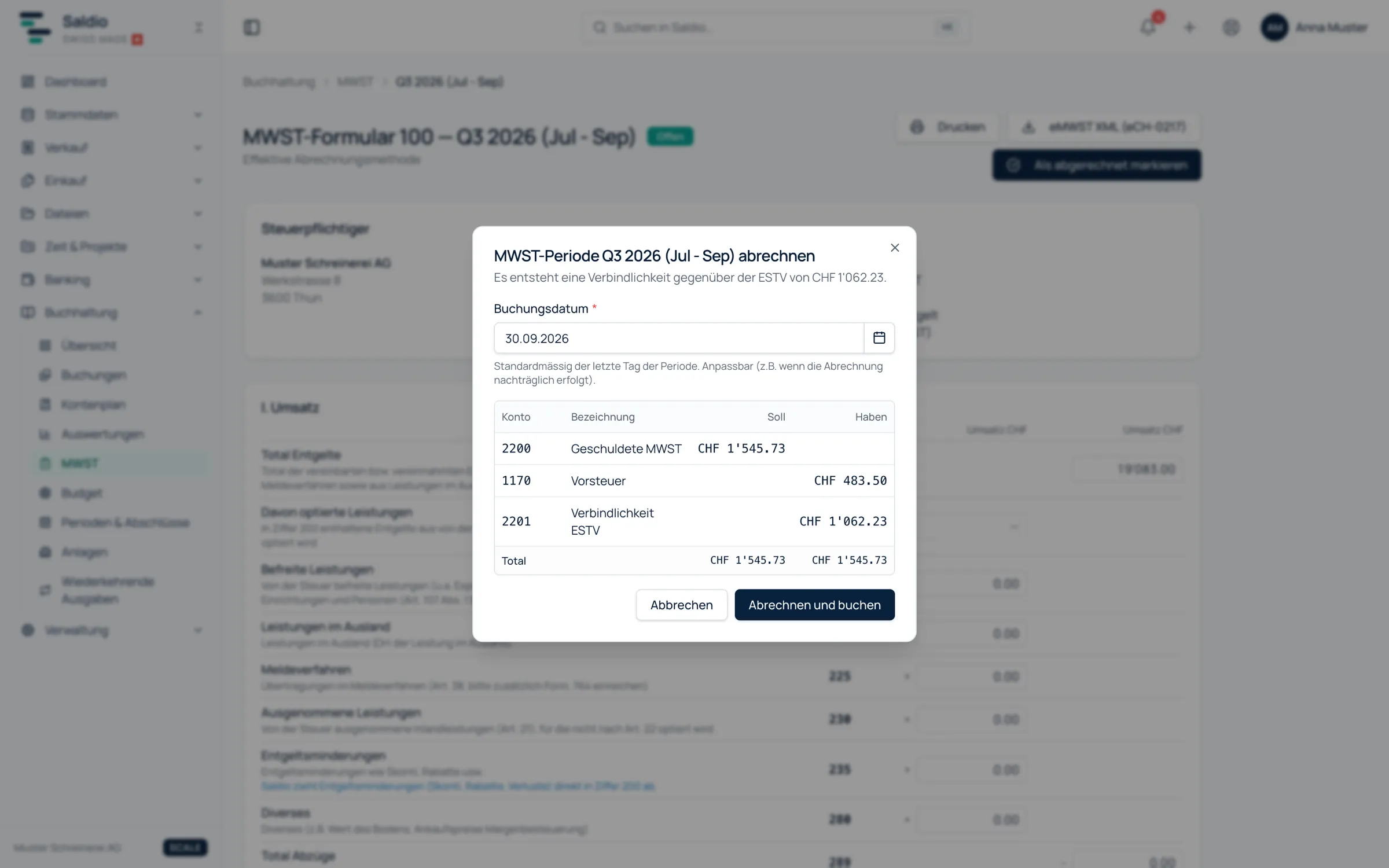
The Settle VAT period dialog shows the entry that will be created, with debit and credit per account. The booking date defaults to the last day of the period and can be changed, for instance when the return is prepared later. For the example above:
| Account | Description | Debit | Credit |
|---|---|---|---|
| 2200 | VAT payable | 9,980.00 | |
| 1170 | Input VAT | 3,400.00 | |
| 1171 | Input VAT on investments | 800.00 | |
| 2201 | Liability FTA | 5,780.00 |
Settle and book creates this entry in the journal, with the source VAT return. If the return results in a credit, a receivable from the ESTV on account 1175 replaces the liability. If a period contains no VAT-relevant entries at all, no entry is created — the status still changes to Submitted.
A settled period is locked: entries and documents dated within it can no longer be recorded or changed. In the list of booking periods the affected months show as Locked (VAT Q3 2026). Nobody can slip an invoice into a quarter that has already been declared.
If a correction is still needed, Reopen opens the period again. Saldio reverses the settlement entry as of today, sets the status back to Open and records the action in the audit log. To confirm, you have to type the period. If something changed after settlement, the page shows the booked and the current figure side by side and suggests checking whether a correction return is needed.
Submit and pay
For submission, download eVAT XML (eCH-0217) from the period. The file follows the eCH-0217 standard and can be uploaded in the ESTV portal SuisseTax instead of typing in the boxes. If the UID or company name is missing in the company settings, Saldio names the missing fields instead of producing an invalid file.
Each period has a notes field — meant for “submitted on …, paid on …” and anything an accountant will want to know later.
The payment to the ESTV runs through bank reconciliation. If a bank line names the ESTV and its amount exactly matches the open liability of exactly one settled period, Saldio suggests the match. You confirm it with the return’s document number, for example MWST-2026-Q3; the period then counts as paid. The same applies to a refund when the return shows a credit.
What Saldio deliberately does not do
- No settlement before the period ends. A period that is still running can still receive entries. It is settled afterwards.
- No filing on your behalf. Saldio produces the eVAT file; uploading and submitting it in the ESTV portal is up to you. Responsibility for the return stays with the taxable person.
- No flat tax rate method. Saldio supports the effective method and the net tax rate method. Public bodies and institutions that settle with flat tax rates (Pauschalsteuersätze) are not covered.
- No estimated boxes. Whatever Saldio cannot derive from the ledger — opted supplies in box 205 or proceeds from selling securities, for example — stays visibly empty instead of being guessed.
- No silent back-posting. A settled period stays locked until someone deliberately reopens it — with a reversal and an audit entry.
Conclusion
VAT processing in Saldio is not a separate set of numbers but a view of the general ledger. Because invoices, supplier documents and bank lines end up there anyway, Form 100 is already in place at the end of the quarter. The work shifts from adding up to checking.
The process itself is short: review the form, settle and book, upload the XML, confirm the payment in bank reconciliation. The period lock makes sure that what was declared stays that way.
The basics — VAT liability, rates and deadlines — are covered in the guide Swiss VAT (MWST) explained.
From order to balance.