

How Supplier Management Works in Saldio
Create suppliers from the document, recognise them by IBAN, suggest accounts: how Saldio brings together suppliers, incoming invoices and payments.
Contents
A supplier master file decays quietly. The print shop is in there twice, once as “Muster Printing Ltd” and once as “Muster Print”, one entry has no IBAN and the other an outdated one. With every new invoice someone hunts for the right entry, and at payment time you wonder which account is actually correct.
The problem is rarely data entry. It is that master data only gets maintained when someone thinks of it — and nobody thinks of it as long as the document goes through anyway.
Saldio turns that around: the supplier master is largely maintained by the documents themselves. This article shows how that works and where the master data is actually used day to day.
One contact, three roles
Suppliers in Saldio are not a separate database but addresses under Master Data → Addresses. Every address has a type: Customer, Supplier or Customer & Supplier. The garage that services the company car and has also ordered a website from you is one contact, not two.
An address is a company or an individual and carries:
- name or company, address with separate street and house number
- Company ID and VAT ID — a Swiss UID is checked for format and check digit
- Communication — email, phone, website and other channels, each with a default entry
- Contact persons with their role, and delivery addresses
- Payment information with account holder, IBAN, bank and BIC
- defaults for default payment terms, document language and delivery method
Saldio assigns the number automatically, with separate ranges: K-NNNN for customers, L-NNNN for suppliers. If you are taking over an existing numbering, set it by hand.
Existing suppliers come into the system by import as CSV, vCard or a full JSON export. Saldio checks for duplicates by email, UID number, company and last name, or customer number, and lets you decide per match: overwrite or skip. Individual addresses can also be taken over from search.ch, if that is enabled for the tenant.
The supplier is born from the document
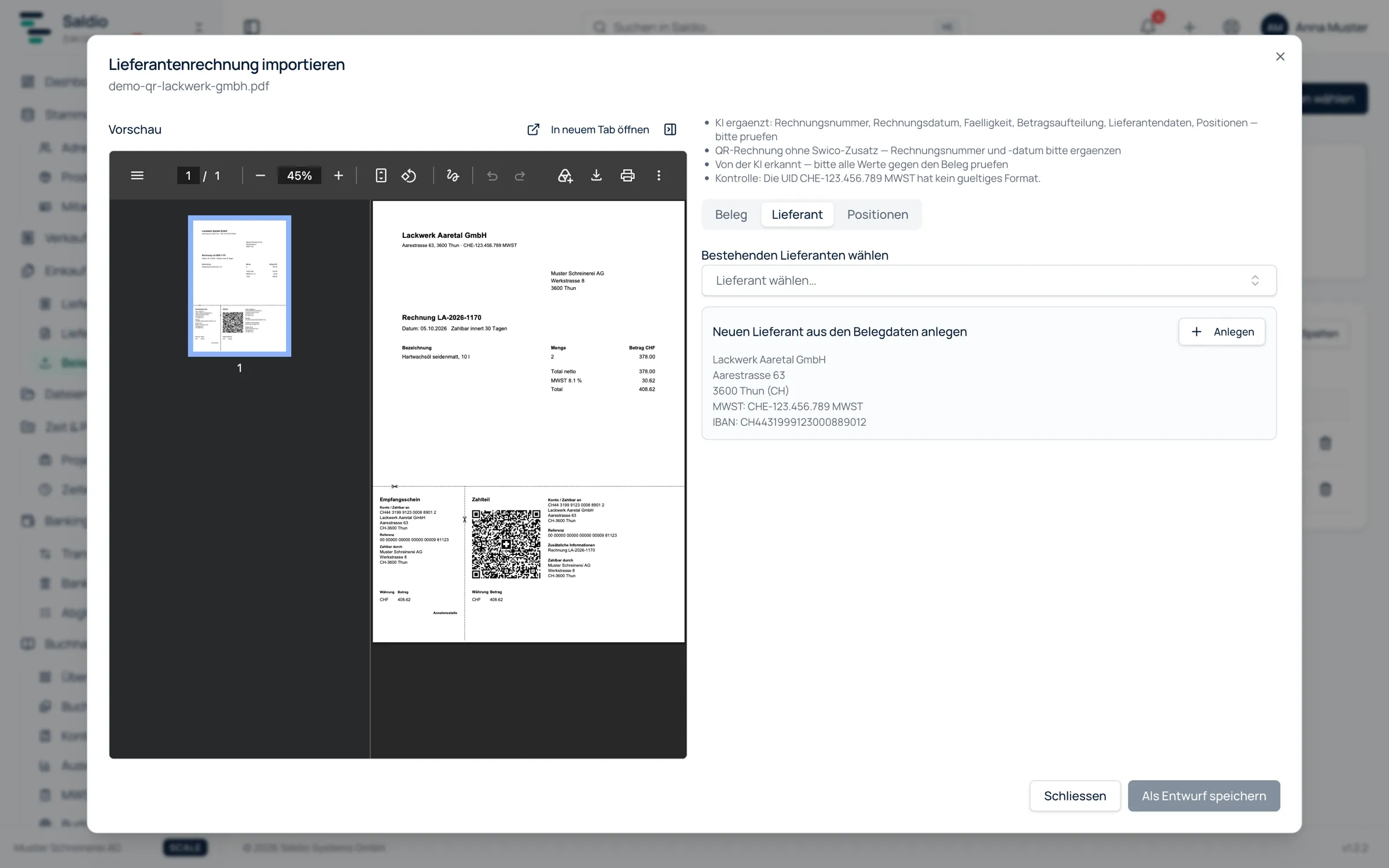
The most common route to a new supplier, though, is not a form but its first invoice. In document import, Saldio reads the biller from the QR code, the e-invoice or via AI and looks for it in the master data. Every suggestion states its reason:
| Match | Certainty | Where the data comes from |
|---|---|---|
| IBAN matches | unambiguous | every QR bill |
| VAT number matches | unambiguous | e-invoice, Swico add-on in the QR code |
| UID number matches | unambiguous | e-invoice, Swico add-on in the QR code |
| Name similarity | suggestion | every document |
If Saldio finds nobody, the Supplier tab shows Unknown supplier with two options: Choose existing supplier or Create supplier from document data. The second opens the usual address form, prefilled with company, street and house number, postcode, town, country, UID and VAT number, and the IBAN as payment information. You check, correct, save — and the new supplier is linked to the document.
If similar entries already exist, Saldio warns before creating: Similar suppliers exist — please check before creating a new one. That is the point where “Muster Print” does not get created next to “Muster Printing Ltd”.
How Saldio reads the data from QR code and e-invoice in detail is described in Reading Supplier Invoices Automatically – Without AI.
What Saldio remembers
The real benefit lies in what happens after the first document. Saldio does not train a model here; it completes the master data — traceably, and within your own tenant.
The IBAN. When a document is booked, Saldio stores its IBAN as the supplier’s payment information if it is not there yet. The next document from the same sender then matches through the strongest rule: IBAN matches.
The account. Per line item Saldio suggests the expense account — first from earlier documents of this supplier with the same or a similar description, otherwise the account it is booked to most often. From the print shop’s second invoice on, “printed matter” already sits in the right account, without anyone writing a rule.
The products. A recognised line item can be turned straight into a product in the product master, with prefilled fields, purchase price and a link to the supplier.
This is how it looks for a new supplier over three months:
| Document | What happens |
|---|---|
| 1st invoice | supplier unknown, created from document data; account chosen by hand; IBAN remembered |
| 2nd invoice | supplier recognised by IBAN; account suggested from the first invoice |
| 3rd invoice | supplier and account prefilled; document goes through Book unambiguous without individual review |
Where the master data is used
Clean supplier data is not an end in itself. It is used directly at three points in the process.
When paying. Open supplier invoices can be bundled into a payment file in pain.001 format and uploaded to e-banking. That needs the IBAN — from the document or from the master data. For exceptions, the document has an Alternate IBAN field, filled in only if the payment should go to a different account than the one on file.
In bank reconciliation. When the debit comes back on the bank statement, bank reconciliation looks for the matching supplier invoice by payment reference, the creditor IBAN from the document or master data, or the counterparty’s name. If several open documents from the same supplier add up exactly to the bank amount, Saldio shows them as a combined payment.
For VAT. If you record an invoice from a foreign supplier without Swiss VAT, Saldio suggests the acquisition tax that belongs in box 383 of the VAT return.
The supplier at a glance
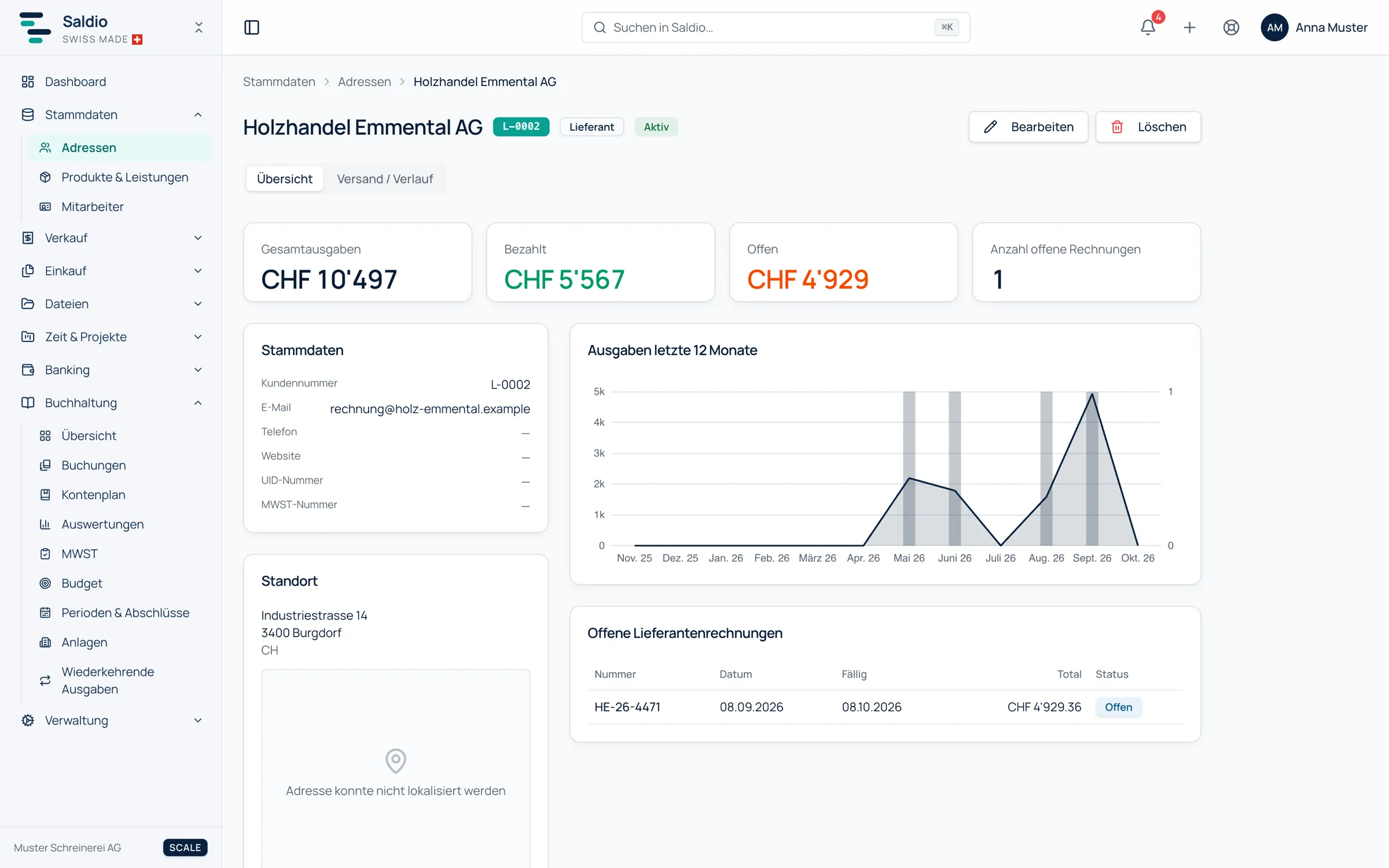
A supplier’s profile shows, in the Overview tab, the figures Total expenses, Paid, Open and the number of open invoices, along with Expenses last 12 months as a trend and the list of Open supplier invoices.
The Sent / History tab records what was sent to this contact. More on that in the article on contact history.
What Saldio deliberately does not do
- No creating without a look. A new supplier is created from document data, but only after review in the prefilled form.
- No automatic match for shared IBANs. Several suppliers with the same IBAN deliberately do not produce an unambiguous match.
- No purchase orders or approval workflows. Saldio does not match incoming invoices against purchase orders and has no multi-step invoice approval.
- No learning across tenants. What Saldio knows about a supplier comes from your own tenant’s documents.
Conclusion
Supplier management in Saldio is not a separate module that needs tending, but a by-product of document processing. The first document creates the supplier, every further one adds IBAN and account assignment, and payment and bank reconciliation draw on exactly that data.
Keeping the master file clean comes down to two things: the duplicate warning when creating, and the IBAN in the payment information. The documents take care of the rest.
From order to balance.