

How Quotes and Orders Work Together in Saldio
Quote, order, delivery note, invoice: how Saldio creates documents from one another, freezes the origin and shows the document chain as a diagram.

Contents
Six months after a project ends, the customer asks: “What is this invoice actually based on? Our quote said a different amount.”
If you write quotes in Word, confirm orders by email and enter invoices in the accounts, you now have to look in three places. And even if you find all three documents, it remains unclear whether the quote in the folder is the one the customer accepted — or a later version that never went out.
That is why sales documents in Saldio are created from one another instead of side by side. Every document knows which one it came from, and the origin is preserved on conversion. This article shows how that document chain is built and what gets frozen along the way.
The links in the chain
Saldio knows six sales document types, each with its own prefix:
| Document | Prefix | Created from | Leads on to |
|---|---|---|---|
| Quote | AN | — | Order or invoice |
| Order | AU | Quote or directly | Delivery note, invoice |
| Delivery note | LS | Order or invoice | — |
| Invoice | RE | Quote, order or directly | Delivery note, reversal |
| Credit note | GS | entered directly | — |
| Reversal | ST | posted invoice | — |
The chain has two main routes: Quote → Order → Invoice for work that is confirmed and carried out over time, and Quote → Invoice directly for everything that does not need an order confirmation. Delivery notes branch off from order or invoice.
How a quote with versions and online acceptance is created is described in the article on quotation management. This one is about what comes next.
Converting instead of copying
Moving from one document to the next is called converting in Saldio. The document offers the actions for it:
- On the quote: Convert to order or Convert to Invoice
- On the order: Convert to invoice and Create delivery note
- On the invoice: Create delivery note
A quote can be converted as soon as it has been sent or accepted. Not as a draft — a quote the customer has never seen cannot be the basis of an order.
When converting a quote directly into an invoice, Saldio asks for invoice date and due date. The new invoice inherits the running number and only the prefix changes: AN-2026-0117 becomes RE-2026-0117. Saldio also attaches the quote’s PDF to the invoice as an immutable attachment — the proof of what was actually agreed.
When converting an order into an invoice, the invoice gets its own number and the order is frozen.
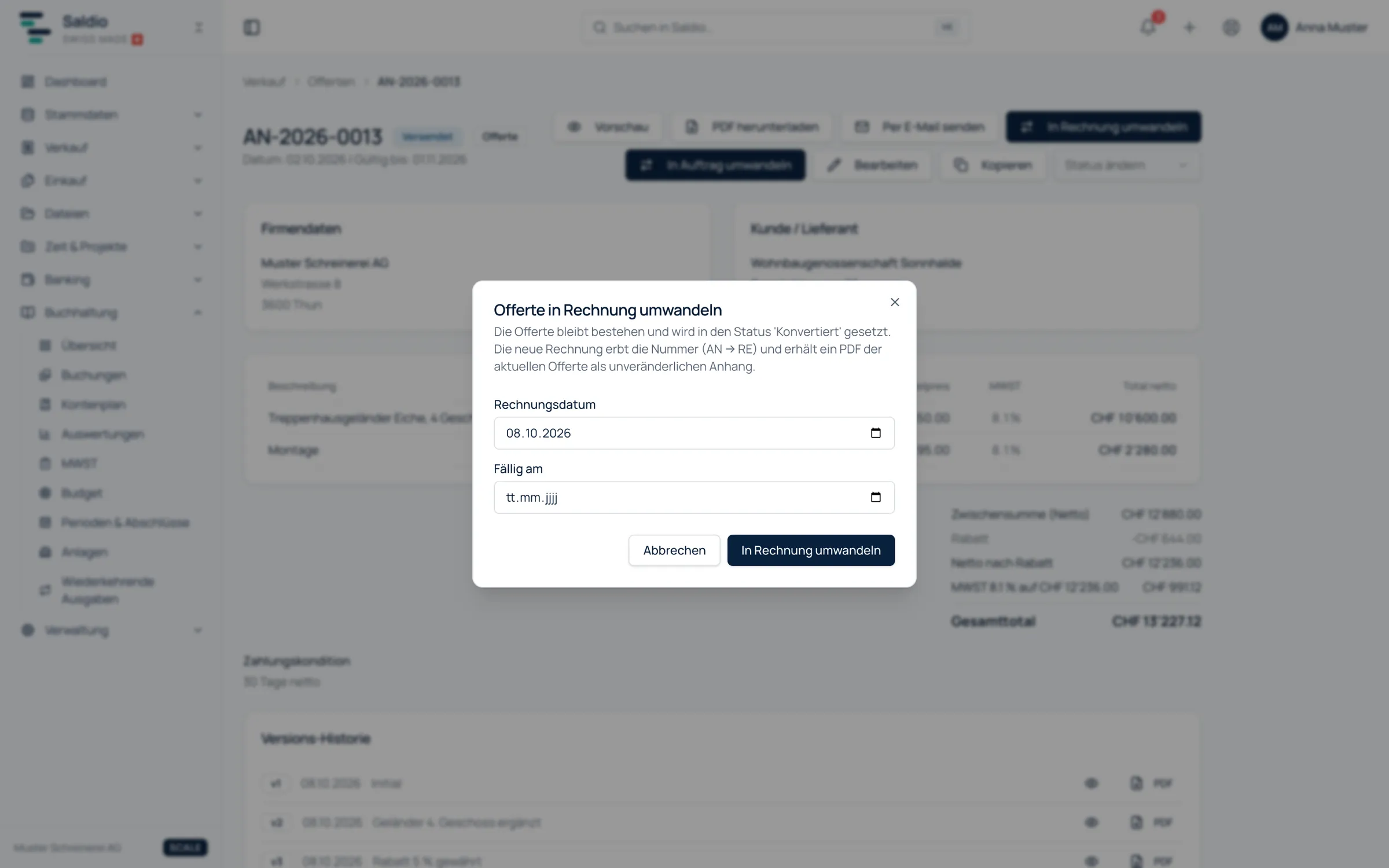
The new document shows its origin: “Created from quote” or “Created from order”, each with a reference. The origin, in turn, shows what it was converted into.
What «frozen» means
After conversion, the original document has the status Converted. That is not an ordinary status you could reset, but a final state: a converted quote can be neither edited nor set to another status.
That sounds strict, but it is the core of the chain. If the quote could still be changed after conversion, the proof would be worthless — the invoice would point to a document that now says something else. That is exactly the problem the chain is meant to solve.
If you need a similar quote for another customer, use Copy. The copy is a standalone document, explicitly with no link to the original — not a link in the chain, but a new start.
Delivery notes and partial deliveries
Delivery notes are created from an order or from an invoice. They are standalone copies: if the original document changes later, that does not affect a delivery note already created.
Several delivery notes per original document are allowed. That is the route for partial deliveries: an order for 40 units can be delivered with three delivery notes for 15, 15 and 10 units, all linked to the same order.
Prices are kept internally on the delivery note but hidden in the PDF. The delivery note is a document that accompanies the goods, not a second invoice.
No delivery note can be created from a cancelled order or a cancelled invoice.
An example through the whole chain
A painting company quotes a property manager for painting a stairwell:
- AN-2026-0117 is sent, extended with scaffolding as version 2 after a query, and accepted via the online link.
- The quote is converted into an order: AU-2026-0031. From now on the quote is Converted.
- The work runs in two stages. Two delivery notes are created from the order, LS-2026-0058 and LS-2026-0063.
- When the job is done, the order is converted into an invoice and sent. The order is frozen, the receivable posted.
Six months later one look is enough: from the invoice, the chain leads via the order to the quote — including the version the customer accepted.
The document chain as a diagram
On the document, the Document chain section shows all linked documents as a diagram — arranged by document type, from the quote on the left through order and delivery note to invoice, credit note and reversal. The connections show the type of relationship: conversion, delivery or reversal. A reversal is highlighted in colour.
Fullscreen opens the chain on a page of its own. There you can also search directly for an order, invoice or quote number to call up the chain of any document.
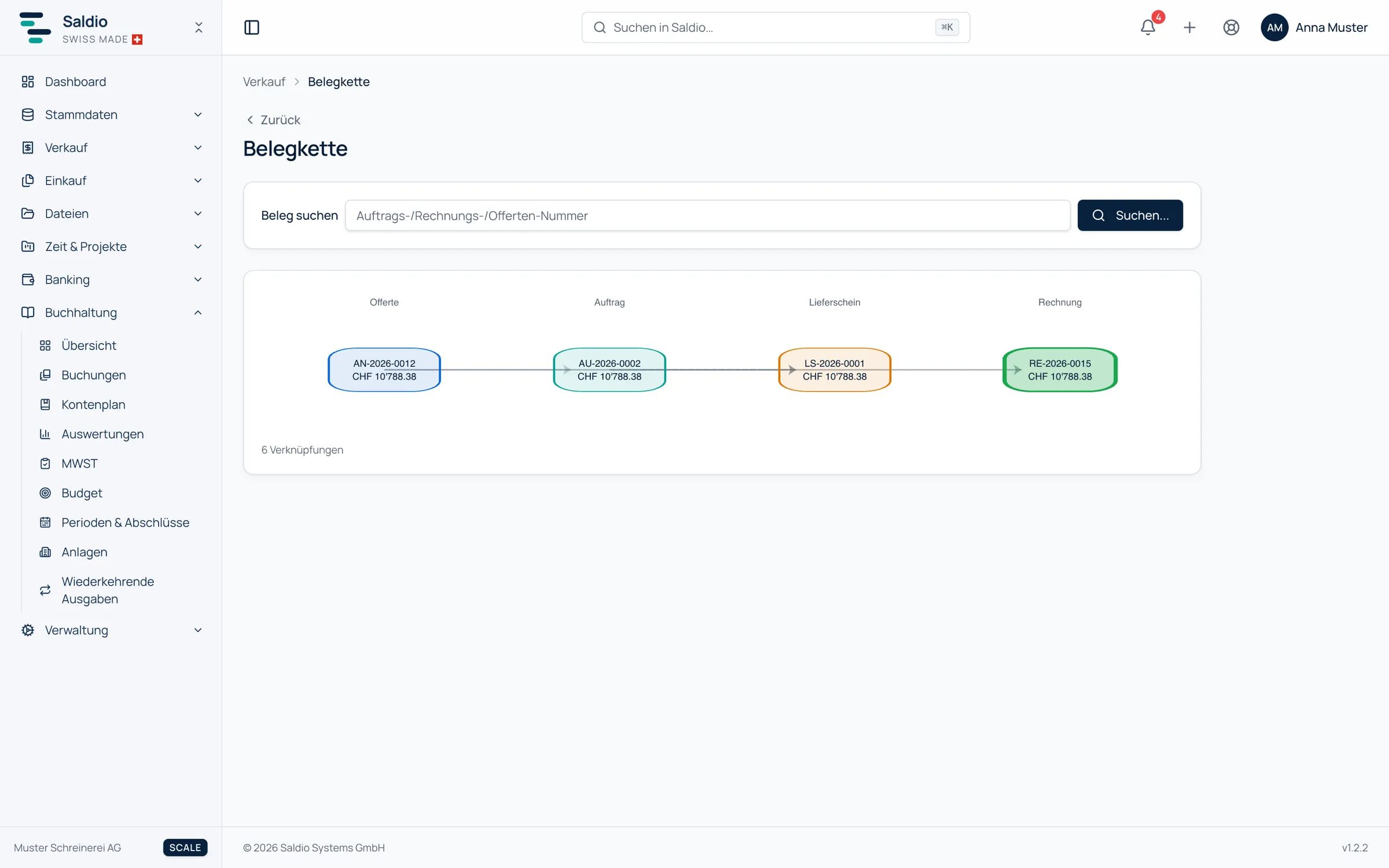
Corrections belong in the chain too. If a posted invoice is reversed, the reversal document appears in the chain next to the original. How reversal and issuing work in accounting terms is covered in the article on invoicing.
What Saldio deliberately does not do
- No editing converted documents. Converting fixes the origin for good.
- No conversion in both directions. A quote becomes an order or an invoice, not both.
- No conversion from draft. Only what has been sent or accepted can become a basis.
- No retroactive changes to delivery notes. A delivery note stays as it is, even if the order changes.
- No delivery note from cancelled documents.
- No chain by copying. A copy is a new document without an origin.
Conclusion
The document chain in Saldio answers a question every set of accounts faces sooner or later: where does this amount come from? Because documents are created by conversion and the origin is frozen along the way, the answer is always there — on the document, in the diagram, without searching three systems.
The price is a deliberate decision at every junction: order or invoice, convert or copy. Once you have understood that decision, you never have to reconstruct the chain by hand again.
From order to balance.