

How Project Management Works in Saldio
Quote, hours, supplier invoices and documents in one place, plus project costing with a traffic light: how Saldio shows whether a project is making money.

Contents
Most projects feel fine while they are running. Whether one actually made money often only becomes clear months later — when someone lays the quote, the timesheets and the supplier invoices side by side.
The problem is rarely a lack of will; it is scattered information. The quote sits in sales, the hours in a list, the photographer’s invoice in purchasing and the plans in a folder on the server. Pulling it together happens by hand at the end, if at all.
Saldio brings these pieces together in the project and continuously calculates the project costing from them. This article shows how a project is structured, what exactly the costing calculates and where its limits are.
Creating a project
Projects live under Time & Projects → Projects. Via New project you record:
- Project number — leave it empty and Saldio assigns one in the format
PR-2026-0007 - Project name and Description
- Customer — optional; for internal projects the field stays empty
- Status, Start date and End date
- Default hourly rate and Currency
The default hourly rate is the fallback: it only applies to time entries when no rate is set for the project member or in the employee register.
Seven tabs, one project
The project view is split into seven tabs:
| Tab | What it contains |
|---|---|
| Overview | hours in draft, open billable and invoiced, plus the description |
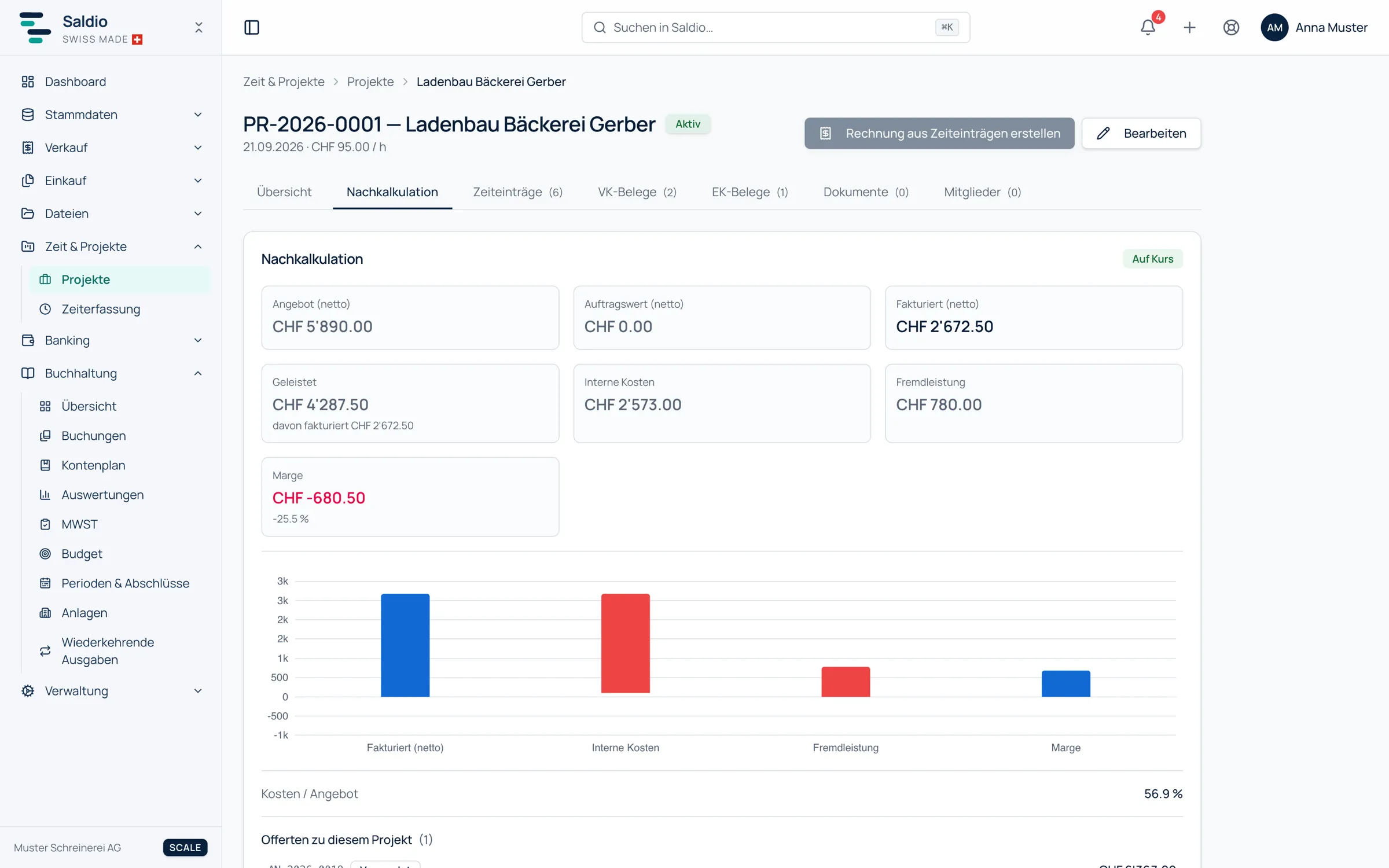
| Profitability | quote, billed amounts, work performed, costs and margin |
| Time entries | all hours on this project |
| Sales documents | quotes, invoices, credit notes and reversals for the project |
| Purchase documents | supplier documents booked to the project |
| Documents | files attached directly to the project |
| Members | who works on the project, at which rate |
So you can see in one place which quotes and invoices belong to the project, which supplier documents are booked to it and which files are attached. How a quote becomes an order and then an invoice is covered in the article on quotes and orders.
Members and rates
Add member brings people from the employee register into the project, each with a role — Lead or Member — and optionally their own Hourly rate (override).
The member list shows each person’s Effective rate and the hours worked and invoiced. The effective rate follows a fixed order: the override on the project comes before the billing rate from the employee register, which comes before the project’s default hourly rate.
That way a special price for a single customer can be reflected without touching the employee register.
Project costing
The Profitability tab sets what was promised against what was billed and what was used:
- Quoted (net) — the sent or already converted quotes for the project
- Order value (net) — the sent or converted orders for the project
- Billed (net) — the issued invoices, excluding drafts and reversals
- Work performed — the value of the recorded hours, split into billed and in draft
- Internal cost — the hours worked at the employees’ hourly wage
- Suppliers — the supplier invoices on the project, less credit notes
- Margin — billed minus internal cost minus suppliers
- Cost / Quote — internal cost and suppliers relative to the quote
A traffic light sums this up: On track, Tight or Over budget. What counts is the ratio of cost to quote. From 80 percent the light shows Tight, above 100 percent Over budget. If there is no quote to compare against, it shows Tight as soon as any costs arise.
The Margin bridge shows graphically where the margin is made and where it is lost.
An example
Project PR-2026-0007 “Website relaunch” for Bäckerei Muster AG. The quote for CHF 24,000 has been sent. 110 hours at CHF 140 have been recorded: 90 hours on a sent invoice and 20 hours on an invoice that is still a draft. The hourly wage is CHF 60, and the photographer has invoiced CHF 3,000.
| Figure | Amount CHF |
|---|---|
| Quoted (net) | 24,000.00 |
| Billed (net) | 12,600.00 |
| Work performed | 15,400.00 |
| billed / in draft | 12,600.00 / 2,800.00 |
| Internal cost (110 h × 60) | 6,600.00 |
| Suppliers | 3,000.00 |
| Margin | 3,000.00 |
| Cost / Quote | 40 % — On track |
The margin is deliberately sober here: the 20 hours in the draft invoice already cost money but only count as billed once the invoice is issued. If internal cost and suppliers rise to CHF 19,200, 80 percent of the quote is reached and the light switches to Tight — long before the project goes into the red.
Project status
A project goes through four statuses: Active, On hold, Closed and Archived. Active projects take time entries and invoices; closed and archived projects remain visible but have been taken out of day-to-day business.
A project can only be deleted as long as nothing is attached to it. Once it has time entries or documents, closing or archiving is the way to go — so the project costing remains traceable years later.
What Saldio deliberately does not do
- No task management. Saldio has no tasks, tickets or Gantt charts. The project is a commercial bracket, not a planning tool.
- No hour budget. The traffic light compares against the quote in francs, not against an allowance of hours.
- No flattering margin. Unbilled hours count as cost but not as income; hours without a cost rate are flagged instead of being valued at zero.
- No deleting with history. Projects with time entries or documents are closed or archived, not deleted.
- No automatic invoice. The invoice from time entries is created as a draft and only sent after review.
Conclusion
A project in Saldio is where quote, hours, supplier invoices and documents come together. From these, the project costing continuously calculates what the project has cost and what it has earned — with a traffic light that warns early and a margin that does not dress anything up.
How the hours get into the project and how the invoice is created from them is covered in the article on time tracking.
From order to balance.