

How Multi-Company Management Works in Saldio
An operating company, a property company, an association — or twelve client mandates: how Saldio keeps companies separate and switches with one login.

Contents
Running one company means one set of books. Running two often means two logins, two passwords and, with every entry, the question of which system you are actually in.
The opposite mistake is no better: the operating company and the property company share a single ledger, separated only by a cost centre. Legally they are two companies with two financial statements and two VAT numbers; in the system they are one pot.
Saldio separates them strictly: every company is its own tenant (in German, Mandant). Anyone working in several tenants still needs only one login. This article shows what a tenant contains in Saldio, how it is created and how switching between tenants works.
What a tenant is
A tenant is the sealed-off data space of one business or association. Everything that belongs to a company’s accounting lives in exactly one tenant:
- company details, UID and VAT number, bank details and logo
- chart of accounts, fiscal years and VAT settings
- addresses, products, employees and projects
- invoices, supplier documents, bookings and files
- users with their roles and permissions
- the subscription
Nothing flows between tenants. A customer who buys from both companies is a separate contact in each tenant. That is deliberate: each company has its own closing, and no document from one company should end up on the other company’s balance sheet by accident.
Billing is per tenant too. Every tenant has its own plan with its own limits for users and storage.
A new tenant starts with registration
You do not create a new tenant inside an existing one. It is created through registration, followed by confirming the email address. Whoever completes the registration is the Owner of the new tenant.
If you already have a Saldio login, you simply register another tenant with the same email address. Saldio attaches your existing login to the new tenant; your password and second factor stay as they are.
The Setup assistant then guides you through the setup, grouped into Plan, Company, Documents, Accounting and Review & start:
| Step | What is entered |
|---|---|
| Plan | already chosen at registration and active |
| Company details | name, address, UID and VAT number — they appear on every invoice |
| Bank details | logo and IBAN or QR-IBAN |
| Chart of accounts | set up through the assistant |
| Fiscal year | the monthly periods are created automatically |
| VAT | accounting method and standard rate |
| Opening balances | balances per balance-sheet account when switching systems; debit and credit must match |
| Summary | what is set up and what is still open |
The assistant does not have to be completed in one go. Open items can be done later, and a banner reminds you. Only the chart of accounts is mandatory — without it the assistant does not finish.
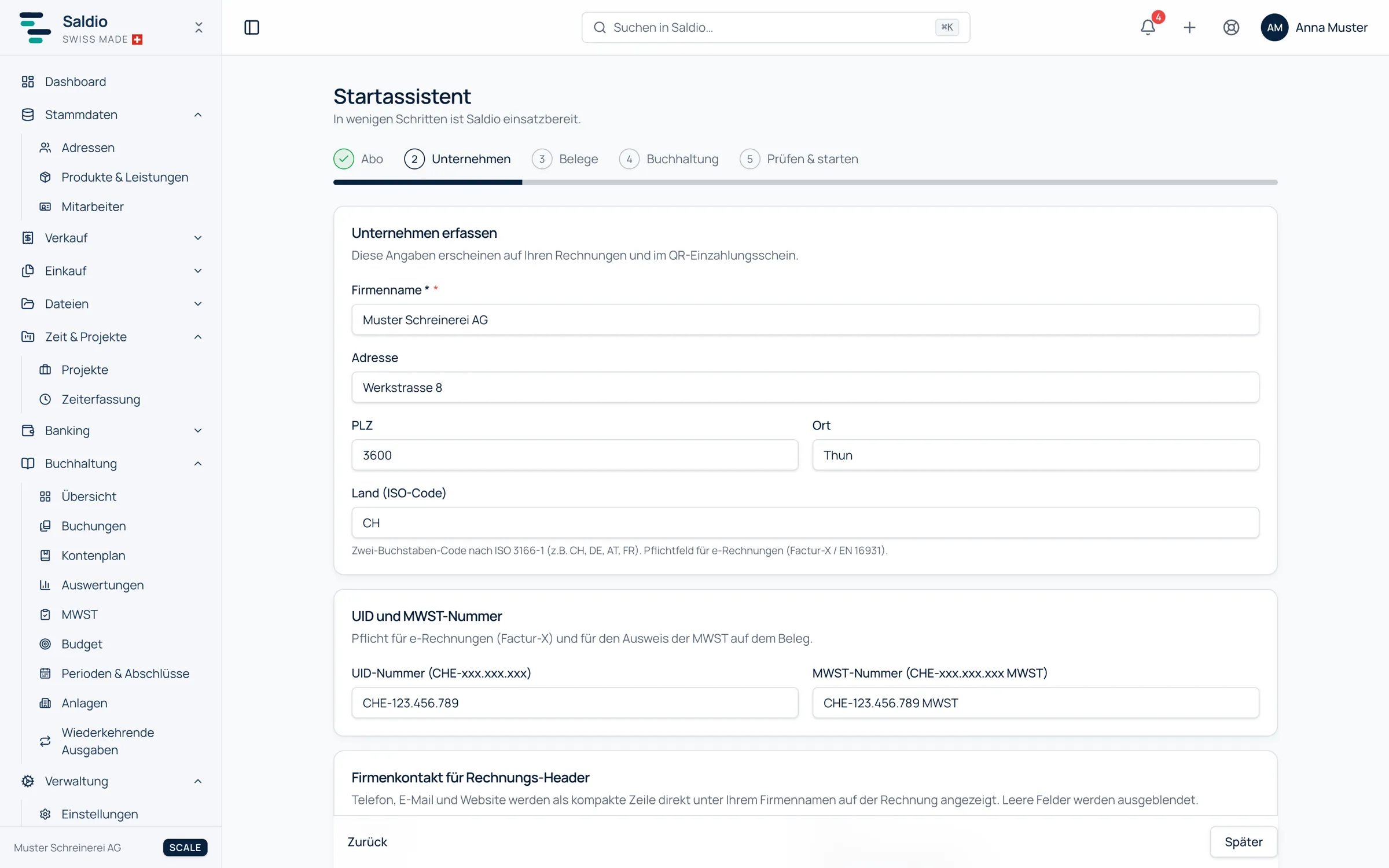
Two dependencies are worth knowing: without a valid IBAN or QR-IBAN, no invoice with a payment slip can be issued, and without a fiscal year nothing can be booked.
One login, several tenants
One login can be a member of several tenants — each with its own role. There are two ways in: you register a tenant yourself, or you are invited into an existing one.
Invitations go through the user management of the tenant in question. If the invited email address already has a Saldio login, no new account and no temporary password are created: the membership is active immediately, and the tenant appears the next time the profile menu is opened.
You switch in the profile menu at the top right. Under the heading Tenant it lists every tenant of the login, each with your role and the plan. One click switches the tenant and opens its dashboard.
An example: an accountant runs her own firm in Saldio and looks after two clients who have invited her into their tenants.
| Tenant | Her role | What she does there |
|---|---|---|
| Muster Treuhand GmbH | Owner | own accounting, plan, users |
| Beispiel Schreinerei AG | Fiduciary | accounting, VAT, banking — no user management |
| Turnverein Musterdorf | Standard user | capturing documents within her module permissions |
The same person therefore sees in each tenant exactly what her role there allows. An administrator role in her own firm grants no rights at all with the client.
Anyone who belongs to several tenants and signs in again first picks the tenant to work in, in the Select tenant dialog. The dialog can only be closed by making a choice — there is no state “without a tenant”.
What is configured per tenant
Because each tenant is its own data space, the settings under Administration are separate per tenant as well: company details and reminder texts, VAT method and rate history, currencies, payment terms, document and email templates, integrations including the switch for AI features, and hidden modules.
The same applies to everything facing outward. An API token is valid only for the tenant in which it was created. The backup under Settings → System contains the data of exactly one tenant. And the audit log only shows what happened in that tenant.
Closing a tenant
Only the Owner can delete a tenant, under Administration → Subscription. The deletion request does not take effect immediately: deletion happens 30 days later, and until then the request can be withdrawn.
One of three things is required: a backup downloaded within the last 30 days, a closing backup that Saldio creates before deletion and sends by link, or an explicit waiver of the export.
What Saldio deliberately does not do
- No shared master data. Contacts, products and employees always belong to exactly one tenant. If you have the same customer in two companies, you record them twice.
- No cross-tenant reports. Balance sheet, income statement and key figures always refer to one tenant. Saldio does not produce a consolidation across several companies.
- No inherited rights. A role applies only in the tenant where it was granted. Being Owner in one company gives you only what you were invited to do in the next.
- No tenant inside a tenant. A new tenant is created through registration, with its own plan and its own setup assistant — not as a subfolder of an existing one.
- No immediate deletion. There are always 30 days between the deletion request and its execution.
Conclusion
In Saldio, a tenant is one company with everything that belongs to it — and nothing beyond. The separation is strict so that financial statements, VAT returns and permissions never bleed into each other.
It is still convenient: one login covers several tenants, switching sits in the profile menu, and your role adapts to the tenant. Who gets which rights is covered in the article on role and user management.
From order to balance.