

How Invoicing Works in Saldio
Create, issue, send, match the payment: how an invoice becomes a posted receivable in Saldio – with QR-bill, e-invoice and reversal instead of deletion.
Contents
Writing an invoice is rarely the problem. The problem starts afterwards.
In many SMEs an invoice lives in three places: as a Word or PDF file in a folder, as a receivable in the accounts, and as a tick in a spreadsheet once the money has arrived. Three places means three versions of the truth. Whoever corrects an invoice afterwards has to remember to update the accounts too — and whoever forgets notices at the latest when filing the VAT return.
In Saldio these three places do not exist. The invoice is the accounting document: issuing it posts the receivable, and matching a payment settles it. This article follows the path from draft to paid invoice — and shows what happens when an invoice was wrong.
Creating an invoice
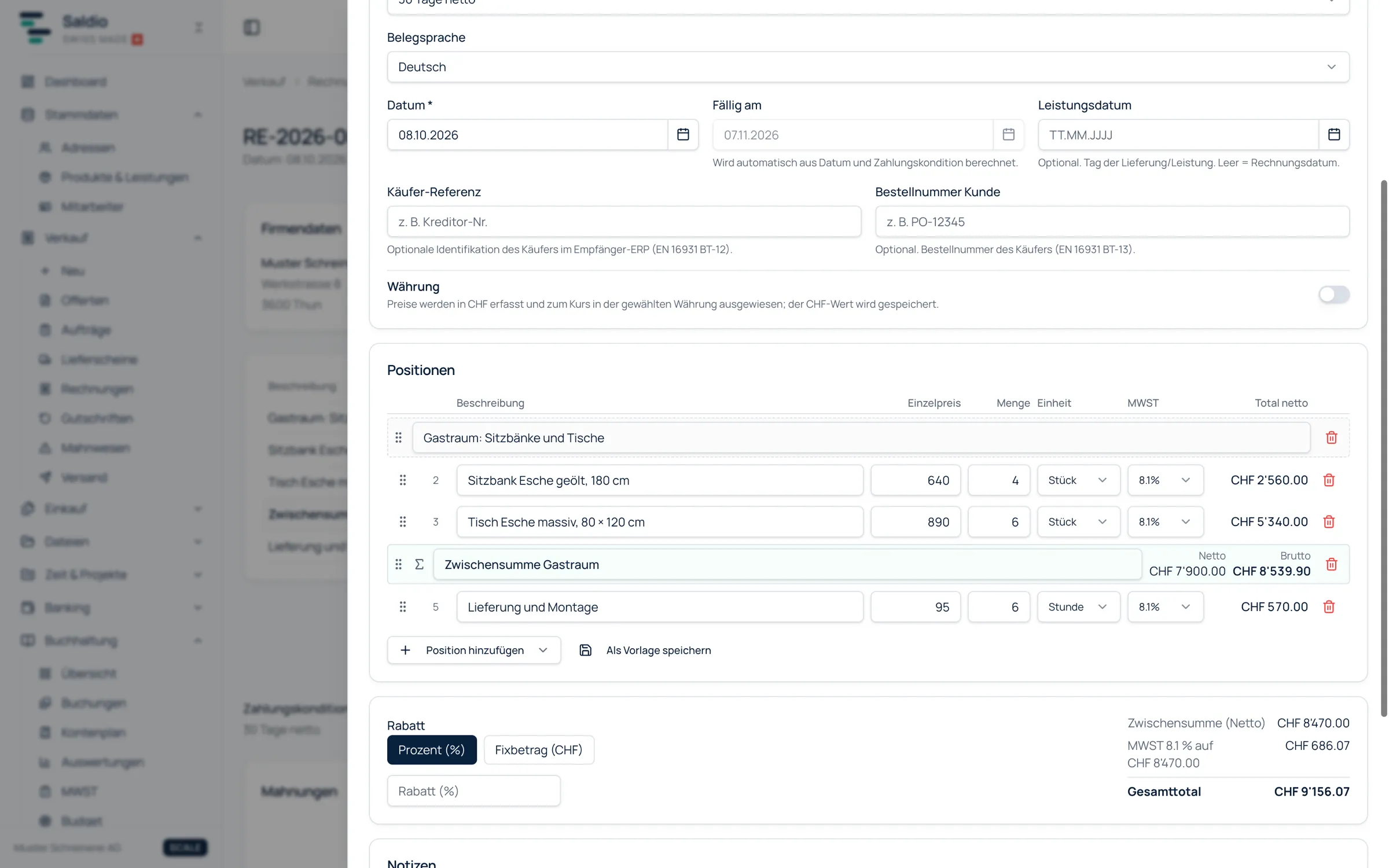
A new invoice is started from the Create New dialog or directly on the Invoices page under Sales. The Invoice Header holds customer, date, payment terms and document language. You do not have to work out the due date: with payment terms such as “30 days net”, Saldio calculates it from date and terms. If you do not want terms, choose None (set due date manually).
There are also optional fields that start to matter with larger customers: the delivery date if it differs from the invoice date, the Purchase order ref. and the Buyer reference — both fields the recipient’s ERP can use to match an e-invoice.
Line items come from the product catalogue or are entered freely. Besides the normal item there are text items, subtotals and Multiple items, which takes over a selection from the product catalogue in one go. Recurring combinations can be stored with Save as template and appended later with Insert from template. A discount is set as a percentage or a fixed amount.
Saldio keeps notes cleanly apart: Notes (visible on the document) end up in the PDF, Internal Notes stay in-house.
Numbers: sequential, but not reset every year
Invoices carry the prefix RE. Quotes and invoices deliberately share one counter: when a quote is converted straight into an invoice, the invoice keeps the running number and only the prefix changes from AN to RE.
The counter runs continuously and does not start again at one at the turn of the year. The year in the number comes from the document date. If you expect gapless numbering per year, you will find it in the journal’s posting number, not in the document number.
Issuing means posting
As long as an invoice is a draft, nothing is posted. You can change, copy or delete it at will.
The decisive step is Issue and post under Change status — or sending it by email, which triggers the same thing. Saldio asks for confirmation first, because from here on:
- The receivable is posted to the general ledger.
- The PDF is archived unchangeably.
- The invoice can no longer be edited or deleted. Corrections only go through a reversal.
Before issuing, Saldio checks that everything the document needs is there. If a valid IBAN or QR-IBAN is missing for the QR payment slip, or if mandatory fields such as the VAT or UID number or the recipient’s address are missing while e-invoicing is active, Saldio names the missing fields instead of letting the send fail silently. What belongs on the payment part, and when to use a QR-IBAN or an IBAN, is covered in How to create a QR bill.
Saldio produces the e-invoice as Factur-X or ZUGFeRD, profile EN 16931, as a PDF/A-3 with embedded XML. It is activated per company.
The life of an invoice
| Status | What it means | What happens in the accounts |
|---|---|---|
| Draft | being edited | nothing |
| Sent | issued, with the customer | receivable posted, PDF archived |
| Partially paid | payment received, balance open | payment posted |
| Overdue | due date passed, amount open | — (reached by itself) |
| Paid | fully settled | payment posted |
| Closed | remainder written off to an account | difference posted |
| Cancelled | void, never posted | nothing |
The status is hardly ever set by hand. It follows from what happens: issuing, incoming payment, the passing of time.
Sending
The document offers Send by email. The PDF is attached automatically; subject and text come from a stored template or are written directly, and Cc and Bcc are possible. How the templates are structured is shown in the article on email templates.
Saldio also inserts a time-limited online link into every email. With it the customer opens the invoice in the browser, without logging in, and downloads the PDF. An access log on the document records when the invoice was viewed and when the PDF was downloaded. The email history shows what was sent and what failed.
To send many invoices at once, use the Dispatch center under Sales → Dispatch. It sends by email or prepares the postal route: the invoices are issued, posted, archived and downloaded as a ZIP for printing.
Invoices in foreign currency are possible, in one of 72 currencies with the daily rate of the Swiss customs authority (BAZG). Prices are entered in francs and shown in the foreign currency. Under the Swiss standard, however, the QR payment slip is only possible for CHF and EUR — for other currencies the payment part is omitted.
Matching payments
The normal path for a payment is bank reconciliation: Saldio recognises the incoming payment by reference, invoice number, or payer and amount, and matches it to the invoice.
Manually it works via Record payment on the document, with amount, payment date, payment method and note. A partial payment automatically sets the invoice to Partially paid. If the payment exceeds the open balance, the excess is posted as customer credit.
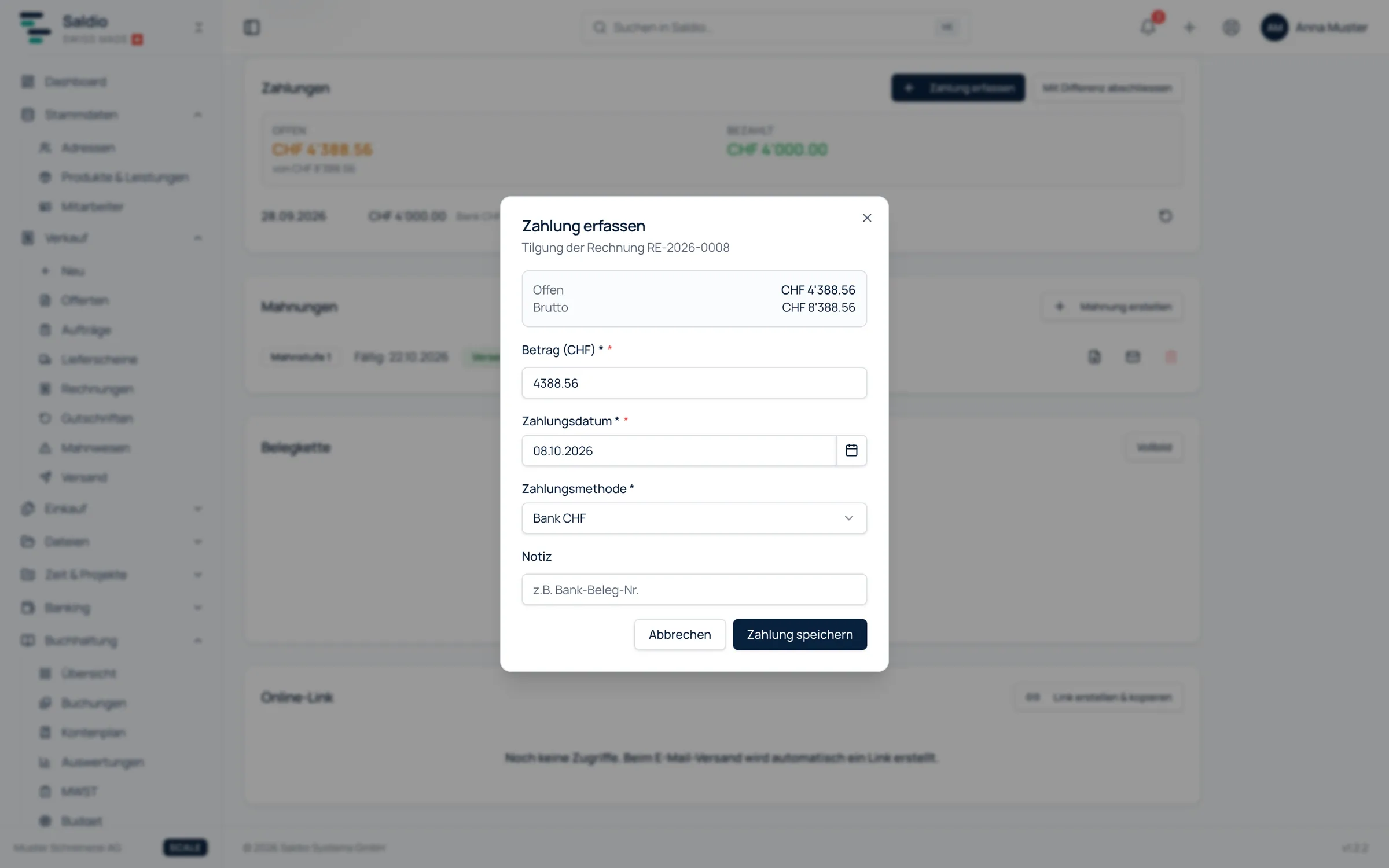
If a small remainder is left — cash discount, rounding, bank charges — you close with difference. How that works in detail, and how cash payments are rounded to 5 centimes, is covered in the article on open items.
When an invoice was wrong
An issued invoice is not deleted and not overwritten. It is reversed: Reverse invoice asks for a reason and optionally a reversal date, and creates a separate reversal document with negative amounts.
This reversal document posts everything back — receivable, revenue and VAT owed. Payments already recorded are reversed with it, and linked time entries become billable again. You then enter the corrected invoice anew. Original and reversal remain visible side by side in the document chain.
Invoices that do not start from scratch
Many invoices are not created empty but from something that already exists. From a quote or an order they are created by conversion, and the origin stays linked — see the article on quotes and orders. From recorded hours, a wizard in the project leads to the invoice, as shown in the article on time tracking.
What Saldio deliberately does not do
- No editing after issuing. A posted invoice stays exactly as the customer received it. Changes go through reversal and re-entry.
- No deleting issued invoices. Deletion is only possible for drafts and for documents that were never posted.
- No reversal by status change. A posted invoice is always posted back, never silently voided.
- No document numbers reset every year. The gapless number per year is the posting number, not the invoice number.
- No QR payment part outside CHF and EUR. That is a rule of the Swiss standard, not of Saldio.
Conclusion
Invoicing in Saldio is not a word processor with accounting bolted on. The draft is free, issuing is binding: from that moment the receivable is in the general ledger, the PDF is archived, and every later movement — payment, difference, reversal — runs through the same document.
That takes away a freedom you should not have anyway: changing an invoice after it has been sent. In return, there is no second version left to keep in sync.
From order to balance.