

How Digital Document Management Works in Saldio
Documents, attachments, archived invoice PDFs and receipts: how Saldio stores files – visibly linked, with issued documents unchangeable.
Contents
The booking is there. The receipt for it is somewhere: as an email attachment, as a photo on a phone, as a PDF in the downloads folder or as paper in a drawer.
At the latest, this shows up at year-end closing. The accountant asks for the receipt for the expense booking from March, and nobody knows where it is anymore. Or worse: there are two versions of an invoice, and nobody knows which one the customer received.
That is why Saldio does not store files in folders but on the record they belong to. The Files area gives the overall view. This article shows how this storage is organised, what happens to issued documents and where the limits are.
Files belong to a record
The normal case is not uploading into a file store, but uploading where the work happens: the receipt on the bank transaction, the scan on the supplier invoice, the acceptance report on the project, the purchase contract on the fixed asset, the product image on the product.
Files can be PDF, JPG or PNG, up to 25 MB each.
From then on, every file knows its link — the record it is attached to. That can be an invoice, a transaction, a journal entry, a supplier invoice, a fixed asset, a project, a product or an employee. This link is what makes the difference later: the file is not found by its name but by the business transaction.
The Files area: documents and attachments
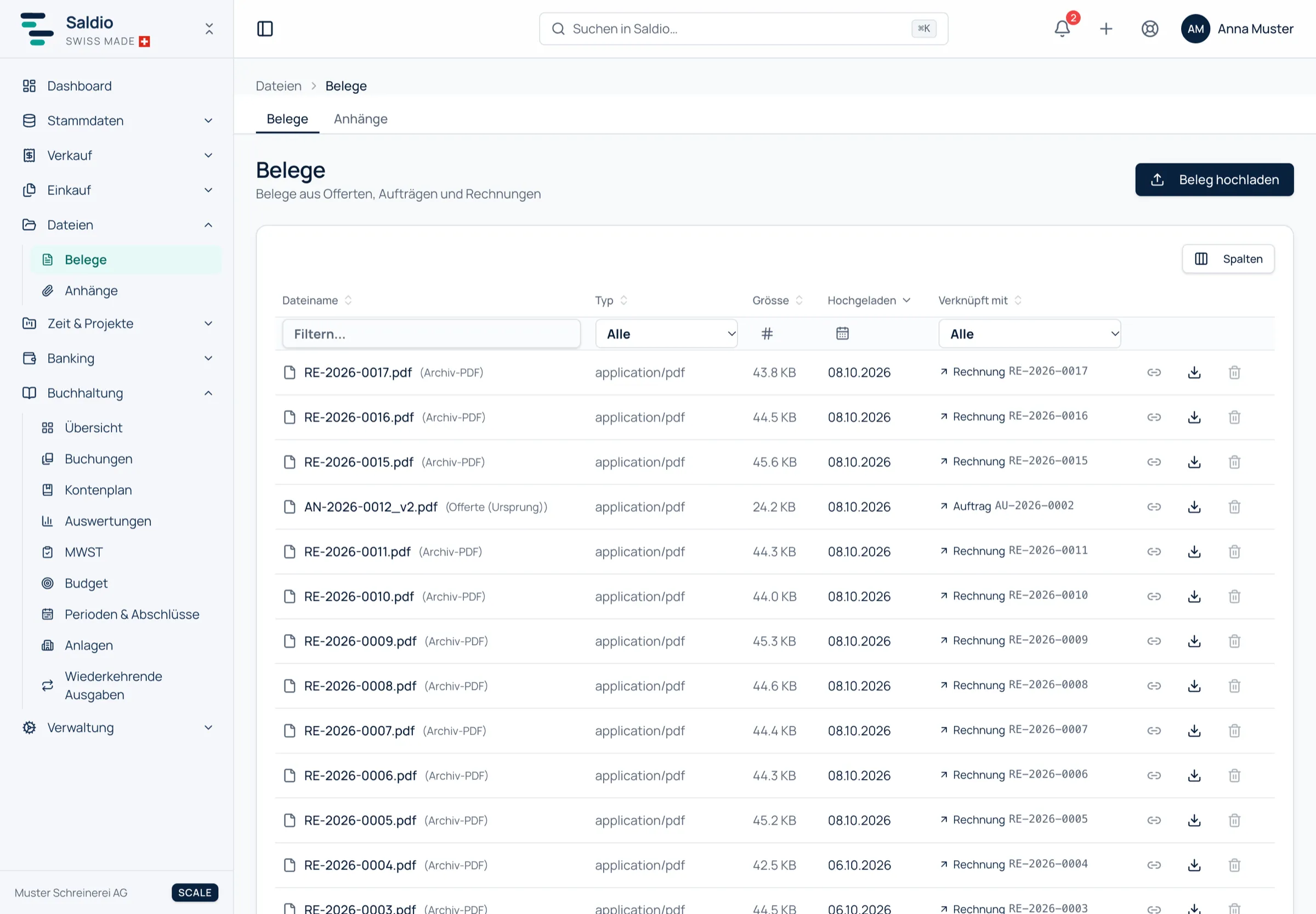
Under Files there are two lists.
Documents are evidence of business transactions: files from quotes, orders and invoices, receipts on transactions and bookings, scanned supplier invoices, records for fixed assets. This is the part auditors and the tax authorities want to see.
Attachments are descriptive material on master data: product images, employee photos, documents on projects. They are always created in context and uploaded there, which is why this page has no upload button of its own.
Both lists show the same columns: Filename, Type, Size, Uploaded and Linked to. The last column is a link: one click goes straight to the invoice, transaction or project the file is attached to. Clicking the filename of a PDF opens a preview without having to download it.
Linking loose documents later
Not every receipt arrives at the right time. Sometimes it is in the inbox before the booking, sometimes it comes weeks later.
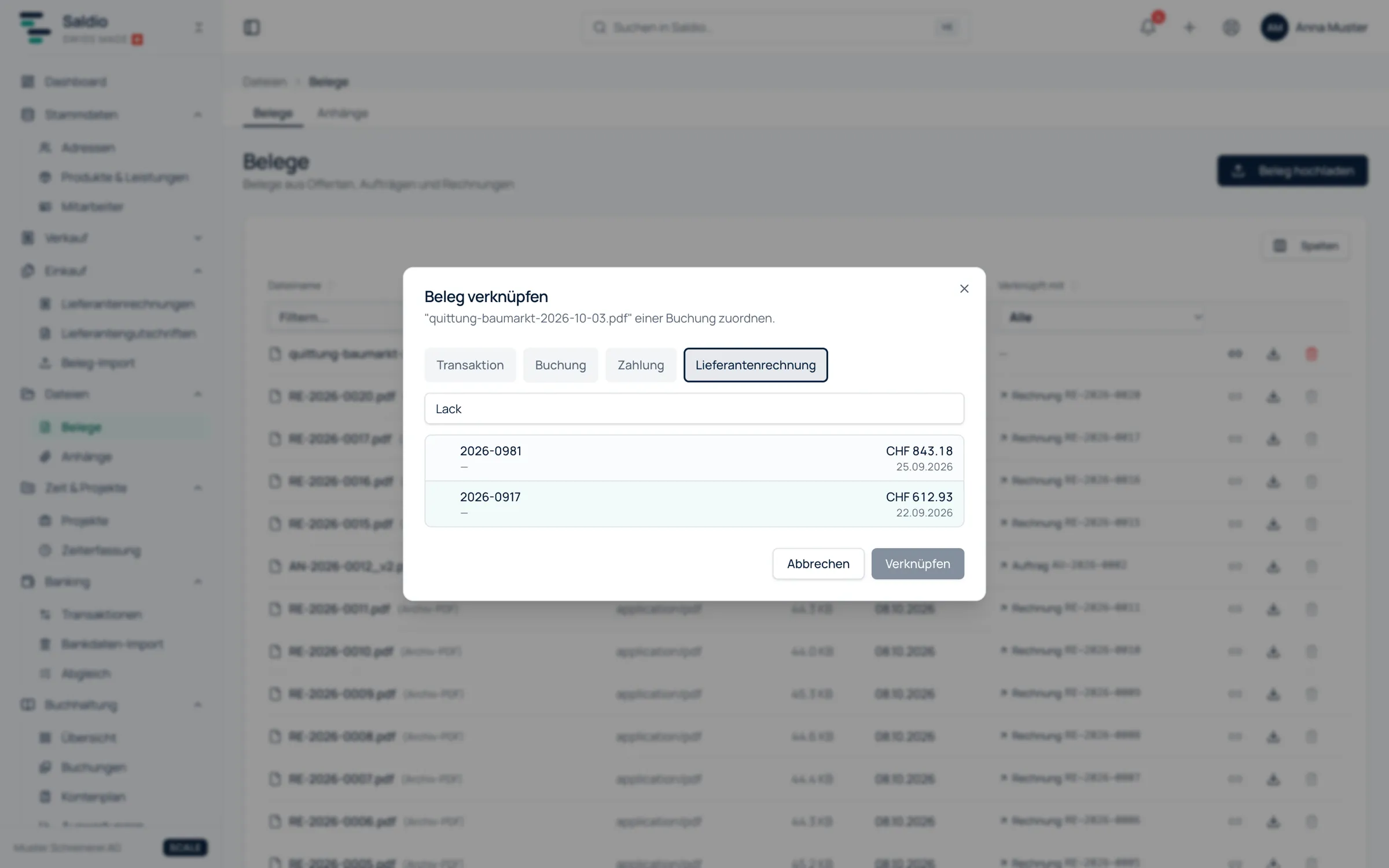
For this case, Documents has the Upload Document button. The file first lands in the list without a link. Later, Link to a booking assigns it: in the dialog you search by text, number or reference and choose a transaction, a journal entry, a payment or a supplier invoice. A wrong assignment can be undone with Remove link.
If you have supplier invoices in larger numbers, the document import in Purchasing is the better route. There the file is not just stored but read. How that works is covered in the article on importing PDF, QR and e-invoices.
What is archived on issue
Some files nobody uploads. Saldio creates them itself — and stores them unchangeably.
When an invoice is issued, Saldio posts it to the general ledger and archives its PDF. This archived PDF is exactly the document the customer received. If the invoice is later cancelled, it still stays: it is the proof of what was originally invoiced.
The same principle applies to quotes. When a quote is converted into an invoice, the invoice receives the quote’s PDF as an immutable attachment. Earlier versions of a quote are kept as PDFs too.
| File | created | delete or relink |
|---|---|---|
| Archived PDF | when an invoice is issued, automatically | not possible |
| Source offer | when a quote is converted into an invoice | not possible |
| Offer version | when a new version of a quote is made | not possible |
| Scanned supplier invoice | on document import | possible until posted, protected afterwards |
| Own upload | by hand, on the record or under Documents | possible |
In the list, protected files can be recognised by their role in brackets, for example (Archived PDF). The delete and link buttons are disabled for them; a tooltip explains why.
Retention
Saldio keeps invoices, documents, bookings and uploaded files for as long as the tenant exists. There is no deletion by age.
The legal retention obligation of ten years under Art. 958f CO, however, lies with the business, not with the software. If you stop using Saldio one day, you must back up your data first: under Settings → Backup & Restore a complete backup is created as a ZIP to download.
What Saldio deliberately does not do
- No folder structure to maintain. Order comes from the link, not from directories someone has to create and keep tidy.
- No deleting archived documents. Issued invoice PDFs and quote PDFs are protected against deletion and relinking, even after a cancellation.
- No automatic deletion by age. Files stay for as long as the tenant exists. What may go after ten years is the business’s decision.
- No arbitrary file formats. PDF, JPG and PNG are accepted — the formats in which receipts actually arrive.
Conclusion
Document management in Saldio is not a separate filing system next to accounting but part of it. Files are attached to the business transactions they belong to, and the Files area shows for each one where that is. What Saldio issues itself is archived on issue and stays unchanged.
How to find something again in this store — and in the rest of Saldio — is described in the article on document search. What of it is needed at closing is shown in year-end closing preparation.
From order to balance.