

How Customer Management Works in Saldio
Create addresses, add contact persons and delivery addresses, import contacts from CSV, vCard or JSON: how Saldio manages customers and suppliers.
Contents
An invoice sent to the wrong address is annoying. An invoice in German sent to a customer in Lausanne who has been receiving French quotes for years is embarrassing.
Neither usually happens through carelessness. It happens because customer data lives in three places: in a spreadsheet, in the email client’s address book and in the head of whoever looks after the customer. Whoever writes the invoice sees only one of them.
In Saldio there is one place for it: Master Data → Addresses. This article shows what an address contains, which details affect every document and how existing contacts come over from your old solution.
One address for customers and suppliers
Saldio does not split customers and suppliers into separate registers. Every address has a type — Customer, Supplier or Customer & Supplier — and a kind: Company or Individual. The carpenter who buys from you and to whom you also deliver timber is one record, not two.
Saldio assigns the customer number automatically, in separate ranges: K-NNNN for customers, L-NNNN for suppliers. If you want to keep existing numbers from your old system, enter them by hand. If the field stays empty, Saldio keeps counting.
The header of an address holds:
- Salutation, company name with additional info, first name and last name
- Street, No., address addition, ZIP, city and country
- Company ID and VAT ID
Only one thing is mandatory: company or last name. Saldio checks the company ID on save against the format CHE-ddd.ddd.ddd and its check digit. A typo in the UID is caught while entering it, not when the e-invoice gets stuck at the recipient. Foreign numbers are not checked.
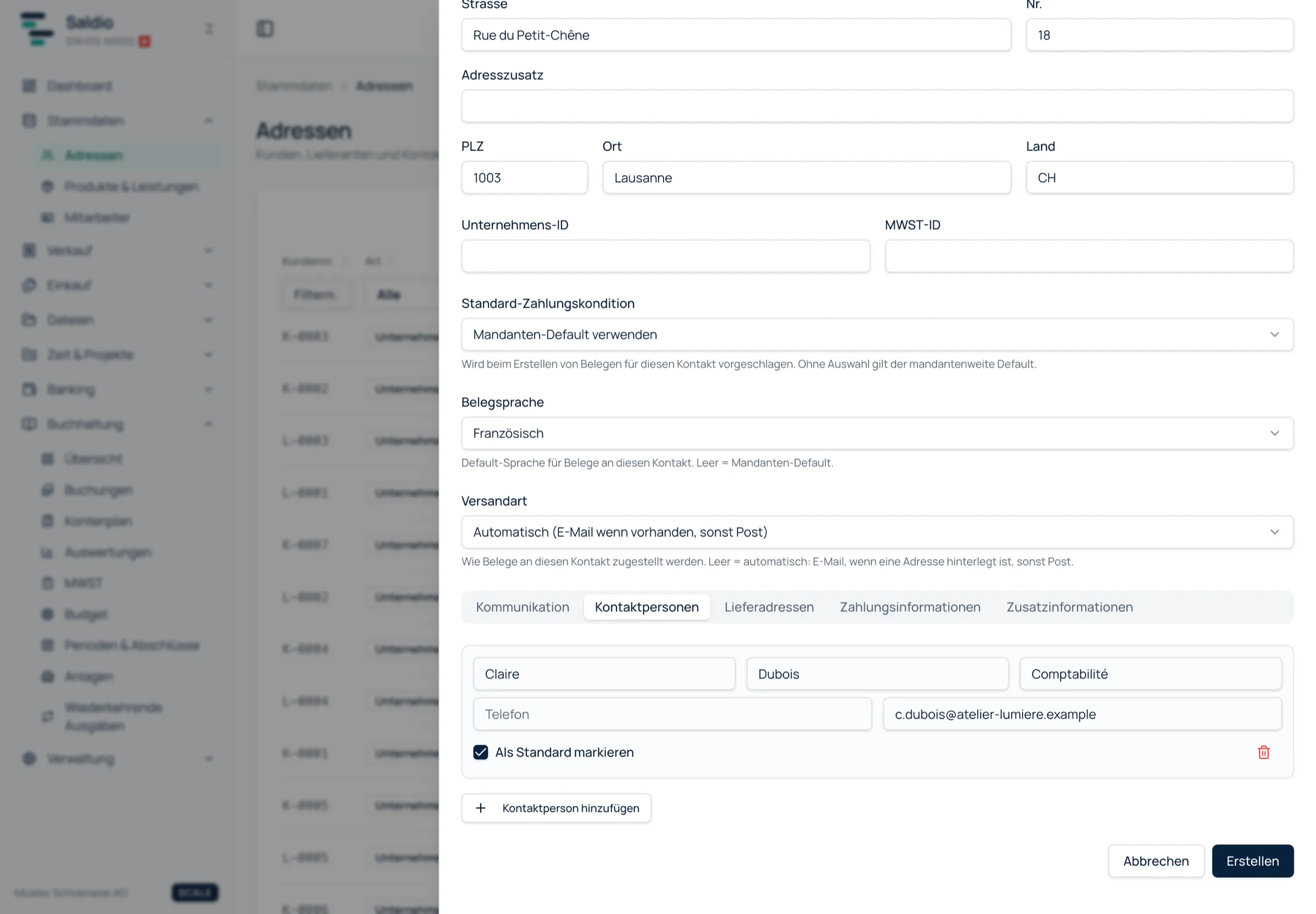
Communication, contact persons, delivery addresses
Below the header, the form is split into tabs.
Communication takes any number of channels — Email, Phone, Mobile, Website, Skype and Other — each with an optional label. One channel per kind can be marked as default. If a customer has a general address and one for accounts payable, the accounts address is the default and the general one sits next to it.
Contact persons exist for companies. Each person has a salutation, first and last name, role / function, phone and email. Here too, one person can be marked as default — typically the one quotes and invoices are addressed to.
Delivery addresses are for customers whose goods do not go where the invoice goes: the building site, the warehouse, the branch. Again, there is a default.
Payment information holds account holder, IBAN, bank and BIC / SWIFT. For suppliers this often fills itself: when an imported supplier document is posted, Saldio stores its IBAN as a payment account automatically.
Additional information holds the private notes on the address — for anything that does not fit a field.
Three defaults that apply to every document
The most important part of the form is three inconspicuous fields. They decide how documents for this contact are created.
| Field | Effect | Left empty |
|---|---|---|
| Default payment terms | suggested when creating any document | tenant-wide default |
| Document language | language of the documents: German, English, French or Italian | tenant-wide default |
| Delivery method | email or post | automatic: email if an address is on file, otherwise post |
That solves the Lausanne problem from the start. Set French once for this customer and every quote, every order and every invoice comes out in French — even when a colleague who does not know the customer creates the document.
The delivery method carries through to the Dispatch center: it assigns each document to the email or post channel based on this setting. How the invoice is created after that is covered in the article on invoicing.
Importing addresses from search.ch
You do not have to type in new customers. The form has a search called Import from search.ch: enter a name, company or phone number, from three characters on up to ten results appear, and one click fills the entire form.
The origin stays visible on the contact, including a link to the search.ch profile. If you maintain the address by hand later, Detach link removes the connection.
Import and export
When switching systems, the contacts are usually somewhere already. On the Addresses page, Import opens a dialog that accepts three formats:
- CSV — with an example template you download, fill in Excel and upload again
- vCard (.vcf) — from the Apple, Android or Outlook address book
- JSON — the full Saldio export, for example when moving between two tenants
Saldio creates new contacts directly. It gets interesting with contacts that already exist. Saldio recognises them by email, UID number, company + last name or customer number and shows them at the end under Review duplicates: field by field, Existing against Incoming, and for each entry the choice between Overwrite and Skip. For long lists there is Overwrite all and Skip all.
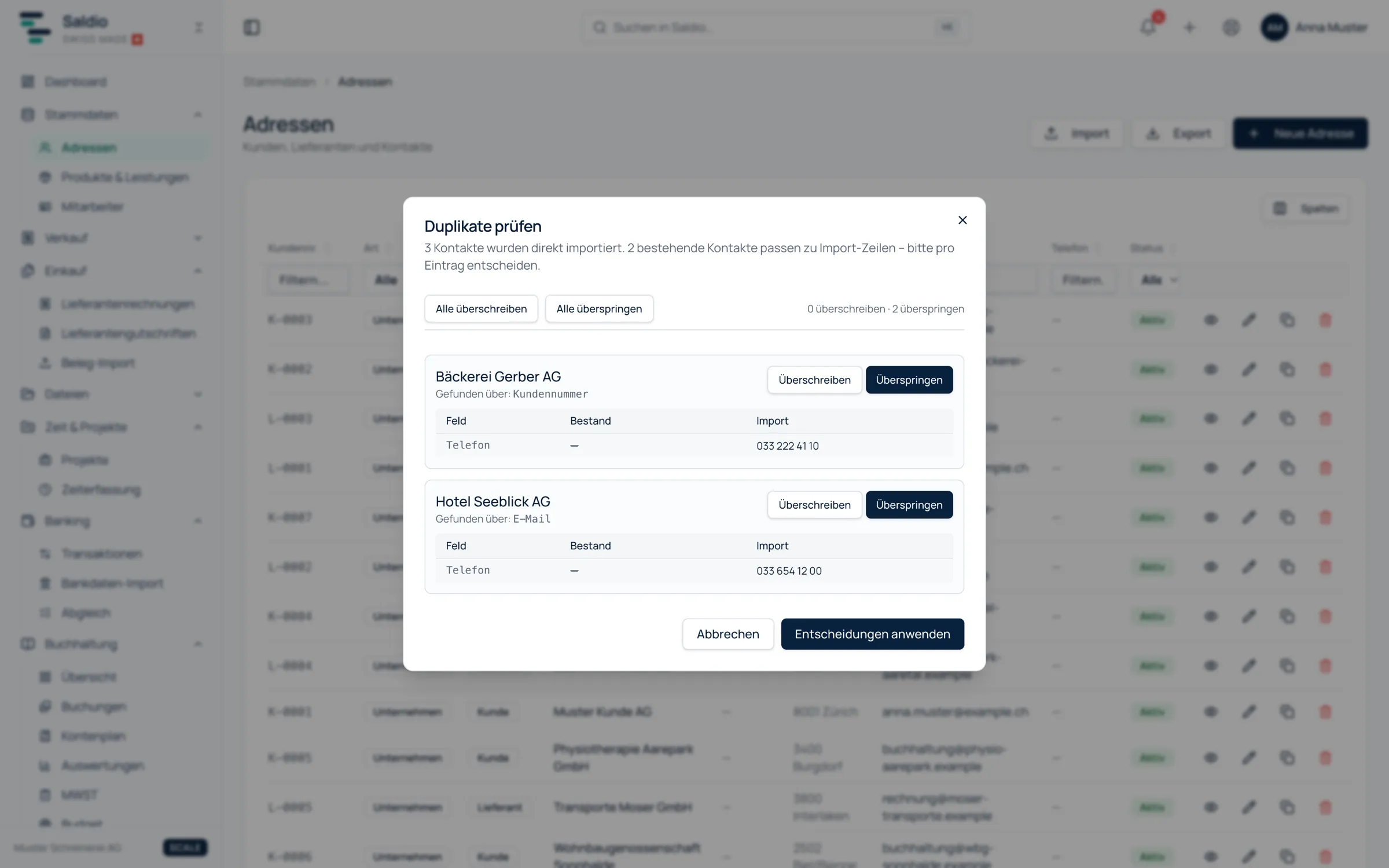
Rows that could not be imported are listed with row number and reason. The rest of the import still goes through.
Export works in the same three directions: CSV (UTF-8 with BOM, semicolon separator, with German or English column headers), vCard 3.0 for the phone, and JSON. Only the JSON export is lossless — it also contains contact persons, delivery addresses and bank accounts.
What Saldio deliberately does not do
- No silent merging. If the import recognises an existing contact, a person decides whether to overwrite. Saldio does not merge records on its own.
- No deleting contacts with documents. A customer with invoices stays on record. If you no longer want to see them, set them to Inactive.
- No background address lookup. search.ch is only queried when someone searches. Saldio does not reconcile existing addresses by itself and overwrites nothing.
- No second customer list in Sales. Quotes, orders and invoices all use the same addresses. A change here applies to every new document.
Conclusion
Customer management in Saldio is deliberately not a CRM of its own, but cleanly maintained master data. An address holds what a document needs: postal address, contact person, delivery location, bank account — and three defaults that make sure language, payment terms and delivery method are right for every customer, no matter who creates the document.
What builds up around a customer over time — revenue, open invoices, payment behaviour — is shown in the digital customer file. What was sent to them and when is in the contact history.
From order to balance.