

How Contact History Works in Saldio
When did which invoice go to whom, did the email arrive, was the document opened? Email history, email log and the access log of online links in Saldio.

Contents
“We never received that invoice.”
The sentence usually comes after the second reminder. And usually that is when the search begins: in the outbox of the email client used by the colleague who sent the invoice back then. Which address did it go to? Was the PDF attached? Did an error message come back that nobody saw?
Saldio logs every document it sends by email and every time the recipient accesses the online link. This article shows where these logs are, what they record and what they can prove.
What is logged
When Saldio sends a document by email — an invoice, a quote, an order, a delivery note or a credit note — it creates an entry with:
- date and time of sending
- recipient, plus Cc and Bcc if set
- document with number and document type
- subject and an excerpt of the email body
- status: Sent, Failed or Rate-limited
- the error message if something went wrong
- who triggered the sending
Failed attempts are recorded just like successful ones. An email that fails on an invalid address does not disappear silently; it shows up in the history with its error text. The same applies to emails blocked by a sending limit.
Three views of the same history
The same entries are visible in three places, depending on the question you are asking.
| Where | What you see | Who sees it |
|---|---|---|
| On the document — Email history card | all sends of this one document | everyone with access to the document |
| On the contact — Sent / History tab | all sends for all documents of this contact | everyone with access to contacts |
| Administration → Email log | all sends of the tenant, filterable | administrators and owners |
The tab on the contact is the actual contact history. It answers the question “What have we sent this customer?” across all quotes, orders and invoices. Clicking a row opens the details with Cc, Bcc, body excerpt and any error; clicking the document number opens the document.
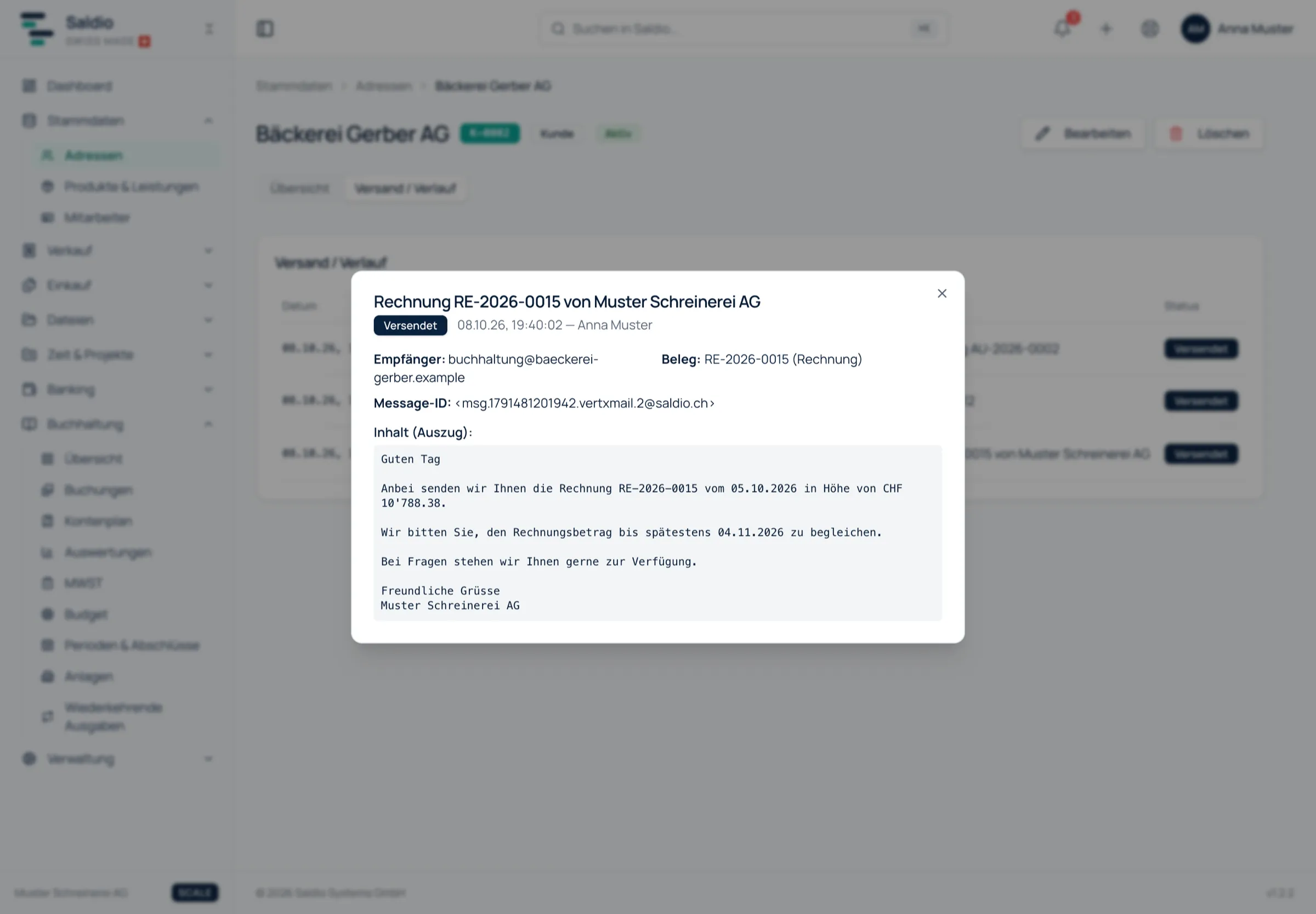
The Email log under Administration is the tenant-wide view. It can be filtered by time range, status and document type and searched by recipient, subject or document number. If you want to know which emails failed last week after a problem with a customer’s mail server, two filters find them here.
The online link and its access log
A sending entry proves that Saldio sent the email. It does not show whether the customer looked at the document. That is what the online link is for.
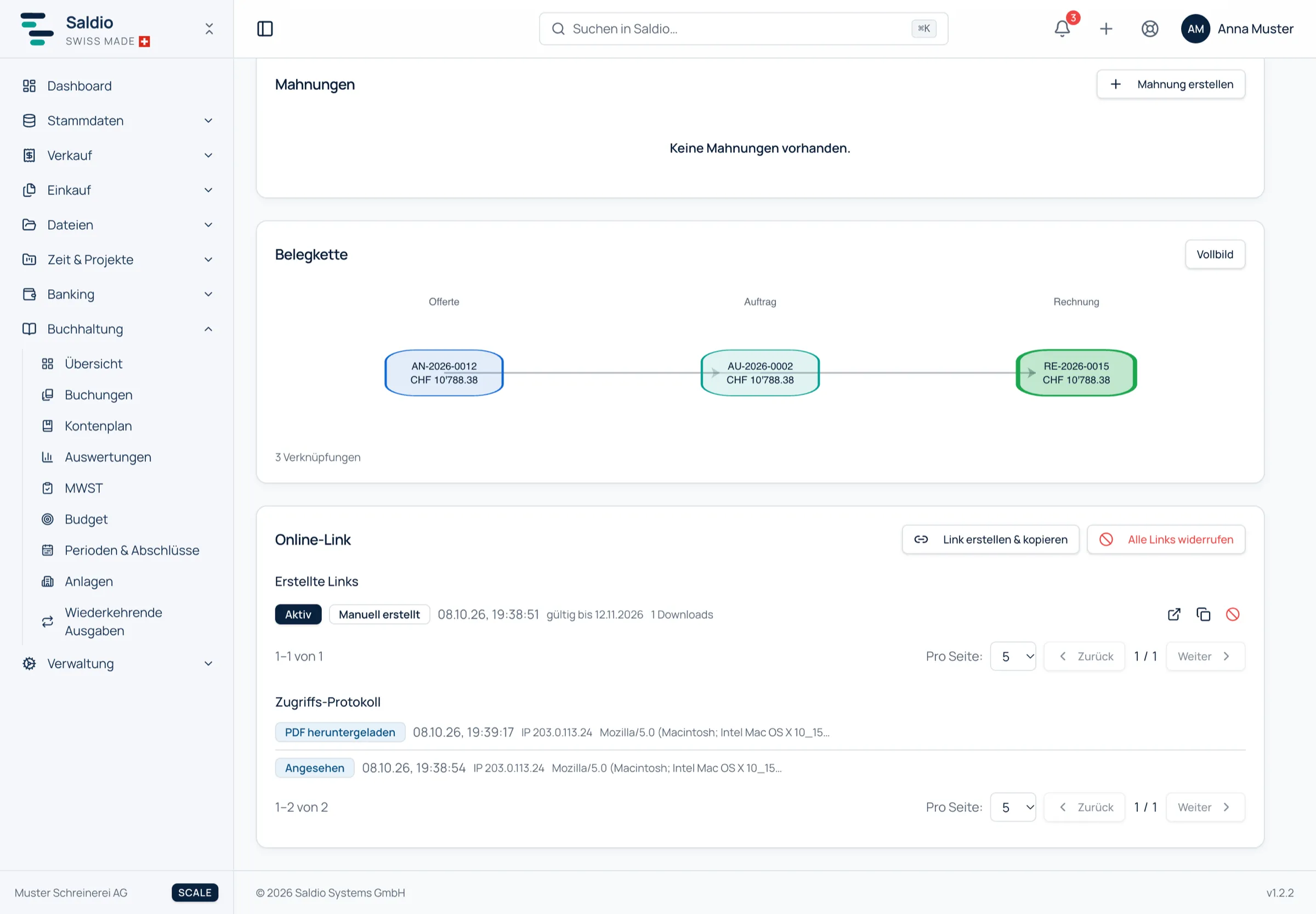
Saldio automatically adds a link to every document email, through which the recipient views the document in the browser without logging in and downloads the PDF. For quotes, they can accept there with their name or decline with a reason. Every access ends up in the access log on the document:
- Viewed
- PDF downloaded
- Accepted
- Declined
Below that are the created links, each with its origin — Email delivery or Created manually —, validity, number of downloads and status Active, Revoked or Expired. A link is valid for 35 days. It can be revoked individually, or all links of a document at once with Revoke all links. Anyone opening a revoked or expired link lands on an explanatory notice page instead of an error.
When a customer opens a shared document for the first time, the notification bell at the top right reports it immediately. The same applies when they accept or decline a quote online.
Back to the start: “Never received”
With both logs, the objection from the beginning can be settled in a minute. A typical history for invoice RE-2026-0117:
| Date | Source | Entry |
|---|---|---|
| 12.09.2026, 09:14 | Email history | Sent to accounts@customer.ch |
| 12.09.2026, 11:02 | Access log | Viewed |
| 12.09.2026, 11:03 | Access log | PDF downloaded |
Here the matter is clear: the invoice arrived, was opened and downloaded. The conversation is then about payment, no longer about delivery.
It looks different if the history says Failed or the recipient address is out of date. Then the customer is right — and you see it before contradicting them. The address can be corrected in address management and the document sent again.
What remains after expiry
Expired links are cleaned up after a grace period, but the access log stays. Even months later, the document still shows when it was viewed and downloaded.
Links through which a quote was accepted or declined are an exception: they are kept. They are the proof of which link and which version the customer agreed to. How an accepted quote becomes an order is covered in the article on quotation management.
What Saldio deliberately does not do
- No reading your outbox. The contact history shows what Saldio has sent. Emails written from your own mail client do not appear; neither do the customer’s replies.
- No email history for paper. If you print a document and mark it as sent, no email is triggered — so no entry appears in the email history.
- No links without expiry. Every online link expires after 35 days and can be revoked at any time before. A document does not stay publicly reachable forever.
- No hiding of errors. A send that failed or was blocked by a limit is not reported as successful but logged with its reason.
Conclusion
The contact history in Saldio is a sending history, and that is exactly what makes it reliable. It records what Saldio sent to whom, whether it worked and whether the recipient opened the document — automatically, without anyone having to write a note.
In everyday terms: the question “Did you receive that?” is no longer answered with guesswork but with a timestamp. How the text of these emails is created is described in the article on email templates; everything else about the customer at a glance is in the digital customer file.
From order to balance.