

How Budget Planning Works in Saldio
One annual amount per account, with actuals drawn continuously from your books. Why a budget belongs in the general ledger and not in a spreadsheet.

Contents
In December someone spends two evenings on a spreadsheet. Accounts on the left, figures on the right, a total at the bottom. Next year’s budget is done.
In March someone opens it for the first time. The budget column is still correct — the actuals column is empty, because nobody copied the figures out of the accounting system. By June the file is closed, and by October nobody can find it.
The spreadsheet is not the problem. The problem is that plan and actuals live in two separate systems and somebody has to merge them by hand. That step does not exist in Saldio.
Why a budget belongs in the general ledger
In Saldio the actual figure is never stored. It is calculated from the fiscal year’s trial balance every time the report is requested.
That sounds like a technical detail, but it is the whole difference. A stored actual would be wrong from the first subsequent posting onwards — and subsequent postings always happen. A correction in February, a forgotten expense claim, a reversal. Each of them would quietly make a stored figure stale without anyone noticing.
Because the comparison is recalculated on every visit instead, there is no cut-off date, no refresh and no reconciliation. Post a supplier invoice today and it shows up in the budget a minute later. The budget is not a report you run — it is a state you look at.
One annual amount per account, nothing more
The data model is deliberately narrow: a row holds a fiscal year, an account and an amount. There is exactly one row per account and fiscal year, guaranteed by the database. There is no header record, no scenario A and B, no “draft” or “approved” status.
An amount of zero is not stored at all — the row is deleted. Not budgeted means not budgeted, not “budgeted at 0”.
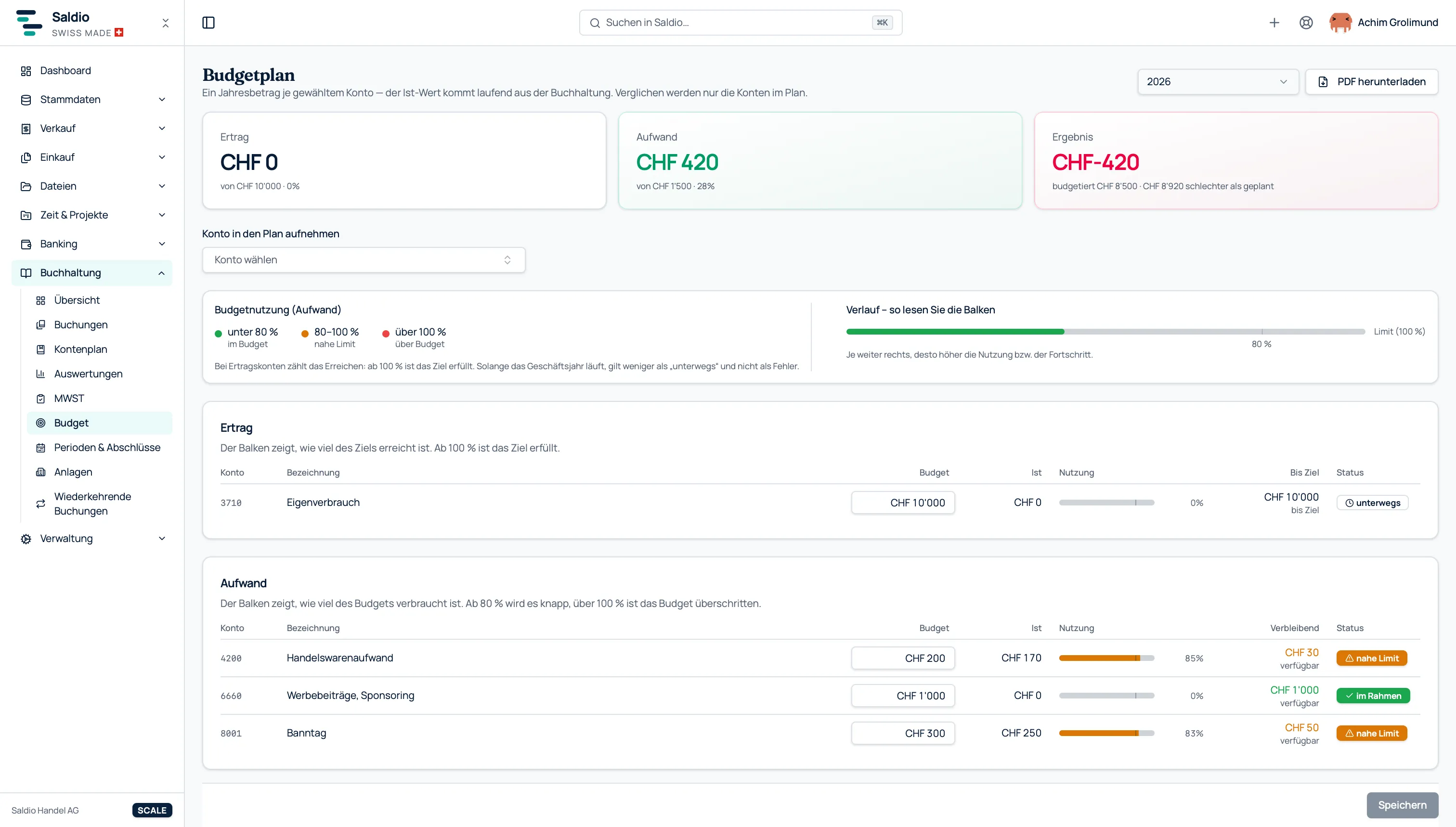
Just as deliberate: the plan is a selection, not a mirror of your chart of accounts. Accounts are added one at a time through a combo box, separated into revenue and expense. If you only want to keep an eye on the five cost blocks that actually move — payroll, rent, marketing, vehicles, subcontractors — you add five accounts and you are done.
The practical benefit is the time it takes. A budget in Saldio is not a two-hundred-row form of which a hundred and ninety rows stay empty. It is a short list that takes twenty minutes to set up and five minutes the following year.
The flip side belongs in the picture too: an account that is not in the plan is missing from the variance, even if it has activity. So that this never comes as a surprise, the combo box shows every selectable account together with the amount already posted to it. You see what is sitting there at the moment you add it.
The traffic light is deliberately asymmetric
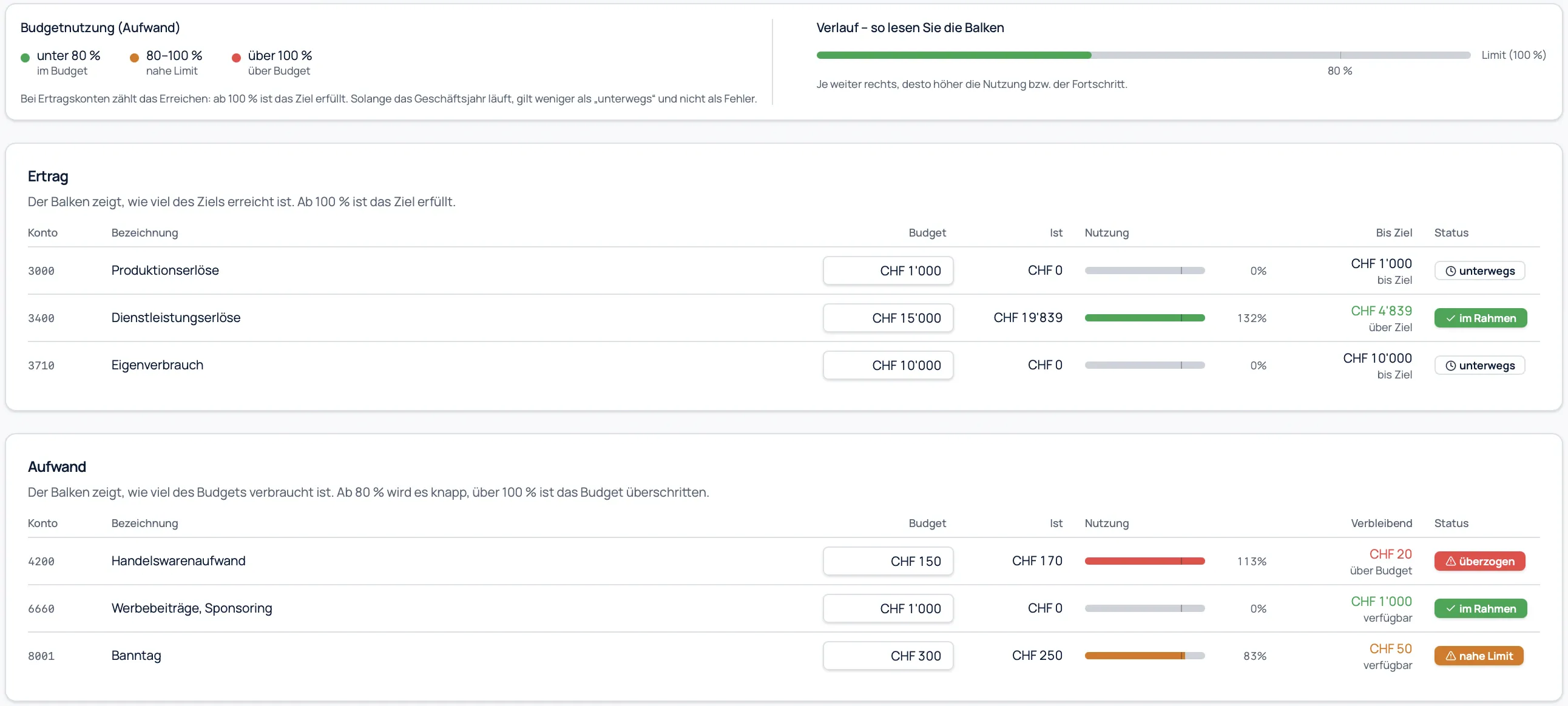
Every row carries a status. At first glance it looks like a bug that revenue and expense are judged differently — it is the single most important decision in the whole feature.
| Account type | Usage | Status |
|---|---|---|
| Expense | below 80 % | on track |
| Expense | 80 – 100 % | near limit |
| Expense | above 100 % | exceeded |
| Revenue | 100 % or more | on track |
| Revenue | below 100 %, fiscal year running | in progress |
| Revenue | below 100 %, fiscal year over | below target |
For expenses, consumption is the point: eighty per cent in October is unremarkable, eighty per cent in April is worth a conversation. Hence the early-warning stage.
For revenue, reaching the target is the point — and there the same logic would be useless. A revenue target is at zero per cent on 1 January. If every revenue account went red on New Year’s Day, the colour would be meaningless within two weeks, and it would take the expense colours down with it. A revenue target that has not been met therefore only counts as a miss once the fiscal year is over. While the year is running, the status reads “in progress”.
That is what the traffic light actually achieves: red appears rarely enough that people read it.
The per-row progress bar, with a marker at eighty per cent, carries the same idea visually. There is deliberately no chart — the bars say the same thing without anyone having to decode a legend first.
Closed years stay analysable
A budget is only worth something if you can look back after year-end and see how close you were. This is exactly where budget features tend to fail — over a detail you only notice in your second fiscal year.
At year-end closing, all profit and loss accounts are zeroed out through a closing entry dated on the last day of the fiscal year. Counting that entry would put every account of a closed year at an actual of zero in the budget comparison, making the report worthless for precisely the years you want to compare. Saldio excludes closing entries from the actuals calculation.
For the planning side the opposite applies: once the fiscal year is closed, the budget rows are read-only. Anyone trying to adjust the budget to match the actuals after the fact gets an error message instead of a silent change.
The report for the board, the bank and your accountant
The budget comparison can be exported as a PDF in German, English, French or Italian. It is built in two sections — revenue and expense — with columns for account, description, budget, actual, usage in per cent, remaining amount and status, a total row per section, and budgeted versus actual result at the foot.
One design decision in it deserves a mention, because it prevents misunderstandings in practice: the report uses no plus or minus signs. A “+200” on an expense account means you spent two hundred francs too much; on a revenue account it means you earned two hundred francs more — the same number, the opposite message. So the remaining amount is printed without a sign, with a direction word next to it.
Anyone who has ever explained to a board why a minus is actually good news knows why that is an improvement.
For associations: the treasurer gets to budget
In an association, budgeting is rarely a matter for the chair — it is the treasurer’s job. The permission model is built around exactly that.
Access is not tied to the accounting module but to the transactions module. The difference matters in practice: tied to accounting, only owners and administrators could budget in a team or association tenant — precisely the roles a treasurer usually does not hold. As it stands, read access to transactions is enough to view a budget and write access is enough to maintain one.
Budget planning is included in the Team, Scale, Office and Flow plans. For associations it is an optional building block. It is deliberately absent from Solo: a sole trader without their own bookkeeping does not plan at account level.
What Saldio deliberately does not do
The scope is a decision, not a construction site. What is missing deserves to be named:
- No cost centres. Budgeting happens at account level, not per department or location.
- No monthly or quarterly budgets. One annual amount per account. Spreading most cost types across twelve months would be guesswork anyway.
- No budget per project or customer. The project traffic light is a separate feature and compares accrued costs against the quoted value — a post-calculation, not annual planning.
- No scenarios and no versions. One budget per fiscal year, no plan A against plan B.
- No approval workflow. No draft status, no sign-off. The only status that counts is within budget or over it.
- No forecasting. Saldio shows plan and actuals but does not extrapolate the trend to year-end.
- No carry-over from last year. New year, new amounts.
- No email alerts when a budget is exceeded. The warning is purely visual: traffic light, progress bar, KPI tile.
Conclusion
Budgets rarely fail at the planning stage. They fail at the follow-up — because somebody would have to move figures from one system into another on a regular basis, and after the second time they stop.
Saldio removes that step. The plan is a short list of annual amounts, the actuals come from the general ledger, and the comparison is simply there the moment you look at it. What is missing in exchange — cost centres, monthly values, scenarios — is missing so that the feature is usable in twenty minutes rather than in a project.
The rest is looking at it twice a year.
Further reading: how Saldio analyses the actual figures is explained in the article on financial key figures. Budget planning is part of accounting.
From order to balance.