

How Bank Balance Reconciliation Works in Saldio
Does the ledger balance match the bank statement? How to reconcile the bank account in Saldio at month-end, find differences and lock the period.

Contents
Every bank line is matched, the list of pending assignments is empty. Yet the bank statement shows a closing balance of CHF 48,230.40 as of 31 August, while the bank account in the general ledger shows CHF 47,980.40.
A difference of two hundred and fifty francs is not a disaster. But as long as nobody knows where it comes from, every figure on the balance sheet is worth a little less — and the auditors will ask about it at the latest.
That is the difference between two tasks that are often lumped together. Bank reconciliation matches individual bank lines to the right documents. Bank balance reconciliation then checks the whole: does the balance of the bank account in the general ledger match the bank’s balance? This article shows how that works in Saldio.
Where the two balances come from
One balance comes from the bank: the closing balance on the bank statement or in e-banking as of the cut-off date.
The other one is in Saldio. Every money account — bank, card, cash, wallet or payment provider — is linked to a ledger account under Settings → Money accounts & payment methods, typically 1020 Bank for the business account. Everything bank reconciliation books lands on that account: customer payments, supplier payments, direct postings, transfers.
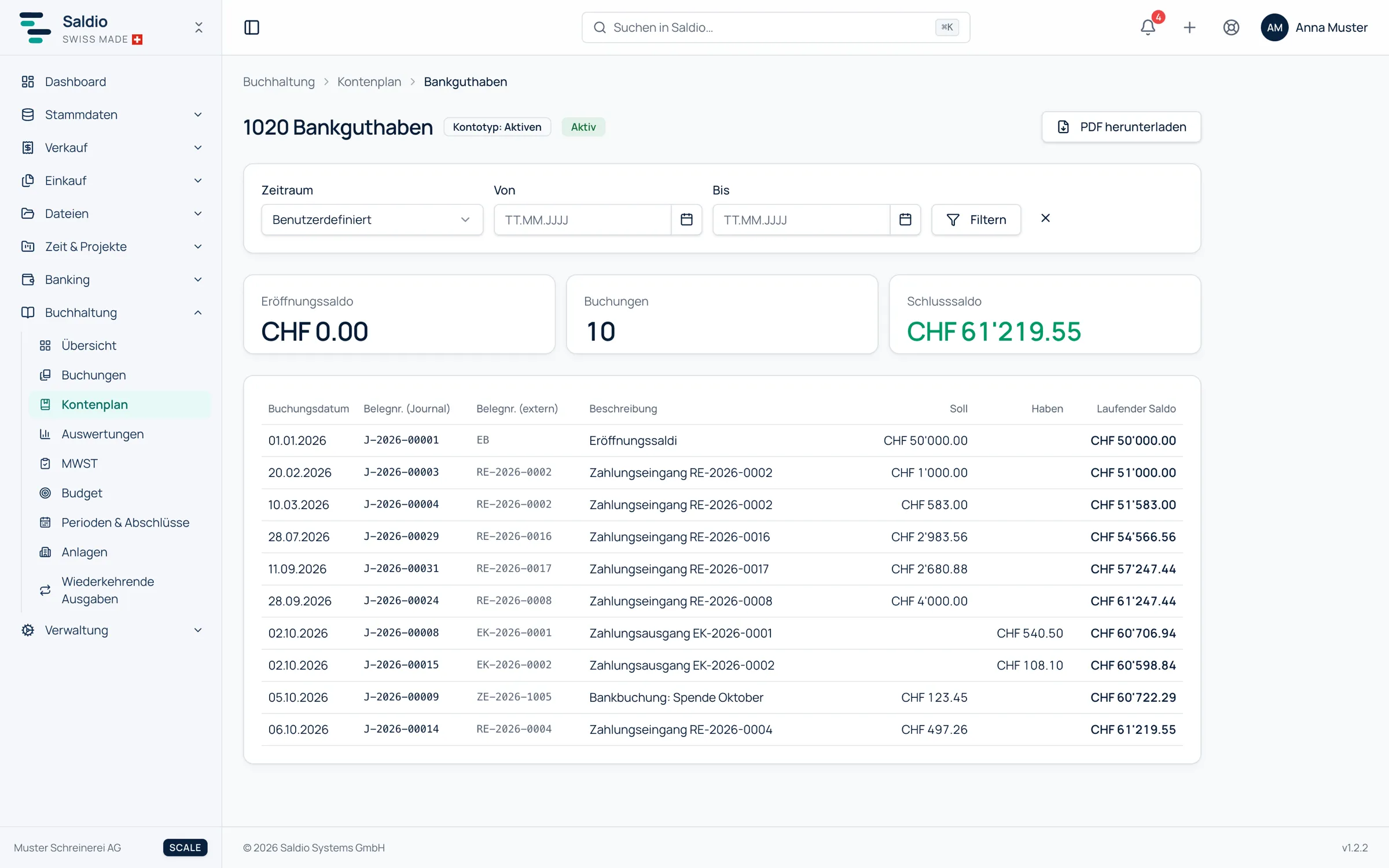
The balance of that account is shown in the account statement in Accounting. You open the account in the account overview via Open statement, choose the range — free or as a period — and see the Opening balance and Closing balance at the top, and below them every entry with booking date, journal and document number, debit, credit and Running balance. The statement can be downloaded as a PDF and filed with the bank confirmation.
Reconciling step by step
The order matters, because each step rules out one source of error before you look for the next.
1. Fully imported? Under Banking → Bank import, the Import history lists every file read in, with format and Period. Do the periods line up without gaps up to the cut-off date? A missing week explains more differences than any booking error.
2. Nothing left open? The Reconcile page, filtered to the money account, should say Nothing open — all reconciled. Every bank line still in the pending assignments is booked at the bank but not in the ledger.
3. Compare the balances. Set the bank account’s statement to the cut-off date and put its closing balance next to the bank’s. If they match, you are done. If not, go to step 4.
4. Explain the difference. The running balance in the statement helps narrow it down: compare it day by day with the balance on the bank statement until the first deviation appears. That is where the cause lies.
Where differences typically come from
| Cause | Effect | Where to find it | Fix |
|---|---|---|---|
| Bank line not yet matched | bank has it, ledger does not | Reconcile, pending assignments | match it or post to an account |
| Bank line ignored although money moved | bank has it, ledger does not | Bank import, status Ignored | book it properly |
| Payment recorded by hand and bank line booked | twice in the ledger | statement, two identical amounts | reverse the bank line and link it to the existing entry |
| Manual entry on the bank account without a bank line | ledger has it, bank does not | statement, entry without a counterpart | check whether it belongs there |
| Bank line in a locked period | stays open | Reconcile | check the period, unlock if needed |
| Foreign-currency line without an FOCBS rate | stays open | Reconcile, notice on the line | follow the notice on the line |
For the example at the start, that means: a difference of CHF 250.00, bank higher than ledger. Reconcile still lists two lines from 31 August — a customer payment of CHF 265.00 and the account maintenance fee of CHF 15.00. The customer payment is confirmed, the fee is posted to bank charges, and the balances agree.
| CHF | |
|---|---|
| Ledger closing balance 1020 before clean-up | 47,980.40 |
| + customer payment, not yet matched | 265.00 |
| − account fee, not yet booked | 15.00 |
| = ledger closing balance after clean-up | 48,230.40 |
| Bank statement closing balance | 48,230.40 |
Booked twice: the most common case
The most typical difference is not caused by forgotten entries but by duplicate ones. Someone uses Record payment on the supplier invoice by hand, with the bank as payment method. Two days later the debit arrives on the bank statement, and because the invoice is already paid, reconciliation finds no open document. If the line is now posted to an account, the payment is in the ledger twice.
The right way is Link to existing entry: the bank line is ticked off against the existing entry without creating a second one. Following the same principle, for documents recorded as Already paid from a money account, the later bank line is ticked off against that entry.
If it has already happened, the duplicate is reversed through the bank transaction detail view and the line is linked afterwards. An entry from bank reconciliation cannot be corrected in the journal itself.
After reconciling: lock the period
Once the month is reconciled, it should stay reconciled. That is what the Booking periods under Accounting → Periods & closings are for: one period per month of the fiscal year, each with the status Open or Locked and a Lock button.
A locked period no longer accepts entries dated in that month — neither by hand nor from bank reconciliation. The import does not book bank lines dated in a locked period automatically either; they stay open. That is intentional: if you find an August payment in October, you should notice, rather than silently changing a reconciled period.
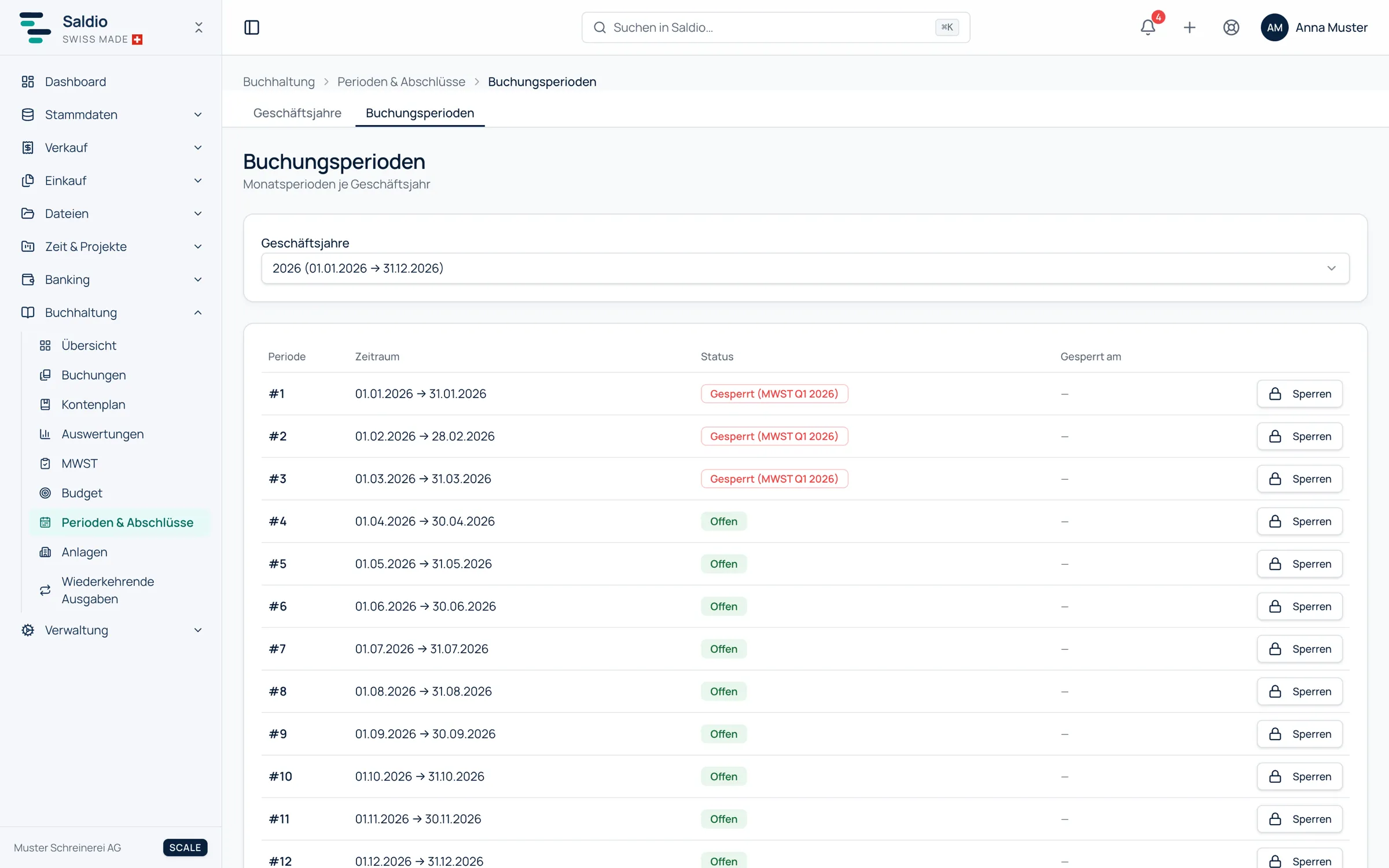
If something does have to go into August after all, the period can be Unlocked again. Closed fiscal years lock all their periods; there, the only way is to reopen the year. Periods locked by a VAT return are shown as Locked (VAT …).
Not just the bank account
The same approach works for every money account with its own ledger account: the company card against the card statement, the cash box against the counted cash, a payment provider’s clearing account against its settlement. Everywhere it is the same: statement as of the cut-off date, balance next to it, explain the difference.
What Saldio deliberately does not do
- No automatic balance comparison. From the bank file Saldio takes the individual movements, not the bank’s closing balance. The comparison is made by a person with the bank statement in hand.
- No balancing entry. Saldio does not post a difference to a suspense account just to make the numbers work. A difference gets explained, not hidden.
- No automatic locking at month-end. Monthly periods are locked by hand; only the VAT return and the year-end closing lock them on their own.
- No bookings into locked periods. The bank import respects that too; the lines concerned stay open.
- No corrections in the journal. Entries from bank reconciliation are only taken back by reversing the bank transaction.
Conclusion
Bank reconciliation makes sure every bank line finds its document. Bank balance reconciliation checks that nothing got lost or arrived twice along the way. In Saldio that is four checks: the import history for gaps, Reconcile for open lines, the account statement next to the bank statement, and if needed the running balance up to the first deviation.
Then the period is locked and the month is done. How the bank data gets into the system in the first place is covered in the article on CAMT import.
From order to balance.