

Reading Supplier Invoices Automatically – Without AI
From PDF to finished document: how Saldio reads ZUGFeRD and the Swiss QR code, identifies or creates the supplier – without sending it to a third party.
Contents
A supplier invoice arrives as a PDF. Invoice number, issue date, due date, net, VAT, gross, currency, IBAN, reference, company name, street, postcode, town, VAT number – roughly twenty fields for someone to retype. At fifty invoices a month that is half a working day, every month, with an error rate nobody enjoys measuring.
The reflex in 2026 is: this calls for AI.
It does not. For the vast majority of supplier invoices the answer is already sitting in the document in machine-readable form. It just has to be read instead of guessed.
That is exactly what Saldio now does: incoming supplier invoices are parsed on import – from the embedded e-invoice XML or from the Swiss QR code. The supplier is identified, the fields come pre-filled, and a supplier that does not exist yet can be created straight from the invoice data. For these two sources there is no need for AI and no need to send data to third parties.
The reflex says AI. The answer is structure.
A language model that “understands” an invoice is fundamentally making a probability statement: that looks like an issue date. That is probably the gross amount. Usually it is right. Sometimes it is not, and you do not notice straight away.
A parser that reads an XML element called IssueDate makes no probability
statement. It reads a date, or it finds none and says so.
| Reading structure | Guessing content | |
|---|---|---|
| Result | deterministic, identical every time for the same document | probabilistic, varies by model version |
| Traceability | field X comes from element Y | black box |
| Cost per document | compute time | tokens, in a foreign currency, at tomorrow’s price list |
| Data flow | stays inside your own infrastructure | invoice content goes to a vendor |
| Failure mode | obvious immediately (empty field, warning) | plausibly wrong |
This is not an argument against AI. It is an argument for using it where it is actually needed – and not where an international standard has already solved the problem.
Two standards that did the work long ago
Factur-X / ZUGFeRD is a hybrid invoice: an ordinary PDF that also carries a complete XML invoice conforming to the European EN 16931 norm. Humans read the PDF, software reads the XML. One document, two ways of reading it. Saldio can already send its own invoices in this format – now it reads them too.
The Swiss QR-bill is the everyday Swiss case. Since the old payment slip was retired for good on 30 September 2022, virtually every Swiss invoice carries a QR code – containing the creditor, address, IBAN, currency, amount and reference in structured form. In Switzerland an XML attachment is the exception and a QR code is the rule, which makes it the more important of the two sources for Swiss SMEs.
What Saldio reads from a PDF
For an e-invoice (Factur-X, ZUGFeRD or XRechnung) the yield is complete:
| Area | Fields |
|---|---|
| Document | invoice number, issue date, due date, currency, document type (invoice or credit note) |
| Amounts | net, VAT, gross |
| Supplier | company, VAT number, UID, street and house number separately, postcode, town, country, IBAN, BIC |
| Line items | description, quantity, unit, unit price, VAT rate and rate type – line by line |
Units of measure arrive as UN/ECE Recommendation 20 codes (HUR, H87, KGM)
and are mapped back onto Saldio’s own units – hours, pieces, kilograms.
For the Swiss QR code the dividing line is clean: whatever the standard mandates is always there. Whatever Swico S1 adds shows up when the issuer set it.
| Field | |
|---|---|
| Always | creditor IBAN or QR-IBAN, name and address of the issuer, currency, reference (QRR or SCOR), unstructured message |
| Only with Swico S1 | invoice number, invoice date, UID/VAT number, VAT rate, payment terms → due date |
| Never | line items – the QR code does not carry them |
Two honest caveats belong here. First, the amount is optional per the specification. If it is missing, Saldio says so instead of booking a zero. Second, the QR code carries only the gross amount. With exactly one VAT rate present, Saldio calculates net and tax back out of it; with several rates it stays at gross – with a clear note to split it yourself. Splitting it wrongly would be worse than not splitting it at all.
How the document is read
Extraction runs as a chain. Each stage only fills what the previous one did not deliver – and the order is not merely the cheaper one, it is the professionally correct one: exact sources beat approximate ones.
- E-invoice XML. If the PDF carries an embedded invoice in Factur-X, ZUGFeRD or XRechnung form, it is read. The profile is detected and shown too – MINIMUM, BASIC, EN 16931 or XRechnung – so you know how complete the document can possibly be.
- Swiss QR code. No XML in the PDF? Then the QR code is located – even on a photo of the payment slip.
- AI recognition. Only if invoice number, date, total, VAT amount or supplier are still missing does the AI step in – more on that further down.
And if nothing is found at all? Then the document is marked as not detected, the entry form opens empty, and the PDF is still attached to the document once it is saved. Not an error, not a dead end – just manual work instead of automation.
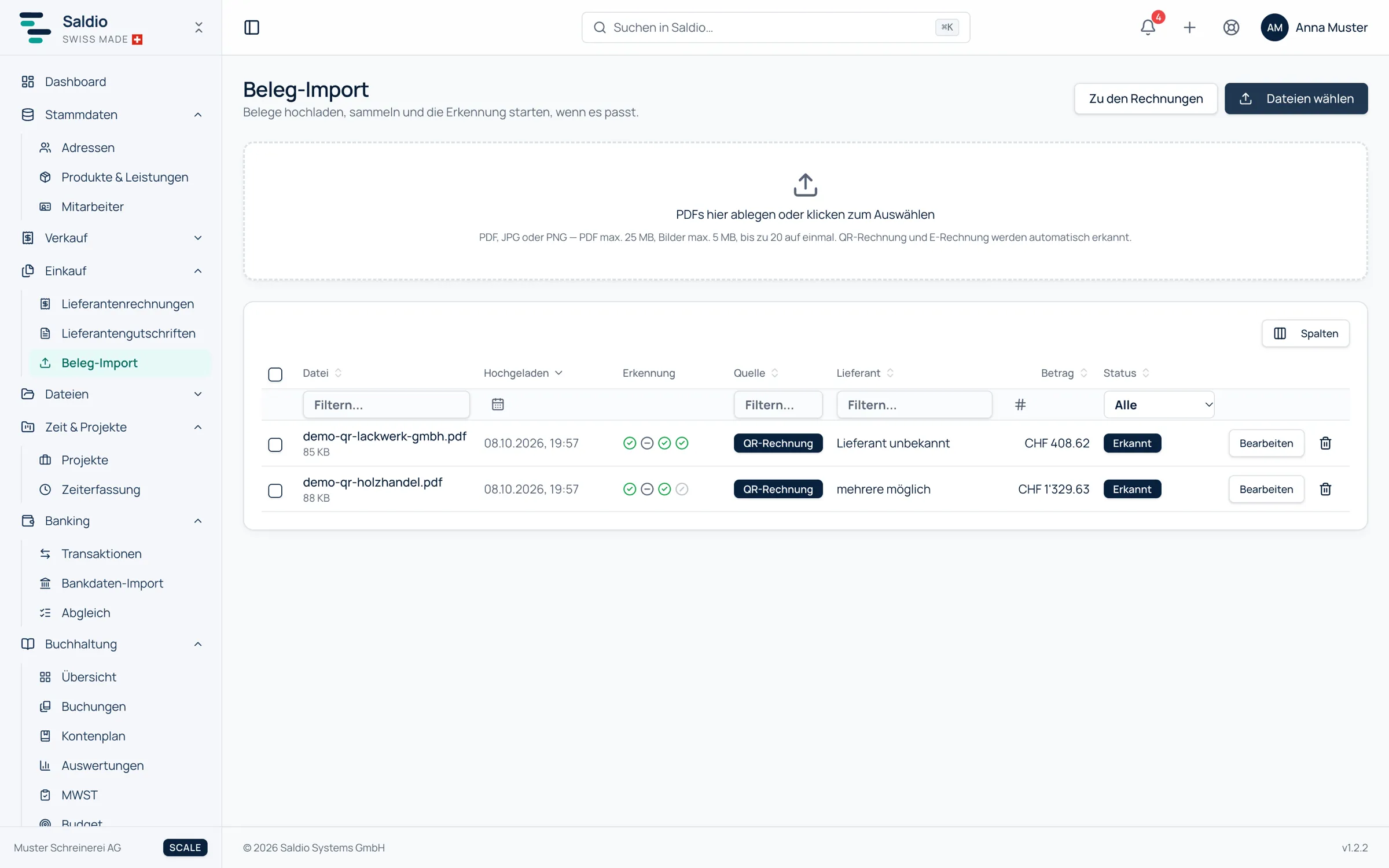
Locating the QR code is the unglamorous part with the most day-to-day value. It runs in three stages by rising cost: first the images embedded in the PDF, then the bottom third of the page – where the payment part sits at a standardised 105 mm – and only then the full page.
From issuer to supplier
Extracting data is one half. The other half is the question: who is this, exactly? Saldio checks in order, descending by certainty – only within your tenant and only against active suppliers.
| Rule | Certainty | Available in the QR code |
|---|---|---|
| IBAN matches a stored payment account | unambiguous | always |
| VAT number matches | unambiguous | only with Swico S1 |
| UID number matches | unambiguous | only with Swico S1 |
| Company name similarity | suggestion | always |
The IBAN leading this list is no accident: it is the only signal a QR-bill always carries – VAT number and invoice number only arrive with the optional Swico add-on. And an IBAN belongs to exactly one company.
Name similarity, by construction, can never reach the level of an exact match. It appears as a scored suggestion, never as a done deal.
Inconspicuous but load-bearing is normalisation: the QR code delivers
CHE-123.456.789 MWST while your master data holds CHE123456789. Without
normalising both sides – separators out, the MWST, TVA and IVA suffixes out –
the VAT and UID rules would essentially never fire.
Creating the supplier straight from the invoice
The most interesting case is the new supplier. Until now that meant: abort the import, create a contact, retype the address, return to the import.
Now a single click opens the familiar contact form – pre-filled from the invoice data: company, street and house number separately, postcode, town, country, VAT number, UID. And, since it belongs there anyway, a payment account with IBAN and BIC. You review, correct, save – and the new supplier is linked to the document immediately. No blind creation, but no retyping either.
If similar companies appear in the suggestion list, Saldio flags that before you create a new one. A supplier duplicated in your master data costs more than ten seconds of checking.
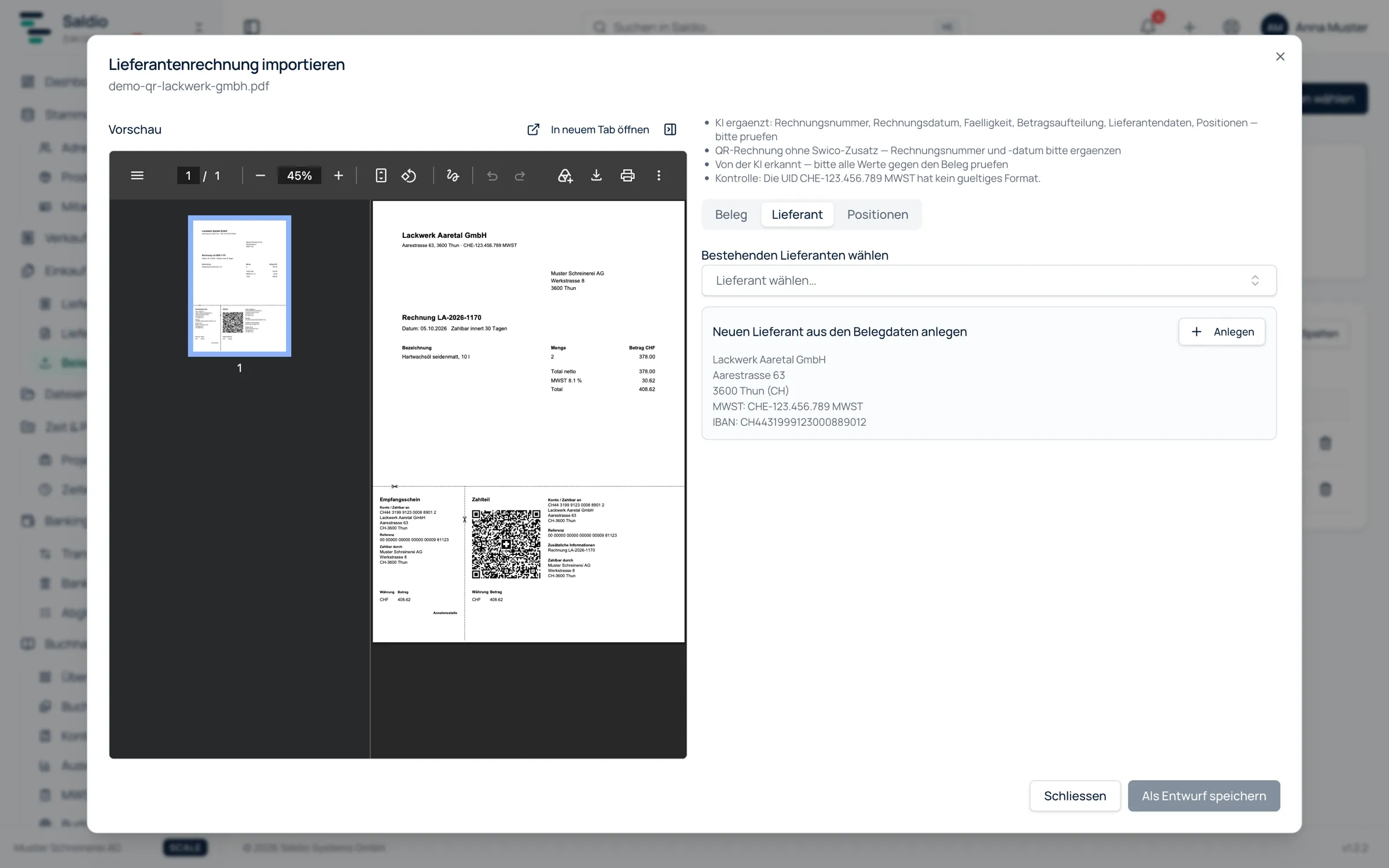
On top of that comes a learning effect that needs no model at all: on save, a valid creditor IBAN that is not yet attached to the supplier is stored as a payment account. The next document from the same issuer then matches immediately via the strongest rule. The import gets better with every invoice – not because a model is training, but because master data is becoming more complete.
And because separating street from house number causes more trouble in practice
than one would expect: Blattenackerweg 15a is split correctly, Chemin des Vignes 7bis too, and Postfach 1234 deliberately is not – the number behind it
is a box number, not a house number.
What does not happen when reading XML and QR code
This list is the actual point of this article.
- No data sent to third parties. Saldio reads XML and QR code inside its own infrastructure. A document that these two stages read completely never leaves it.
- No OCR service. No text is recognised from images, because it is not necessary. Structured data does not need to be seen, it needs to be read.
- No language model. No prompt, no tokens, no vendor, no additional data processing agreement.
- No surprises in the result. The same document yields the same output tomorrow as today. No model upgrade quietly shifting your figures.
- No surprises in the cost. A parser costs development once and compute time afterwards. It does not get more expensive when a vendor adjusts its pricing.
Plus the ordinary precautions you should expect around file uploads: PDF, JPG and PNG, PDFs verified by file signature rather than the declared content type, a maximum of 25 MB per PDF and 5 MB per image, 20 files per run, staging storage cleaned up automatically, strict tenant separation, and duplicate detection across supplier and invoice number that can be deliberately overridden.
Saldio also verifies the payment data itself – the IBAN checksum per ISO 13616, the QR-IBAN against the reserved bank range, the 27-digit QR reference via its recursive modulo-10 check digit, including the rule that a QR-IBAN and a QR reference may only appear together. Arithmetic instead of enquiry.
And where AI does make sense
Not every document is structured. The parking receipt, the scanned contractor’s report, the PDF from a point-of-sale system without a QR code – there is nothing to read there, someone genuinely has to look. That remainder is exactly what Saldio’s AI receipt recognition handles: as a third stage behind XML and QR code, not as a replacement for them. It only runs if core fields are still missing after the first two stages – for instance a QR bill without the Swico add-on, which lacks invoice number and invoice date – and it never overwrites an exactly read value.
The order is fixed – exact, then exact, then estimated. And whatever is estimated gets labelled as such and needs approval before it is posted. For the AI stage the document goes to an external service, with the instruction to store nothing and use nothing for training. If you do not want that, switch off the AI features under Settings → Integrations; XML and QR code are still read. What the whole process looks like in the upload center is shown in the article on document import.
The point is not that AI is bad. The point is that you do not solve a solved problem twice – and certainly not in a way that is more expensive, slower and raises more privacy questions than before.
Conclusion
Automation does not need a model. It needs data that someone structured properly – and the willingness to actually use that structure.
For Swiss supplier invoices that structure has been in place for years: across Europe as Factur-X and ZUGFeRD, across Switzerland as the QR-bill with by now near-complete coverage. Read it, and you get exact data, instantly, at zero cost per document – and without the invoice having to leave the building for it.
Rarely the most spectacular kind of automation. But the most dependable.
From order to balance.
Sources
- QR-bill (SIX) — Official standard page for the Swiss QR-bill.
- Swiss Implementation Guidelines QR-bill v2.3 (SIX, PDF) — Binding specification of the payment part, including mandatory and optional fields.
- Swico S1 billing information syntax definition (PDF, German) — Definition of the Swico tags 10 to 40 in the “billing information” field.
- ZUGFeRD (FeRD, German) — Hybrid invoice format: PDF/A-3 with embedded XML.
- Factur-X (FNFE-MPE) — The Franco-German counterpart to ZUGFeRD, technically identical.
- XRechnung (German) — XML standard following EN 16931 for public-sector procurement.