

How Document Search Works in Saldio
One search field for customers, documents, bookings and files (⌘K or Ctrl K) plus column filters in every list: how to find invoices in Saldio again.

Contents
“Was that invoice 0117 or 0171?” The customer gives a number on the phone, the payment in the account carries a different reference, and the receipt is called scan_2026-03-14.pdf.
In most businesses searching does not take time because the information is missing, but because you first have to know where it is. An invoice? Then the invoice list. A payment? Then banking. A file? Then the file store. If you do not know the place, you search in three.
Saldio has one search field for everything for this, and column filters in every list for narrowing things down. This article shows how both work, what each one searches and where the search deliberately stops.
The global search: ⌘K
At the top of every page is the field Search in Saldio…. Faster than clicking is the keyboard shortcut: ⌘K on the Mac, Ctrl K on Windows and Linux. On the phone, the magnifying glass in the header opens the same dialog.
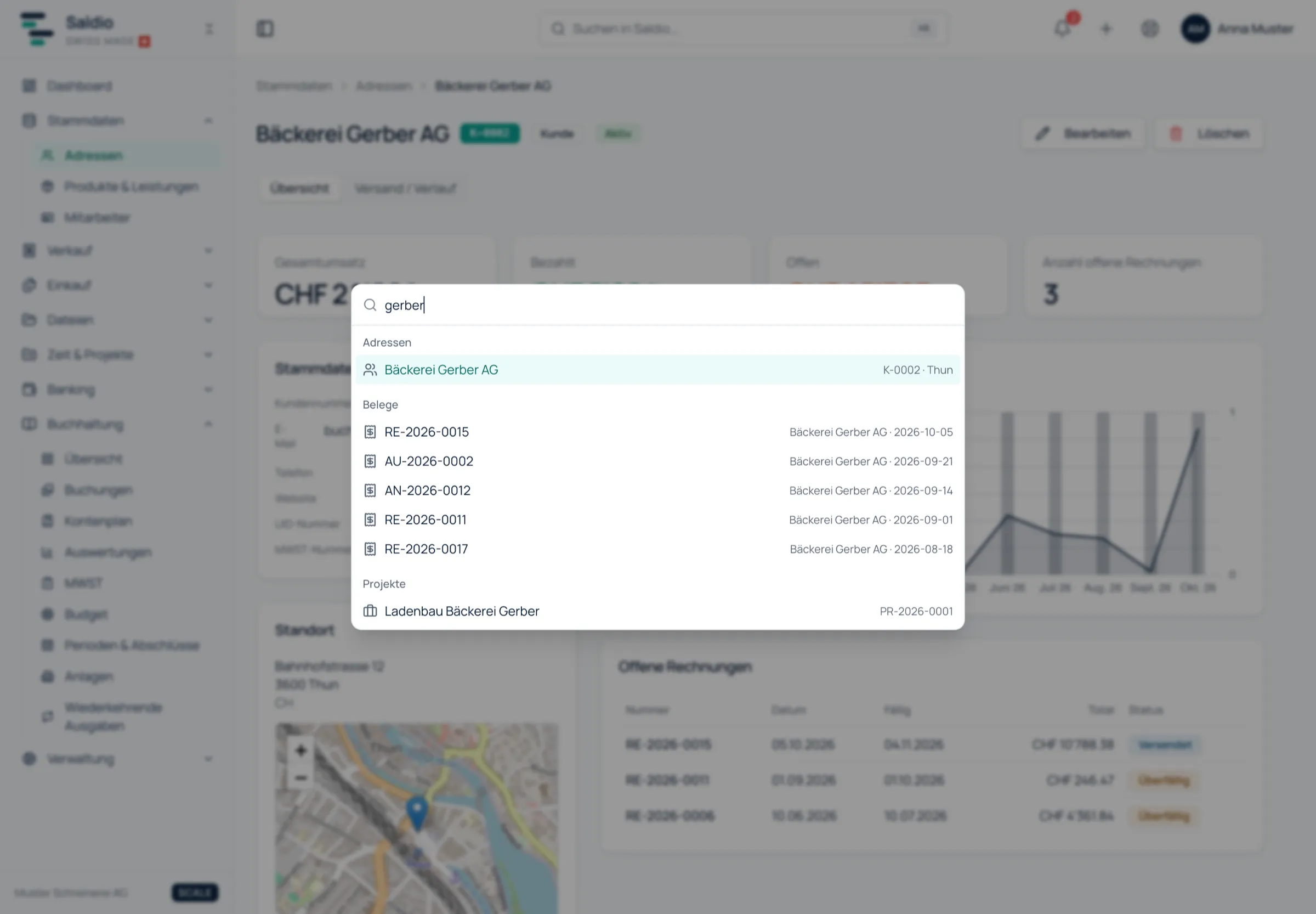
From two characters on, results appear, grouped by source. At the very top are matching pages — type “vat” and you go straight to the VAT statement without the menu. Below come the records, with up to five results per group. Arrow keys select, Enter opens the result. Because the first result is highlighted automatically, typing and Enter is often enough.
What is searched
The search compares the text you enter with fixed fields per record. Upper and lower case do not matter, and part of a word is enough: “meier” also finds Schreinerei Meier AG.
| Group | found by | result opens |
|---|---|---|
| Addresses | company, first name, last name, customer number, email | the customer file |
| Documents | document number, contact name | the document |
| Purchase Documents | internal number, supplier’s invoice number, supplier | the supplier invoice |
| Payments | reference, note | the paid document |
| Transactions | bank booking text | the transaction |
| Bookings | entry number, document number, booking text | the journal |
| Files | filename | the document store |
| Products & Services | name, description, product number | the product |
| Projects | project number, name | the project |
| Time tracking | description, activity | the time entry |
| Employees | name, employee number, email | the employee |
| Recurring Expenses | name, description | the list |
Documents includes all sales documents: quotes, orders, delivery notes, invoices and credit notes. Type the customer’s name and you see the contact and that customer’s documents in one dialog. For associations, Members are added, found by member number and name.
For the invoice from the start this means: type “0117” and the invoice appears under Documents. If the payment came in with a reference, the same search finds it under Payments — and the result leads straight to the paid invoice.
Permissions decide what someone sees
The search only shows what the user is allowed to open. Someone without read access to accounting gets no bookings; a plan without time tracking shows no time entries. Modules the tenant has hidden under Features stay out as well.
The search always covers only the active tenant. If you work for several companies, switch tenant first; the results of the previous one disappear immediately. How permissions are assigned is covered in the article on role and user management.
Column filters: narrowing instead of searching
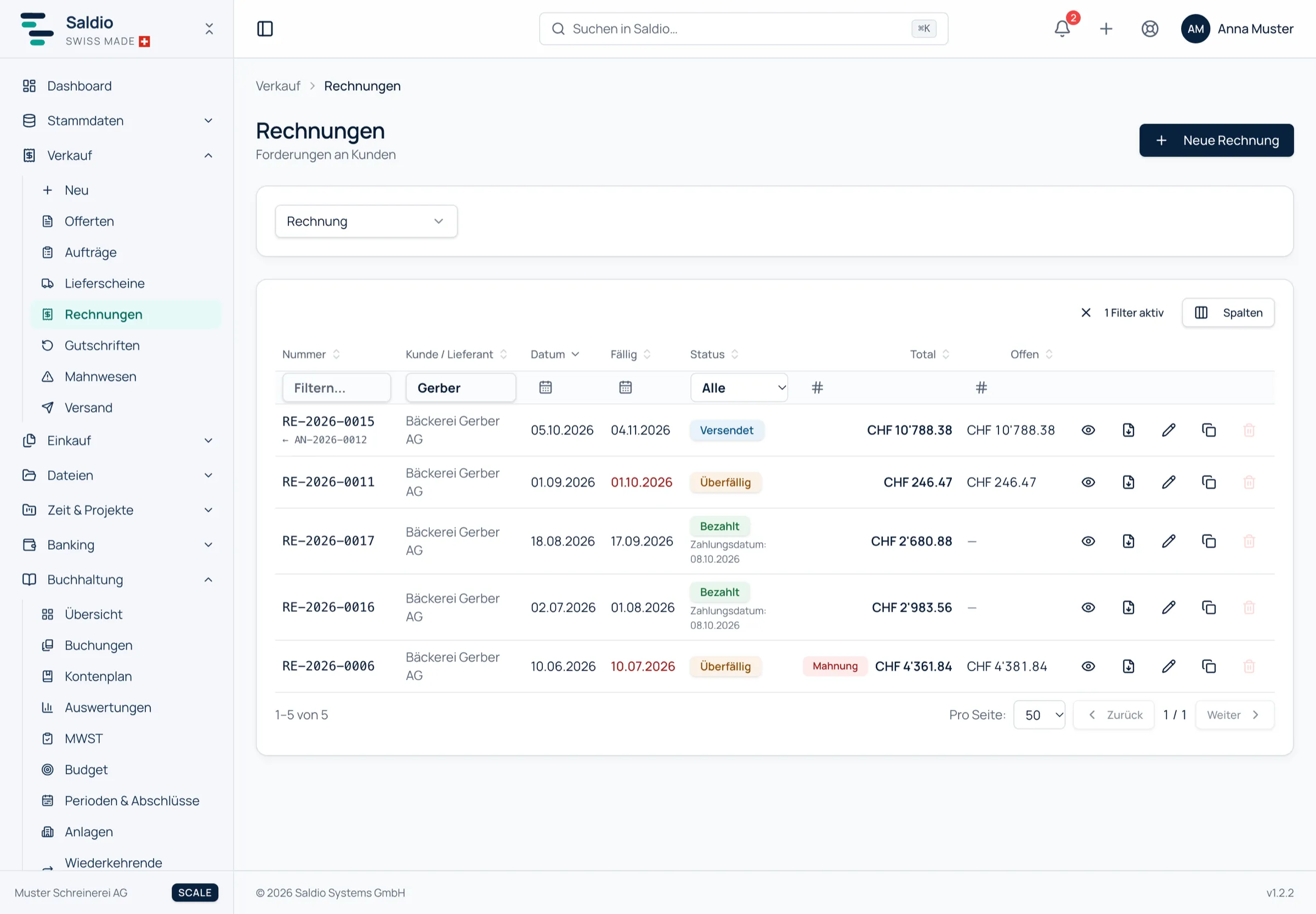
The global search answers “Where is X?”. For questions like “Which invoices to Meier AG since July still have more than CHF 1,000 outstanding?” it is the wrong tool. For that, the lists in Saldio have column filters.
Each column comes with the right filter:
- Text — for numbers, names and descriptions
- Selection — for status, type or link
- Amount range — from–to, for example for total or outstanding amount
- Date range — for document date, due date or upload time
The question above becomes three filters in the invoice list:
| Column | Filter |
|---|---|
| Customer / Supplier | contains “Meier” |
| Date | from 01.07.2026 |
| Outstanding | from 1,000.00 |
Saldio remembers filters and sorting per table. If you open the invoice list again tomorrow, you find it as you left it. Clear filter makes the list complete again.
The same filters exist in the file store under Files → Documents: by filename, type, size, upload date and above all by Linked to. If you are looking for all files on supplier invoices from last quarter, you combine exactly these two filters. How the store itself is organised is described in the article on digital document management.
What Saldio deliberately does not do
- No attachments in the global search. The attachments include employee photos and contact files, often with personal names in the filename. The global search therefore only finds documents; attachments are found via the list under Files → Attachments.
- No cross-tenant search. One search field never searches two companies at once, even if a user has access to both.
- No results past permissions. What a user may not open does not appear as a result — not even as a title.
- No searching for amounts in the search field. Amounts are found with the amount filter of the respective list, not with the global search.
Conclusion
Saldio separates two ways of searching. The global search with ⌘K is for the moment when you know what you are looking for but not where it is: a number, a name, a filename — Enter, and you are there. The column filters are for the question which records meet a condition, and they stay in place until you clear them.
Both only work because the data is already linked: documents know their contact, payments their invoice, files their record. The search does not have to guess.
From order to balance.